iPhone suab tsis ua haujlwm vim muaj teeb meem software thiab kho vajtse. Qhov teeb meem software tuaj yeem kho tau yooj yim. Muaj ntau yam laj thawj uas tiv thaiv tus xov tooj hais lus los ntawm kev ua si suab. Koj yuav ntsib teeb meem hnov koj lub suab thaum hu xov tooj, Suab tsis ua haujlwm thaum ua si suab lossis video, thiab lwm yam, Ntawm no kuv yuav qhia cov kev daws teeb meem ua haujlwm los daws cov teeb meem no.
[lwj]
10 Fixes rau iPhone suab tsis ua hauj lwm
Kho 1: Rov pib iPhone
Yog hais tias koj lub suab iPhone tsis ua hauj lwm, cia li rov pib dua koj lub xov tooj. Nws yuav daws tag nrho cov teeb meem ntsig txog software. Koj cov teeb meem ntsig txog lub suab tuaj yeem kho tau. you can restart your phone in two ways. Soft Reset and Hard Reset.
Mos pib dua
For a soft reset, you have just press the Side Volume up button and the Power button until the power slider popup on the screen.
Once you Found the Power Slider, just Drag the slider from left to right. your Phone will start automatically.
Nyuaj rov pib dua

- Press Volume Up Button and Quick release.
- Press Volume Down Button and Quick release.
- Press Side Button until you found the apple icon on the screen.
- The Phone will Reset automatically.
learn in detail to reset your iPhone from Yuav ua li cas nyuaj pib dua iPhone
Kho 2: Lov tes taw hom ntsiag to
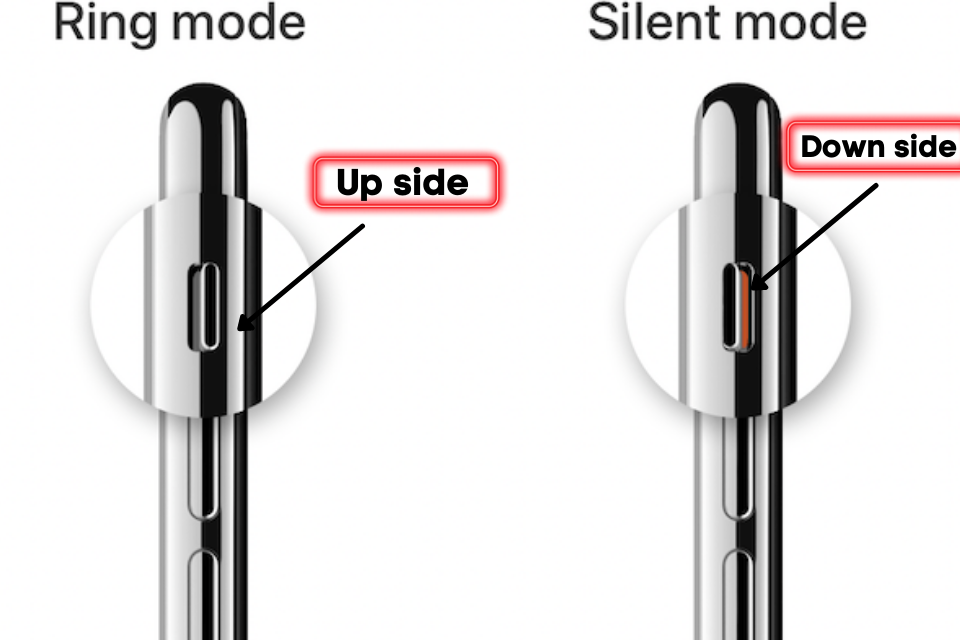
Apple Provide the Silent Button key at the sidebar. this button is used to enable silent mode. If the key is set at the downside that means the silent mode is enabled.
If the button is set to screen-side that means the silent mode is deactivated. so please make sure that your phone’s silent mode should have disabled.
Kho 3: Tua Bluetooth
If your Phone Transferring the audio to another sound speaker or AirPods through Bluetooth then the audio will be muted for your mobile.
To Turn of the Bluetooth, Navigate to the Control panel and tap on the Bluetooth icon to disable it.
You can also turn off the Bluetooth by the following Setting > General > Bluetooth and Toggle the Bluetooth option.
Kho 4: Upgrade iOS no hloov tshiab
Apple Frequently updates the ios version to improve the system. always keep your phone up to date to prevent software bugs. It will improve mobile performance.
To upgrade the iOS version, follow navigate to path Setting > General > Software Update
Kho 5: Pib dua tej chaw
If your Phones Settings is changed mistakenly and the sound is gone from the phone then reset settings are the best choice to reconfigure the default settings.
All your data will be safe. These options just reset the settings that you changed. to reset the value, go to Settings > General > Reset > Reset all settings
Kho 6: Tua tua tsis txhob cuam tshuam
You may Enable the Do Not Disturb service mistakenly. it mutes the sound and notification. to disable the do not disturb navigate to Settings > Do not Disturb option and toggle the mode.
Kho 7: Kuaj tus xov tooj hais lus
If you decrease the level of volume you can Adjust the Volume settings for audio to listen perfectly.
To increase the volume go to Settings > Sounds & Haptics and increase the Ringer alert to the highest level.
Kho 8: Lov tes taw lub roj teeb saver thib peb apps
The third-party apps sometimes change the volume level of the audio. we can’t hear it properly. Yog tias koj nruab ib qho app thiab mam li nco dheev lub suab ploj mus, tom qab ntawd tshem tawm lub app.
Kho 9: Hoobkas pib dua
Yog tias koj sim tag nrho cov kev daws teeb meem tab sis koj qhov teeb meem tseem nyob, ces koj tuaj yeem rov pib dua koj lub xov tooj kiag li. Txhawm rau rov pib dua koj lub xov tooj, mus rau Settings > Reset > Tshem tawm tag nrho cov ntsiab lus
Cov txheej txheem rov pib dua yuav siv sij hawm qee lub sijhawm los ua kom tiav.
Kho 10: Pab kom xov tooj ceeb toom
Yog tias koj tsis xaiv lub Ceeb toom thiab SMS suab, tom qab ntawd cov lus ceeb toom hauv xov tooj yuav nyob ntsiag to. Koj tuaj yeem teeb tsa lub suab ceeb toom los ntawm cov chaw.
Kho vajtse teeb meem
Kho vajtse kuj yog qhov laj thawj rau teeb meem suab. Yog tias ib tus neeg hais lus puas lawm, tom qab ntawd koj yuav ntsib teeb meem thaum mloog suab. Koj tuaj yeem mus rau Apple Care los kho nws sai.
FAQs
Vim li cas kuv lub xov tooj mam li nco dheev tsis muaj suab?
Muaj ntau ntau yog vim li cas uas tiv thaiv lub suab xws li DND kev pab cuam, Ntsiag to hom, Peb-tog apps, Misconfigured chaw, System hloov tshiab, Software kab, thiab lwm yam.
Why can’t I hear anyone when they call me on my iPhone?
There are two common reasons reported by users. the first one is your device is facing a Hardware Problem, second network issue is also the reason for the problem of voice.
How do I get my iPhone off of silent mode?
Apple Provide the silent mode key at the side panel. move this key toward the mobile screen to disable the silent mode.
Kev Xaus Lub Neej
Are facing the problem of sound on the iPhone. You can fix it through Deactive do not disturb, Turn off Bluetooth, Restart the device, Reset the network settings, reset all settings, and factory reset. if you still getting this problem then contact the apple team. they will help you to get out of the problem.
I hope you get the solution for iPhone sound is not working. Yog hais tias koj kho qhov teeb meem ces muab nws rau cov neeg siv iPhone.