lpu
A WebP to GIF converter is an essential online tool for anyone who works with images, animações, or digital content. As modern image formats evolve, WebP has become popular due to its smaller file size and better compression. No entanto, GIF remains one of the most widely supported formats across browsers, social platforms, and devices. Converting WebP images into GIF format ensures better compatibility, easier sharing, and smooth usage across different platforms.
This blog explains everything you need to know about WebP to GIF conversion, how the tool works, its benefits, and why it is useful for designers, marketers, developers, and everyday users.
What Is WebP Image Format?
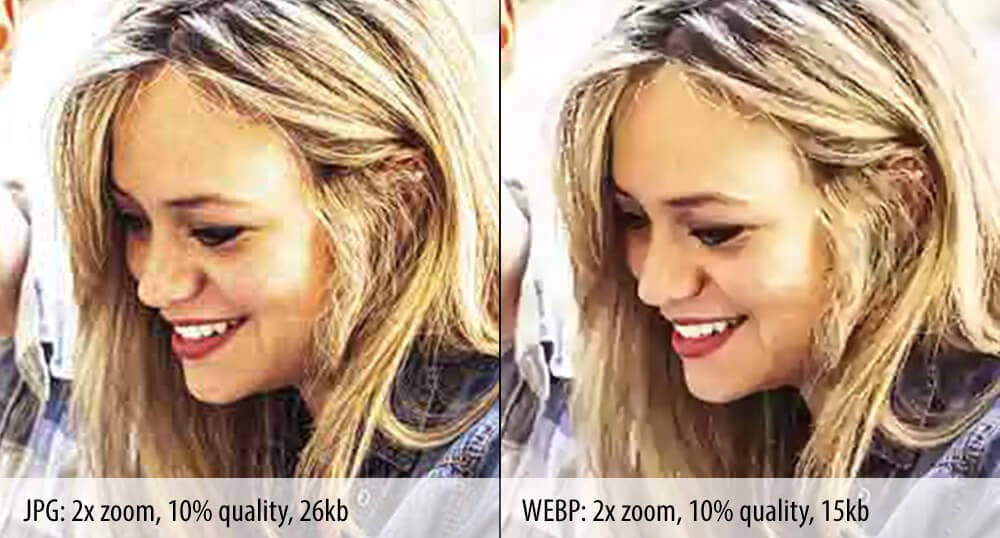
WebP is a modern image format developed to provide high-quality images with smaller file sizes. It supports transparency, animações, and both lossy and lossless compression. Because of its efficiency, many websites use WebP images to improve loading speed and performance.
Despite its advantages, WebP is not always supported by older software, image viewers, or certain platforms. This limitation creates the need for converting WebP images into more universally accepted formats like GIF.
What Is GIF Format?

GIFs, or Graphics Interchange Format, is one of the oldest and most widely used image formats on the internet. GIFs are especially popular for animations, short clips, memes, and visual reactions. Almost all browsers, messaging apps, and social media platforms fully support GIF files.
While GIF files may be larger in size compared to WebP, their universal compatibility makes them a preferred choice for animated content and quick sharing.
Why Convert WebP to GIF?
There are several strong reasons why converting WebP images to GIF format is beneficial.
Better Compatibility
Not all platforms and tools support WebP images. GIF files work almost everywhere without any issues, making them ideal for broad usage.
Easy Sharing
GIFs are commonly used on social media, sites, e -mails, and chat applications. Converting WebP to GIF allows you to share animated images without worrying about format restrictions.
Perfect for Animations
If you have an animated WebP image, converting it into GIF makes it easier to use in presentations, blogs, and online content where GIFs are preferred.
No Software Required
An online WebP to GIF converter allows you to convert files directly from your browser. There is no need to install heavy software or learn advanced editing skills.
How a WebP to GIF Converter Works
Using a WebP to GIF converter is very simple and user-friendly. The process usually follows these steps:
Primeiro, you upload your WebP image file to the converter. Once the file is uploaded, the tool processes the image and converts it into GIF format. After conversion, you can instantly download the GIF file to your device.
The entire process takes only a few seconds, making it ideal for quick tasks and bulk image conversions.
Key Features of a WebP to GIF Converter
A reliable WebP to GIF converter offers several helpful features that make image conversion easy and efficient.
Fast Conversion Speed
The tool converts WebP images into GIF format quickly without long waiting times.
Saída de alta qualidade
Image quality is preserved during conversion, ensuring that animations and visuals remain clear and smooth.
Interface amigável
No technical knowledge is required. The simple interface makes it easy for beginners and professionals alike.
Seguro e privado
Uploaded files are processed securely and are not stored permanently, protecting user privacy.
Gratuito para usar
Most online WebP to GIF converters are completely free, making them accessible to everyone.
Who Can Use a WebP to GIF Converter?
This type of tool is useful for a wide range of users.
Content creators use it to convert animated images for blogs and social media. Designers rely on it to ensure image compatibility across platforms. Developers use GIFs for demos and UI previews. Marketers use animated GIFs for promotions and email campaigns. Even casual users benefit when sharing images on platforms that do not support WebP format.
Advantages of Using an Online Converter
Using an online WebP to GIF converter offers multiple advantages compared to desktop software.
You do not need to download or install anything. The tool works on all devices, including mobile phones, comprimidos, e desktops. It saves storage space and provides instant results without complex settings.
This convenience makes online converters the best choice for quick and efficient image format conversion.
Best Practices for WebP to GIF Conversion
To get the best results when converting WebP images to GIF, keep a few things in mind.
Make sure the original WebP image is of good quality. For animated images, check the GIF after conversion to ensure smooth playback. Avoid extremely large files if you want faster conversion and easier sharing.
Following these simple practices ensures a better final output.
Common Use Cases of GIF Files
GIFs are widely used across the internet for many purposes. They are popular in social media posts, website banners, blog illustrations, tutorials, and marketing campaigns. GIFs also work well in messaging apps, making communication more engaging and expressive.
By converting WebP images to GIF, you can easily reuse content in multiple formats and platforms.
Conclusão
A WebP to GIF converter is a practical and efficient solution for converting modern image formats into widely supported GIF files. Whether you need better compatibility, easy sharing, or smooth animated content, this tool simplifies the entire process.
With fast conversion, high-quality output, and an easy-to-use interface, a WebP to GIF converter is an essential tool for anyone working with images online. If you frequently handle WebP files, converting them into GIF format can save time, improve accessibility, and enhance your digital content experience.