

Sengoliloeng sena se bua ka mokhoa oa ho fihlella mookameli oa mosebetsi bakeng sa mac. lintlha tsohle tse mabapi le mookameli oa mosebetsi tse fumanehang tseo u batlang ho li tseba.
Ka linako tse ling Lisebelisoa li ne li soahlamana ka tšohanyetso ebe komporo ea hau e ka fanyehoa. ts'ebetso ea hau ea komporo e tsamaea butle. faele e ka lahleha ka liphoso tsena tse sa tsejoeng. TaskManager ke sesebelisoa se sebetsang sa ho lekola lits'ebetso tsa sesebelisoa le ho koala kapele lits'ebetso le lisebelisoa tsohle tse fosahetseng. mookameli oa mosebetsi bakeng sa Mac le mookameli oa mosebetsi bakeng sa lifensetere li fumaneha ka bobeli.
Basebelisi ba Windows ba sebelisa batsamaisi ba mesebetsi khafetsa ho emisa lits'ebetso hang-hang. ha o tloha lifensetereng ho ea ho mac, boholo ba linotlolo tse khaoletsang ha li sebetse lits'ebetsong tsa ts'ebetso tsa Mac. u ikutloa joaloka mocha ea nang le sethala se secha le likarolo.
Ka fensetere ho hlahisa Task Manager, Tobetsa Feela Ctrl+Shift+Hlakola popup e tla hlaha skrineng nakong ea motsotsoana. Empa basebelisi ba Mac ha ba khone ho tsamaisa taelo ena. Task manager bakeng sa mac e fumaneha hape empa e na le lebitso le fapaneng. e fana ka ts'ebetso ea komporo le lintlha tse sebetsang tsa software. e boetse e fana ka khetho ea ho emisa ho emisa ts'ebetso efe kapa efe ka motsotsoana.
Mac e na le Task Manager e nang le lebitso le fapaneng 'Mohlahlobi oa Ts'ebetso'. e bula ho tloha ka mokhoa o fapaneng. Activity Monitor e ts'oanang le windows task manager. ha ho thata ho e sebelisa.
Sehlooho sena se bua ka Task manager bakeng sa mac, seo e ka se etsang, mokhoa oa ho fihlella mookameli oa mosebetsi ho Mac.
Mokhoa o mabapi le Open Task manager bakeng sa Mac
Khetho 1:
- bula Finder
- Eya ho Utilities tlas'a Application Tab
- Tobetsa ho Activity Monitors.
Khetho 2:
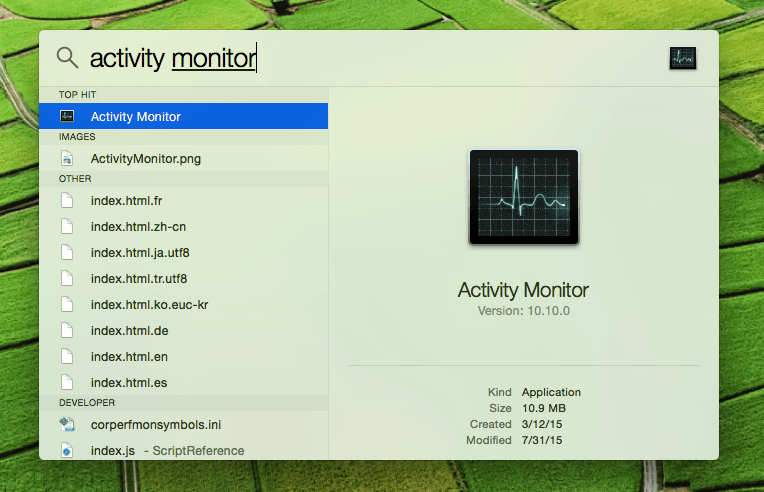
- Tobetsa ea Taelo + Sebaka senotlolo sa ho qala Khanya. e ka fumaneha hape ho tsoa bareng ea menyu e kaholimo ho le letona.
- Mofuta ‘Tlhokomelo ea Mesebetsi‘ lebaleng la ho batla.
- otla Enter
Ho na le li-tab tse fapaneng tse fumanehang ho Task Manager Windows: CPU, mohopolo, matla, disk, marangrang, le cache. e 'ngoe le e' ngoe e bonts'a tlhahisoleseling e fapaneng bakeng sa ho tsamaisa software le ts'ebetso.
Tobetsa feela ts'ebelisong / ts'ebetsong eo u batlang ho e tlohela ebe u tobetsa Konopo e kholo ea Tlosa fensetereng ea Activity Monitor.. e bontša Tlosa Windows skrineng. haeba sesebelisoa se sa arabele, tobetsa feela “Qobella ho Tloha” konopo ho koala app e hang-hang.
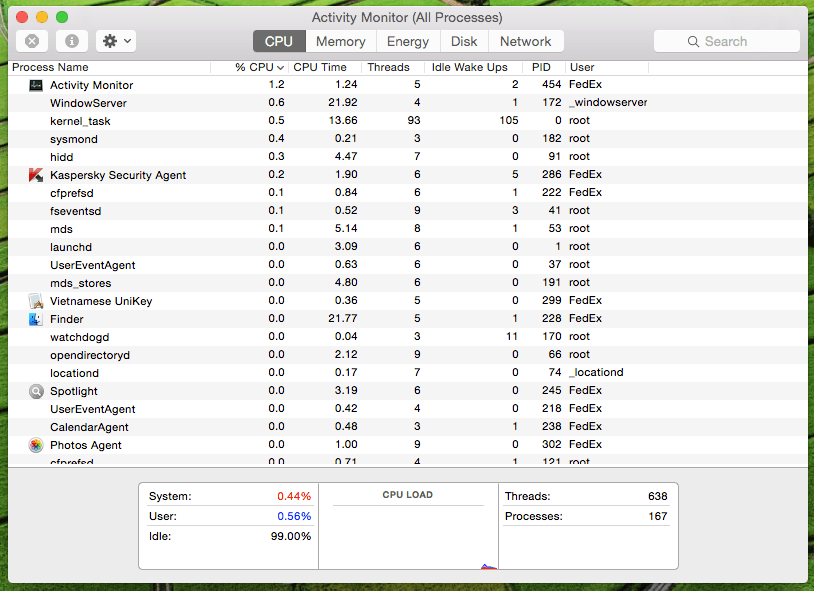
Activity Monitor e bohlokoa haholo hobane ha e bontše feela lits'ebetso tse tsamaisoang ke mosebelisi empa hape e bonts'a tlhahisoleseling mabapi le mosebetsi oa boemo ba sistimi., mesebetsi ea kernel, li-daemone, lits'ebetso tse tsamaeang ka morao tseo e leng tsa mosebelisi e mong.
U ka sebelisa Activity Monitor ho qobella ho tlohela lisebelisoa tsa Mac ha lisebelisoa li sa arabele. o ka sebelisa konopo ea Shortcut ho tlohela sesebelisoa leha e le sefe ka matla. tobetsa feela, Taelo + Khetho + Esc ho hlahisa Qobella ho Tloha Kopo. ka mor'a ho khetha kopo eo u batlang ho e qobella ho e tlohela.

