کیا آپ جوڑی بنانا چاہتے ہیں؟ Boltune BT – BH020 Earbuds آپ کے بلوٹوتھ آلات کے ساتھ? Boltune BT - BH020 ایئربڈز میں بلوٹوتھ V5 ہے۔. 0 آپ کو 2x تیز ٹرانسمیشن کی رفتار ملتی ہے۔ + بغیر کسی سگنل کے نقصان یا میوزک ڈراپ آؤٹ کے زیادہ مستحکم رابطہ.
یہ ایئربڈز کی حد تک ہے۔ 50 پاؤں دور. اگر سننے اور کنٹرول کرنے کے دوران کوئی کٹ آف ہو تو کبھی پریشان نہ ہوں۔. یہ ایئربڈز میوزک پلے بیک اور گفتگو کو پہلے سے کہیں زیادہ ہموار اور واضح بنا رہے ہیں۔. بلوٹوتھ کے ساتھ اپنے طرز زندگی کو ٹھنڈا بنائیں 5. 0 ایئربڈز.
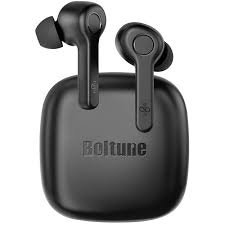
تو, آئیے بولٹون کو جوڑا بنانے کا طریقہ شروع کرتے ہیں۔ – BH020 آپ کے آلات کے ساتھ ایئربڈز اور اس پروڈکٹ کے بارے میں سب کچھ!
Boltune BT - BH020 Earbuds کیسے پہنیں۔
صحیح تجاویز کا انتخاب کریں۔
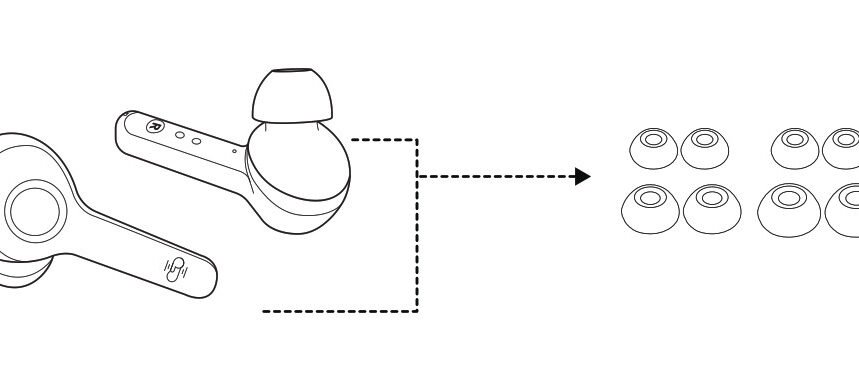
Ear tips come in different sizes that are included in the package, try all sizes and choose the ones that fit you best.
ایئربڈز پہنیں۔
Wear the earbuds in the right way and rotate them for the best fit.
ایئربڈس اور کیس کو کس طرح چارج کریں
ایئربڈس سے چارج کریں
Put the earbuds into the charging case as per the L and R marks cover the lid and the earbuds charging will start automatically.
نوٹ: When the battery is low, a voice prompt Battery low will be heard (if you are wearing the earbuds). Charge it in time or the earbuds will turn off automatically around 10 minutes later.
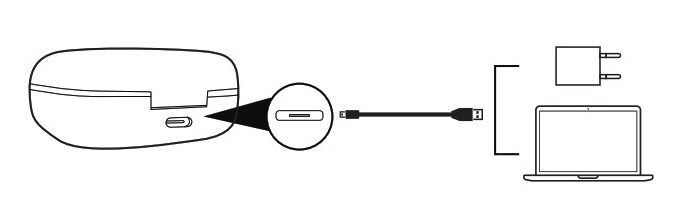
کیس چارج کریں
Connect the charging port with any USB charging adapter or active computer USB port.
The four charging indicators will light up progressively.
ایئربڈز کو پاور آف اور آن کرنے کا طریقہ
پاور آن
Take out the earbuds and they will power on automatically.
بجلی بند
Put the earbuds back into the charging case and close the lid, they will turn off automatically.
Boltune BT - BH020 Earbuds کو جوڑا بنانے کا طریقہ
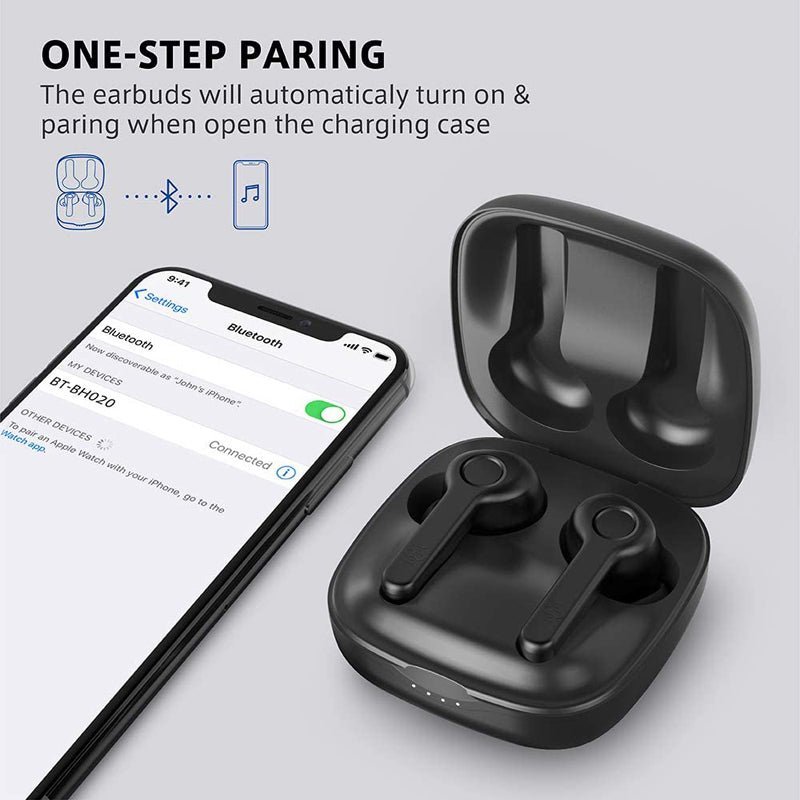
- کیس سے ایربڈز نکالیں, they will connect automatically. ایک بار منسلک, The LED indicators on both earbuds will flash blue and white alternately indicating the earbuds are in pairing mode now.
- Turn on the Bluetooth function on your device and search for nearby devices. Find Boltune BT-BH020 in the search list, and tap on the name to connect.
- ایک بار منسلک, the LED indicators on both earbuds will flash blue slowly.
نوٹ: If the earbuds fail to pair with each other, disconnect the Bluetooth connection with your device, put them back into the charging case, close the lid then open it to pair again.
سنگل ایئربڈس موڈ کیسے لگائیں
Take out one earbud from the charging case, and make sure the other one is placed in the charging case and the lid is covered.
Turn on the Bluetooth function on your device and search for nearby devices. Find Boltune BT-BH020 in the search list, and tap on the name to connect.
ایک بار منسلک, the LED indicators on both earbuds will flash blue slowly.
نوٹ: If you want to change to couple mode, simply take out the other earbuds from the charging case, وہ خود بخود ایک دوسرے کے ساتھ جوڑیں گے۔.
ایئربڈز کے افعال
- کال کا جواب دینے کے لیے کسی بھی ایئربڈ پر ملٹی فنکشن بٹن کو ایک بار دبائیں۔.
- کسی بھی ایئربڈ پر ملٹی فنکشن بٹن کو دبائے رکھیں 2 کال بند کرنے کے لیے سیکنڈ.
- کسی بھی ایئربڈ پر ملٹی فنکشن بٹن کو دبائے رکھیں 2 آنے والی کال کو مسترد کرنے کے لئے سیکنڈ.
- پچھلے ٹریک کے لیے بائیں ایئربڈ پر ملٹی فنکشن بٹن کو تین بار دبائیں۔.
- اگلے ٹریک کے لیے دائیں ایئربڈ پر ملٹی فنکشن بٹن کو تین بار دبائیں۔.
- میوزک چلانے یا موقوف کرنے کے لیے ایئربڈز میں سے کسی ایک پر ملٹی فنکشن بٹن کو دو بار دبائیں۔.
- والیوم کم کرنے کے لیے بائیں ایئربڈ پر ملٹی فنکشن بٹن کو ایک بار دبائیں۔.
- والیوم کرنے کے لیے دائیں ایئربڈ پر ملٹی فنکشن بٹن کو ایک بار دبائیں۔ + اضافہ.
- دوبارہ ڈائل کرنے کے لیے نان میوزک پلے بیک حالت میں کسی بھی ایئربڈ پر ملٹی فنکشن بٹن کو تین بار دبائیں.
خرابیوں کا سراغ لگانا نکات
If you encounter problems with your earbuds follow the steps to shoot the problem.
Failed to turn on the Earbuds: It is due to the low battery charge of the earbuds.
Failed to Charge the Earbuds: Place the earbuds into the charging case properly and make sure the charging case is charged fully.
Can’t charge the charging case: Make sure the charging cable is intact and plugged in properly.
Can’t find Boltune BT-BH020 in the Bluetooth device list: The earbuds reconnected with the previously paired device automatically. Deactivate the Bluetooth function of the previously paired device or clear Boltune BT-BH020 from its Bluetooth device list, and then search again.
Failed to pair the earbuds with your device: Turn on the device and activate its Bluetooth function before pairing
put the earbuds into pairing mode and pair them again with your device by following the above-mentioned steps.
نتیجہ
We hope after reading this article you will be able to Pair Boltune BT – BH020 Earbuds with your desired device. تو, آپ کو صرف یہ جاننے کی ضرورت ہے کہ JBL Earbuds کو کیسے جوڑنا ہے۔. ہمیں امید ہے کہ یہ مضمون آپ کی بہت مدد کرے گا۔!