

Ba'zan Windows 10 Printerlarni ulashda foydalanuvchilar xatoga duch kelishadi “faol katalog domen xizmatlari hozirda mavjud emas”. the error means that the system is not able to find and connect with the printer. computer manage all resources with the help of this system. this error always pops up when creates a problem with drivers and administrative permission. the error preventing the computer to connect with the printer.
Ushbu maqolada, I will guide you to solve this error with the best and easy solution. follow the below steps to remove this error.
there are three methods available to fix this problem. you can try all these ways one by one.
Usul 1: Check Network Installation and Add Printer Manually
sometimes the very easy solution for the problem. the first thing we need to do is printer installed or not?
you need to check through these steps. follow me to solve the active directory domain services is currently unavailable windows 10
- Bosmoq Windows key + X
- Click On Control Panel
- Now find the Devices and Printers option and click on it.
- you can see two categories Device and printers.
- check your printer is available or not. if present double click on it to see connected or not.
- if your printer is not present then you can add it manually. Click on Add printer and select printer from the list and add it.
- if your printer connects with your computer successfully then it works normally.
if still error exists then go for the next solution

Usul 2: Change Printer Spooler settings
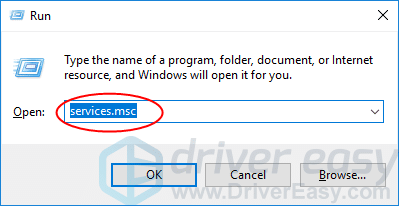
- press the Windows logotipi tugmachasi va R to call Run Box
- In the dialogue box type services.msc and press enter to bring up the service window.
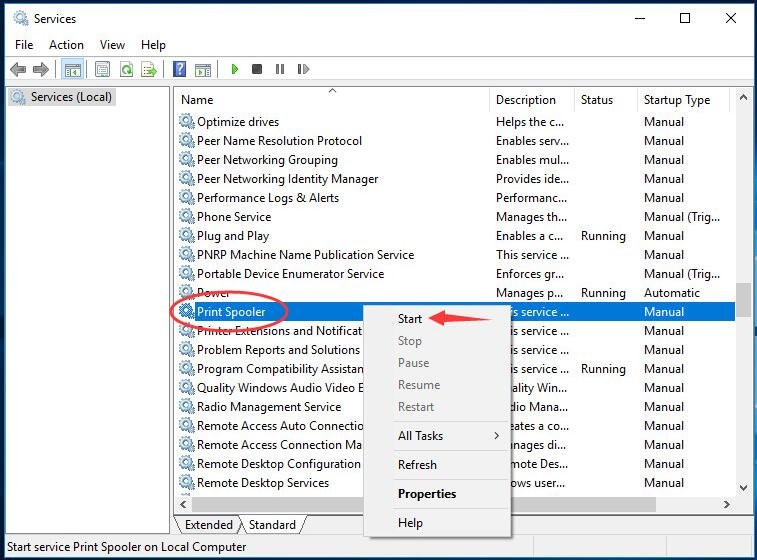
- O'ng tugmasini bosing Printer spoler xizmat va bosing Boshlash.
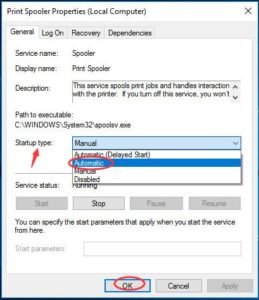
- Ishni boshlaganingizdan so'ng, ustiga ikki marta bosing. Uning ishga tushirish turini o'rnating Avtomatik. Keyin bosing KELISHDIKMI sozlamani saqlash uchun.
- Xizmatlar oynasini yoping va muvaffaqiyatli ishlaydigan fayllarni chop etishingiz mumkinligini tekshiring.
Usul 3: Granting access to PrinterPorts and Windows
Agar ikkala usul ham ishlamasa, biz ro'yxatga olish kitobi muharriri yordamida ruxsatni o'zgartirishga harakat qilishimiz kerak. printer portlariga ruxsat berishingiz kerak.
- Windows logotipi tugmachasi va R Run ilovasini ishga tushirish uchun.
- Tur regedit va bosing Kirmoq Ro'yxatga olish kitobi muharririni ochish uchun.

Bosmoq Ha Foydalanuvchi hisobini boshqarish tomonidan e'lon qilinganda.
- Bir marta ro'yxatga olish kitobi muharririda, quyidagi fayl yo'liga o'ting:
- Ro'yxatga olish kitobi oynasida, ga boring HKEY_CURRENT_USER > Dasturiy ta'minot > Microsoft > Windows NT > Joriy versiya.
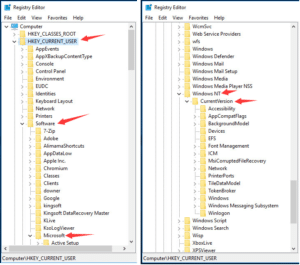
- O'ng tugmasini bosing Qurilmalar ostida Joriy versiya dialog.
Keyin bosing Ruxsatlar.
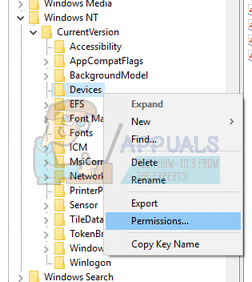
- hisobingizni ushbu ro'yxatdan toping. ostidagi barcha katakchalarni belgilang “ruxsat berish” ustun.
- uchun xuddi shunday tartibni bajaring “printer portlari” va “derazalar” menyu.
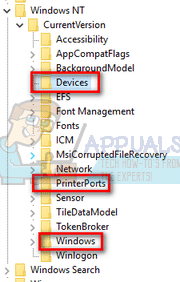
- Muvaffaqiyatli bajarilgandan keyin. iltimos, kompyuteringizni qayta ishga tushiring.
Bu erda siz muvaffaqiyatli xatoni hal qildingiz faol katalog domen xizmatlari hozirda mavjud emas windows 10.Umid qilamanki, siz o'z yechimingizni oldingiz. Agar mening postim sizga yoqqan bo'lsa, iltimos, Facebook orqali muhtoj odamlarga ulashing, Tvitter, Bog'langan, va boshqalar.


![Ovozli pochta xabarlari haqida ko'proq ma'lumotni o'qing? [Osongina hal qiling]](https://toolpub.com/wp-content/uploads/2021/11/jason-goodman-BAanEbxe9No-unsplash-200x300.jpg)
