

Airdrop jẹ imọ-ẹrọ gbigbe data yiyara fun Awọn olumulo Mac. O ṣe iranlọwọ fun ọ lati gbe media gẹgẹbi awọn fọto, awọn fidio, ati awọn faili miiran laarin awọn ẹrọ iOS laisi asopọ intanẹẹti. Airdrop ṣiṣẹ pẹlu Bluetooth. O ṣẹda nẹtiwọki foju kan nipa lilo asopọ Wifi kan. Ilana pinpin faili nṣiṣẹ laisiyonu, ṣugbọn nigbami Airdrop ko le so ẹrọ pọ mọ ara wọn fun idi kan. Ninu eko oni, a yoo pese ojutu fun Airdrop ko ṣiṣẹ.
Airdrop ko ṣe atilẹyin fun awọn ẹya iOS agbalagba. O ti wa ni inbuilt pẹlu iOS 7 nigbamii ti ikede ati ki o tun inbuilt Mac OS X Yosemite tabi nigbamii awọn ẹya. Nitorinaa ṣayẹwo nigbagbogbo boya ẹrọ rẹ ṣe atilẹyin Airdrop tabi rara?
Airdrop nlo Bluetooth lati ṣawari awọn ẹrọ ti o wa nitosi kọja 30 ibiti ẹsẹ. Ti ẹrọ rẹ ko ba sunmọ akoonu, lẹhinna o ko lagbara lati darapọ mọ ẹrọ miiran. Pẹlu, Airdrop nlo wifi fun awọn asopọ ẹlẹgbẹ si ẹlẹgbẹ. O ṣẹda nẹtiwọki foju kan fun pinpin media. Nitorinaa iwọnyi jẹ awọn nkan ipilẹ ti o gbọdọ mọ. Bayi jẹ ki a kọ ẹkọ nipa iṣoro diẹ ti o ni lati ṣatunṣe fun asopọ aṣeyọri.
[lwptoc]
Akojọ awọn ojutu fun Airdrop ko Ṣiṣẹ
Ojutu 1: Tun ẹrọ rẹ bẹrẹ
O le ṣe atunṣe ni kiakia nipasẹ tun ẹrọ rẹ bẹrẹ. Nigbati o ba tun foonu rẹ bẹrẹ, gbogbo apps bẹrẹ lati ibẹrẹ. Nitorinaa ọpọlọpọ awọn iṣoro yẹ ki o ṣatunṣe. Kii ṣe awada. O gbọdọ gbiyanju eyi ni o kere ju akoko kan. Titun bẹrẹ le ṣatunṣe gbogbo awọn idun sọfitiwia nipa tun ẹrọ rẹ bẹrẹ. O tun le tun ẹrọ rẹ lile ti o ko ba mọ lati ṣe nkan yii. O le tẹle itọsọna yii. Bi o si Lile Tun iPhone 11
Ojutu 2: Tun Bluetooth ati Asopọ wifi to
Yipada Bluetooth ati asopọ wifi tun ṣe iranlọwọ fun ọran Airdrop. Ni kete ti o tun wọn, Nẹtiwọọki naa yoo sọtun lẹẹkansi lẹhin ti o le so wọn pọ pẹlu ẹrọ miiran.
- Lati mu Bluetooth kuro ati wifi fa ika rẹ lati oke de isalẹ.
- Iwọ yoo wo wifi ati awọn aami Bluetooth ni apa osi oke.
- Fọwọ ba lati mu wọn ṣiṣẹ. Bayi duro fun 30 iṣẹju-aaya ati Tun-ṣiṣẹ mejeeji. Iyẹn ni o ṣe ilana fun Airdrop ko ṣiṣẹ.

Ojutu 3: Pa Hotspot
Jọwọ ṣe iwọ yoo tọju akọsilẹ O ko le sopọ pẹlu ẹrọ miiran titi ti o fi mu asopọ hotspot ṣiṣẹ? O le mu hotspot kuro lati eto tabi igi Awọn ẹrọ ailorukọ. Fa ika rẹ lati oke si isalẹ. Ni kete ti o rii aami hotspot lati atokọ aami, jọwọ mu o.
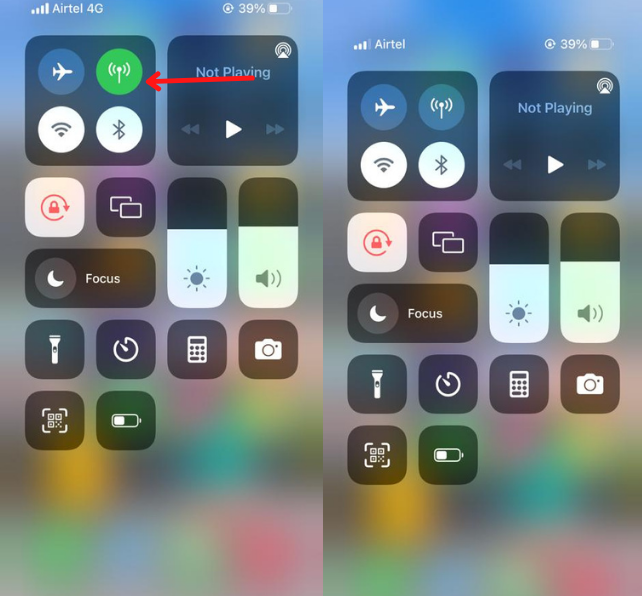
Ojutu 4: Tun Eto Nẹtiwọọki tunto
Tun rẹ iPhone Network ti tun duro atejade yii. Nẹtiwọọki tunto le ṣatunṣe ọpọlọpọ awọn iṣoro nipasẹ atunṣe atunto nẹtiwọọki rẹ.
- Ṣii rẹ eto ki o si lọ si gbogboogbo aṣayan.
- Tẹ lori awọn Tunto aṣayan
- Lẹhinna Nẹtiwọọki tunto Eto.
Ojutu 5: Wọle lẹẹkansi pẹlu Apple ID
Ti o ba tun, ti o ba wa ko discoverable, o le tun rẹ apple id. Apple Id tun le jẹ idi kan lati ṣatunṣe iṣoro rẹ. Kan lọ si awọn eto ki o tẹ orukọ rẹ ni kia kia. Lẹhinna, lọ si iCloud ati ki o jade lati awọn iroyin.
Itele, wole lẹẹkansi pẹlu rẹ iCloud iroyin. Ọpọlọpọ awọn olumulo ṣe atunṣe awọn ọran nipa igbiyanju ọran yii.
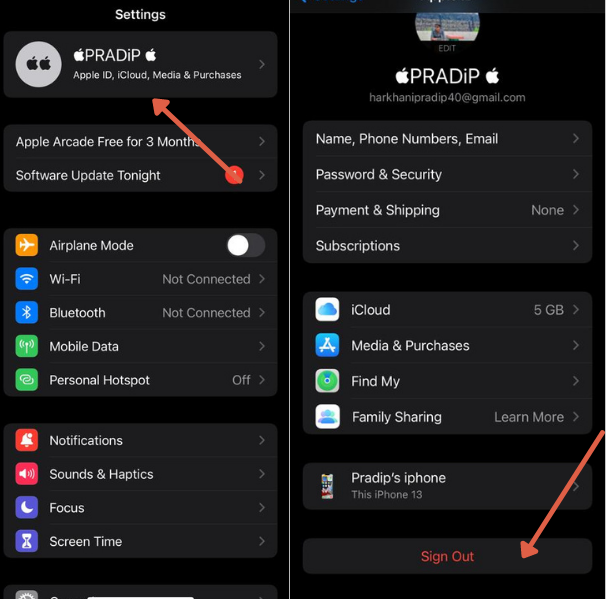
Ojutu 6: Ṣe imudojuiwọn ẹya iOS
Nigba miiran awọn ọran yoo yanju laifọwọyi nipasẹ imudojuiwọn eto kan. Fun apere, ninu awọn agbalagba ti ikede, kokoro kan wa ti o ṣe idiwọ fun ọ lati tẹsiwaju ni aṣeyọri. Ti iwulo imudojuiwọn ba wa lati ṣatunṣe o le lọ fun ẹya tuntun. O le ṣayẹwo nipasẹ eto>Gbogboogbo>Imudojuiwọn Software.
Ti ohunkohun ba nilo imudojuiwọn, o yoo ri a igarun loju iboju.
Lati ṣe imudojuiwọn lori kọnputa Mac. o le tẹle ọna yii Aami Apple> Awọn ayanfẹ Eto > Imudojuiwọn software
Ojutu 7: Kan si Apple Support
Ti o ba gbiyanju ohun gbogbo, sugbon ti ohunkohun ko ṣiṣẹ fun o. Ẹrọ rẹ le koju iṣoro hardware kan. O ni lati kan si apple support lati yanju oro yi. Wọn yoo ṣeto ipinnu lati pade fun ọ ati iranlọwọ fun ọ lati ṣatunṣe iṣoro naa ni kutukutu bi o ti ṣee.
Ojutu 8: Gba Ogiriina laaye
Ogiriina le dènà igbanilaaye lati sopọ pẹlu ẹrọ miiran. Ti o ba nlo awọn ohun elo antivirus lori iPhone rẹ, mu wọn ṣiṣẹ lakoko pinpin media fun akoko to lopin.
Lori Mac, o le lọ si Apu > Awọn ayanfẹ Eto > Aabo & Ibi aṣiri > Ogiriina
Mu awọn Dina Gbogbo Awọn isopọ ti nwọle ki o si tẹ ok.
Nitorinaa gbogbo wọn ni awọn solusan ṣiṣẹ fun Airdrop ko ṣiṣẹ oro. Mo nireti pe o gba idahun rẹ si iṣoro yii. Jọwọ pin itọsọna yii pẹlu awọn olumulo iPhone lati ṣe iranlọwọ fun wọn.
Faaq
Bawo ni MO ṣe ṣe atunṣe AirDrop lori iPhone mi?
Airdrop atunse ni ọpọlọpọ awọn ọna. Awọn atunto aṣiṣe wa ti o ṣe idiwọ pinpin faili. O le tun Bluetooth to, wifi ati awọn eto nẹtiwọki.
Kini idi ti AirDrop mi n pa a?
Ti o ba mu ipo ipamọ batiri ṣiṣẹ tabi fi sori ẹrọ ohun elo ẹnikẹta ti o ṣe idiwọ lilo agbara, lẹhinna Airdrop May duro.
Awọn fọto melo ni o le AirDrop ni ẹẹkan?
O le fi awọn faili ailopin ranṣẹ si ẹrọ miiran laisi iṣoro eyikeyi. Ẹrọ olugba yẹ ki o ni aaye to.
Kini idi ti Mac AirDrop mi ko ṣe afihan lori iPhone mi?
Jeki sunmọ ẹrọ Mac rẹ si iPhone rẹ. Awọn Airdrop ya awọn ẹrọ laarin 30 Ibiti ẹsẹ.
Lakotan
Airdrop ko ṣiṣẹ ni ọpọlọpọ awọn ipo. IPhone tabi Mac ko ṣe atilẹyin Airdrop, Ijinna laarin ẹrọ naa, Ọrọ nẹtiwọki, wifi, Bluetooth, hardware isoro, ati be be lo., gbogbo awon oran ti a jiroro ni apejuwe awọn. Yoo dara julọ ti o ba ṣatunṣe gbogbo awọn ọran fun pinpin faili. Ti o ko ba le yanju iṣoro yii, o le kan si atilẹyin apple.


![Ka diẹ sii nipa nkan naa Ifohunranṣẹ ko ṣiṣẹ lori iPhone? [Ni irọrun yanju]](https://toolpub.com/wp-content/uploads/2021/11/jason-goodman-BAanEbxe9No-unsplash-200x300.jpg)
