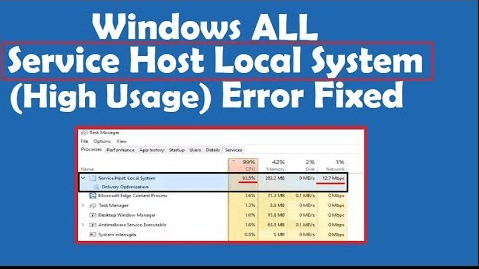
Ingabe uke wabhekana nokusetshenziswa kwe-High Disk okwake kwenzeka yi-service host superfetch kukhompyutha yakho? Ikhompyutha yakho ilengisiwe ngoba ukusetshenziswa cishe kuya 100%. pc ayikwazi ukusingatha lesi simo futhi yenza zonke izinqubo zihambe kancane. Ufuna ukufunda mayelana nendlela yokubhekana ne-service host superfetch high disk. Yini ezoshintsha ngemva kokuyicisha?
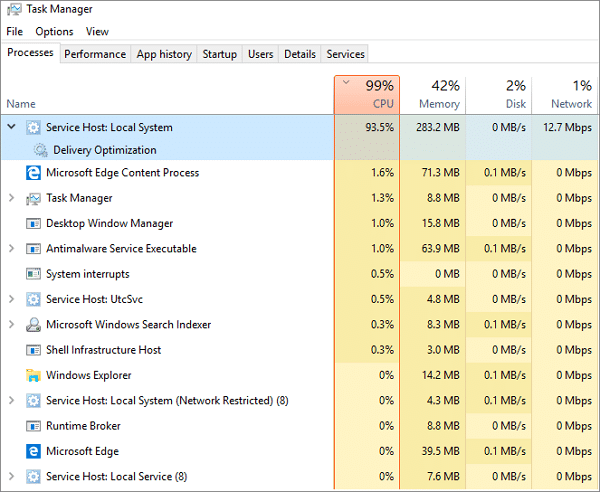
Iyini i-service host superfetch futhi ufunde mayelana nesevisi
ISuperfetch iyingxenye yeWindows OS evumela ukuphatha i-RAM(inkumbulo yokufinyelela okungahleliwe). Ukuze uhlelo lokusebenza lusebenze ngokushelela. i-superfetch ihlala isebenza ngemuva. Kuyimenenja yememori elayisha kuqala. Isebenzisa inkumbulo etholakalayo kuphela. Kuyasiza kuhlelo lokusebenza lwezinkampani zangaphandle kanye nezingxenye zewindi ukuphendula ngokushesha kumsebenzi ojwayelekile. i-superfetch isiza ukuthuthukisa uhlelo.
Isitolo seSuperfetch futhi ufunde idatha yohlelo lokusebenza ngokuqondile ku-RAM esikhundleni se-hard drive. Ifike njengomphathi wenqolobane. I-superfetch igcina wonke amafayela ajwayelekile avela ku-RAM. Kuyasiza ukuqalisa ngokushesha kuhlelo lokusebenza.
Kungani i-service host host superfetch high disk?
Umsingathi wesevisi i-Superfetch high disk ibangela ukuthi uhlelo lungabi nayo ihadiwe yakamuva. Kwesinye isikhathi iSuperfetch yenza ikhompyutha yakho ingasheshi lapho into yakho esetshenziswayo ibuthakathaka futhi ilayisha kuqala futhi. Esinye Isizathu yilapho i-superfetch ilayisha inqwaba yezinhlelo zokusebenza ngaphambi kokuthi windows ilayishe zonke izinhlelo zokusebenza ezidingekayo nezingxenye.
I-service host i-superfetch high disk ayihlali yenza ikhompyutha yakho inembe. Kuyasiza ukusheshisa ezinye izinhlelo zokusebenza ezijwayelekile.
Uma unenkinga njalo nge-service host superfetch, khona-ke ungase ufunde ngokuyikhubaza. Ngokukhubaza i-superfetch ayisebenzi kakhulu ohlelweni. Kodwa ezinye izinhlelo zokusebenza zithatha isikhathi esengeziwe ukulayisha. Asincomi ukukhubaza i-SuperFetch. Idala izinkinga ezingaba khona ezishiwo ngenhla. Kufanele uyinikeze amandla ukuze uthuthukise ukusebenza.
Ungakhubaza i-superfetch ngokulandela zonke izindlela ezichazwe ngezansi. Funda zonke izinyathelo ngokucophelela.
Isu 1: Khubaza i-Service host i-Superfetch nge-Run Command
- Cindezela “IWindows + R” Inkinobho kukhibhodi yakho ukuze uvule i-Run Box.
- Thayipha okuthi ‘services.msc’ bese ucindezela u-Enter ukuze uveze iwindi Lamasevisi
- Manje thola "Superfetch"
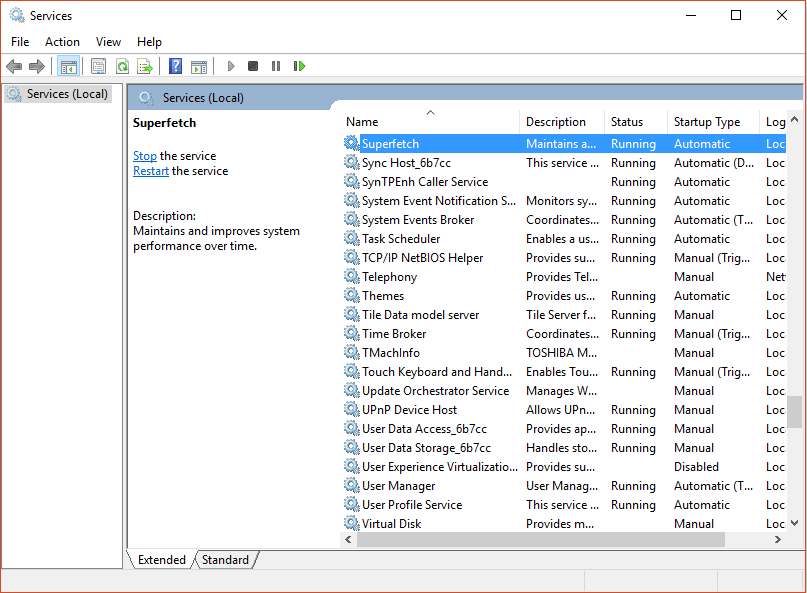
- Chofoza kwesokudla ukuze uvule izakhiwo
- Lapho izakhiwo amafasitela evuliwe chofoza ku-stop
- Kusuka kumenyu yokudonsela phansi 'yohlobo lokuqalisa' kokuthi Izakhiwo, chofoza Kukhutshaziwe
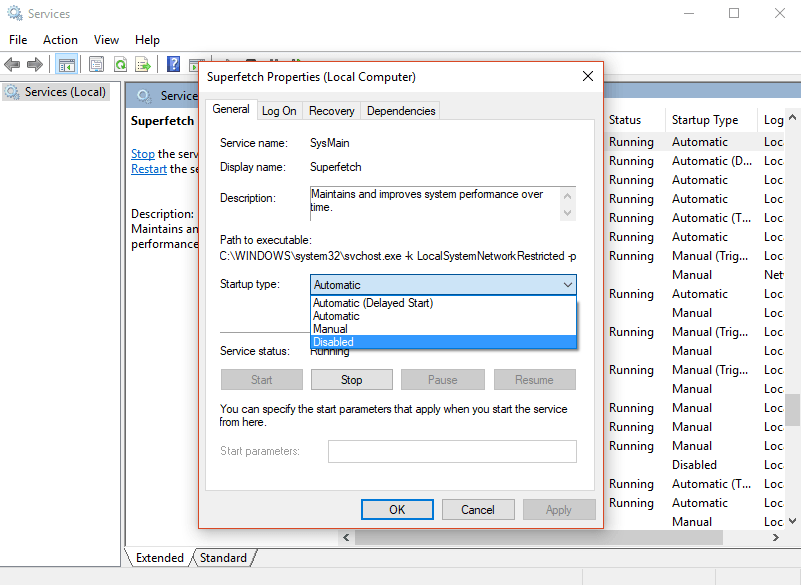
kwenziwe lokho. manje Buyela emuva kugrafu yokusetshenziswa. ungabona manje i-superfetch iya ekusetshenzisweni okuvamile
Isu 2: Ukusebenzisa i-Registry Editor
Uhlelo lokusebenza lwesevisi luncome le ndlela kodwa ayisebenzi ngaso sonke isikhathi ngesizathu esithile. ngaphambi kokuqala le nqubo sicela ulondoloze iRegistry. Esimeni lapho kukhona okungahambi kahle.
- Cindezela iWindows + Inkinobho ka-R ndawonye ukuze uvule ibhokisi elithi Run
- Uhlobo Regedit bese uchofoza kulungile
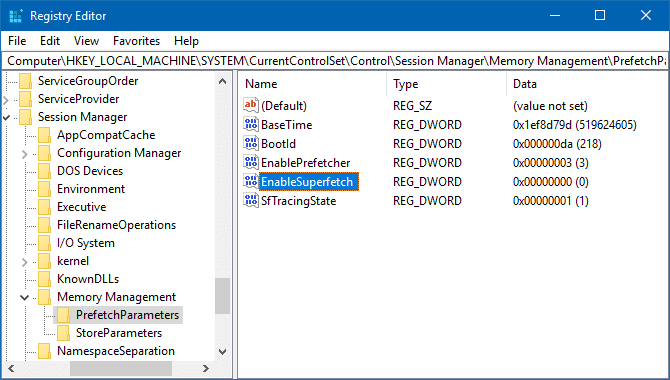
3. Iya ku HKEY_LOCAL_MACHINE ifolda
4. Manje Zulazulela ku
HKEY_LOCAL_MACHINE / SYSTEM / CurrentControlSet / Control / Session Manager / MemoryManagement / PrefetchParameters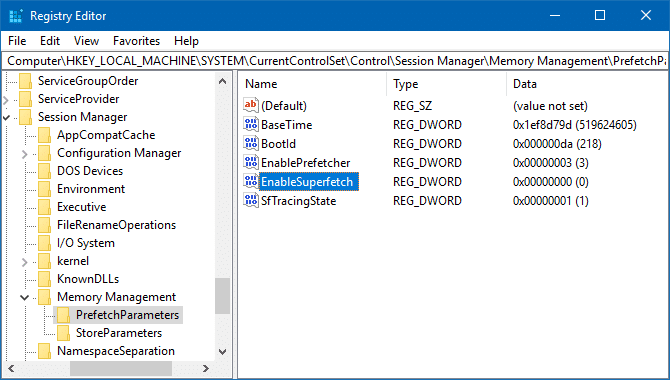
5. Vula i- “I-Superfetch inikwe amandla” ngokuyichofoza kabili.
6.Chofoza kuso bese ukhetha Lungisa
7. Shintsha inani layo libe 0 ukukhubaza iSuperFetch bese uchofoza Ok. vala umhleli wokubhalisa.
Ngithemba ukuthi uyitholile impendulo yakho mayelana nokukhubaza i-service host superfetch high disk. Uma ungaboni noma yikuphi ukuthuthukiswa, vula futhi. Ngisabhekene nenkinga ngicela ungazise ngizozama ukuthola isixazululo senkinga yakho.