Wil u altec Lansing Nanopods Earbuds koppel? Die Altec Lansing Nanopods het 4 ure se batterylewe en 16 ure met behulp van die laaikas. Hulle het Bluetooth 5.0, die IPX5-sweet en stofbestande sertifisering, 50voet van die werkreeks, en meer. Hier leer jy hoe om dit met hierdie nuwe Altec Lansing NanoPods met jou toestelle te gebruik.
Hoe om Altec Lansing NanoPods-oordopjes te koppel?
As jy wil paar Altec Lansing NanoPods-oordopjes na jou toestelle volg die onderstaande stappe noukeurig sonder om enige stap oor te slaan.
Hoe om Altec Lansing NanoPods-oordopjes met iOS- en Android-fone te koppel?
Stap 1: Haal die oordopjes uit die laaikas. Na dit, hulle sal outomaties AANskakel, en 'n lig sal op hulle brand.
Stap 2: Skakel dan Bluetooth op jou toestel aan en gaan na die Bluetooth-instellings.
Stap 3: Nou, kies NanoPods. As vir 'n wagwoord gevra word, tipe 0000.
Na dit, Die paringproses sal gedoen word, die oordopjes sal aan jou toestel gekoppel wees en gereed vir gebruik.
Hoe om Altec Lansing NanoPods-oordopjes met 'n rekenaar te koppel (Vensters)

Stap 1: Eerstens, gaan na die soekbalk op jou rekenaar Klik hier tik Bluetooth en skakel Bluetooth aan.
Stap 2: Nou, gaan na die instellings.
Stap 3: Gaan na Bluetooth en ander toestelle.
Stap 4: Klik op Voeg toestel toe.
Stap 5: Haal daarna die oordopjes uit die houer, hulle sal outomaties aanskakel en jy sien 'n lig op hulle.
Stap 6: Toe, kies NanoPods. Indien nodig 'n wagwoord, tipe 0000.
Na al hierdie stappe, Die paringproses sal gedoen word, die oordopjes koppel met jou toestel, en nou kan jy hulle gebruik.
Hoe om Altec Lansing NanoPods-oordopjes te dra?
Hier beskryf ons 'n paar stappe oor hoe om die Altec Lansing NanoPods te dra Oordopjies.
Stap 1: Eerstens, haal albei oordopjes uit die laaikas.
Stap 2: Toe, identifiseer die linker- en regteroorknoppies.
Stap 3: Kies die oorpunte wat die beste by jou ore pas.
Stap 4: Na hierdie stappe, plaas die oorfone in die binneste kanaal van die ore, draai hulle vir die beste moontlike gemak en beste pasvorm, en sorg dat die mikrofoon na die mond wys.

Hoe om Altec Lansing NanoPods-oordopjes aan en af te skakel?
Aanskakel
Haal die oordopjes uit die laaikas. Na dit, jy sien 'n lig sal op die oordopjes brand, en hulle sal outomaties aanskakel.
Skakel af
Om die oordopjes af te skakel, plaas dit in die laaikas. Hulle sal outomaties afskakel.
Hoe om te beheer? / Hoe om te werk? - Instruksies
Noot: Die multifunksionele aanraaksensor is op die boonste deel van die oordopjes geplaas.
- Druk en hou die multifunksie-raakknoppie op die regteroorfoon vir ongeveer 2 sekondes om musiek te speel of te onderbreek.
- Druk die multifunksionele raakknoppie op die regteroorknoppie twee keer om die volgende liedjie te speel.
- Druk die multifunksionele raakknoppie op die linkeroorknoppie twee keer om die vorige liedjie te speel.
- Druk die multifunksionele raakknoppie op die regteroorknoppie een keer om die volume te verhoog.
- Druk die multifunksionele raakknoppie op die linkeroorknoppie een keer om die volume af te skakel.
- Druk die multifunksionele raakknoppie op enige van die oordopjes een keer om 'n inkomende oproep te beantwoord.
- Druk en hou die multifunksie-raakknoppie op enige van die oordopjes vir ongeveer 2 sekondes om 'n huidige oproep te beëindig.
- Druk die multifunksie-raakknoppie op enige van die oordopjes twee keer om 'n inkomende oproep te verwerp.
- Druk en hou die multifunksie-raakknoppie op die linkeroorknoppie vir ongeveer 2 sekondes om die stemassistent te aktiveer.
Hoe om die monomodus te aktiveer?
Om die monomodus in hierdie oordopjes te aktiveer of te deaktiveer, koppel die oordopjes aan die toestel en haal een van die oordopjes uit die laaikas wat jy wil gebruik. Dit sal vanself begin werk.
Hoe om die oordopjes te laai?
Oordopjies
Om die oordopjes te laai, plaas dit in die laaikas en maak die deksel behoorlik toe. Die oordopjes sal outomaties begin laai.
Laai saak
Om die heffing te hef, koppel die tas aan 'n USB-laaier of laaipoort met die meegeleverde USB-A na C-kabel. Dit sal outomaties begin laai.
Wat beteken die ligte?
Oordopjies
- ’n Liggie gaan aan wanneer jy hulle uit die laaikas haal. Dit beteken dat die oordopjes aanskakel.
- ’n Rooi lig gaan AAN, op die laaikas. Wanneer die oordopjes laai.
- ’n Rooi lig gaan af op die laaikas. Wanneer die oordopjes ten volle gelaai is.
- ’n Blou lig het drie keer geflits. Wanneer die oordopjes die modus terugstel.
- ’n Rooi lig word blou. Wanneer die oordopjes teruggestel word.
Laai saak
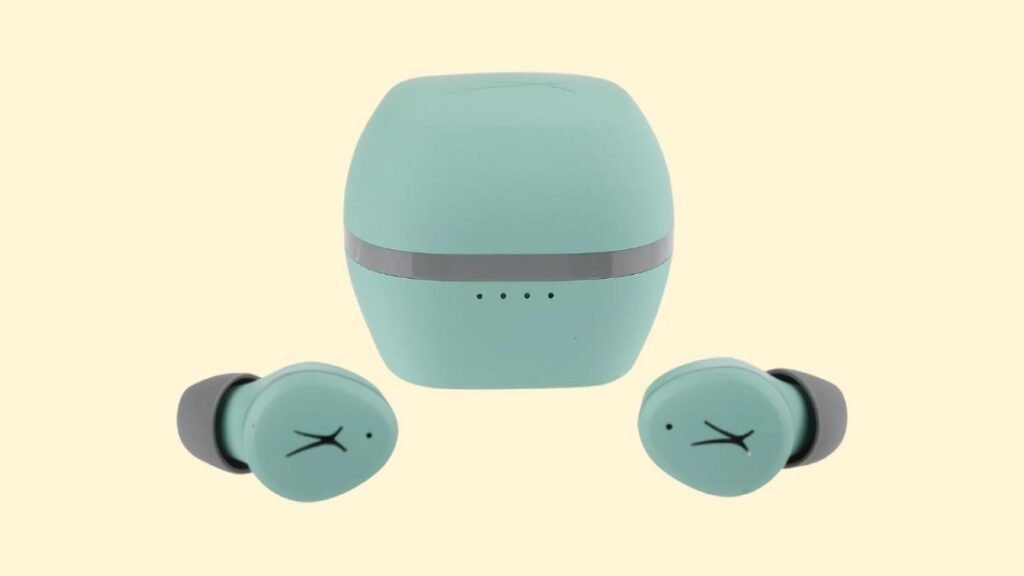
- Een lig wat flikker tydens laai is minder as 25% van die battery.
- Een lig aan en een wat flikker terwyl laai is minder as 50% van die battery.
- Twee ligte aan en een wat flikker terwyl die tas gelaai word, het minder as 75% van die battery.
- Drie ligte aan en een wat flikker terwyl laai is minder as 100% van die battery.
- Alle ligte is aan terwyl die laaikas ten volle gelaai is.
Hoe om Altec Lansing NanoPods-oordopjes terug te stel?
Stap 1: Vee alle saambindrekords van die NanoPods van die gekoppelde toestel uit.
Stap 2: Haal dan albei oordopjes uit die houer. Na dit, Hulle sal outomaties aanskakel.
Stap 3: Nou, druk en hou die multifunksionele raakknoppie op albei oordopjes vir ongeveer 9 sekondes. Na dit, 'n blou lig sal drie keer flikker, om dan rooi te word en terug na blou.
Stap 4: Plaas die oorfone terug in die laaikas. Na dit, Die herinstelling sal gedoen word.
Wenke vir probleemoplossing
Links/Regs/Een kant van die oordopjes het opgehou werk
As hierdie probleem gebeur, dit kan wees omdat dit min battery het of dit nie korrek met die toestel gekoppel is nie. Om dit reg te stel, U kan die volgende doen:
1. Laai die oorknoppie wat nie werk nie of, plaas albei oordopjes in die laaikas.
2. Stel die oordopjes terug.
3. Kyk of die oordopjes binne 'n normale werkbereik werk
As dit nie werk nie, die oorknoppie is waarskynlik foutief.
Links/Regs/Een kant van die oordopjes het 'n lae volume
As dit gebeur, dit kan wees omdat die oorknoppie vuil is of die volume laag gestel is. Om dit reg te stel, jy kan die volgende stappe doen.
1. Maak die oorknoppie skoon met 'n watte depper of maak die gaas versigtig met 'n pen skoon.
2. Probeer fabriek om die oordopjes weer in te stel.
Die mikrofoon werk nie
As dit gebeur, dit kan wees omdat die mikrofoon gedemp is, of die oordopjes is sleg geposisioneer. Om dit reg te stel, U kan die volgende doen:
Gaan die toestelmikrofoonvolume na. As dit nie werk nie, dit beteken daar kan 'n defek in die oordopjes wees, Probeer dus vervang of 'n terugbetaling kry.
Gereelde vrae om Altec Lansing NanoPods-oordopjes te koppel
Is die Altec Lansing NanoPods waterdig?
Geen, die Altec Lansing NanoPods is nie waterdig nie (IPX6 en hoër). Hulle het 'n gradering van ipx5, wat beteken dat hulle beskerm word teen sommige water wat uit 'n spuitstuk geprojekteer word.
Het die Altec Lansing NanoPods 'n mikrofoon?
Ja, die oordopjes kom met geïntegreerde mikrofone.
Het die Altec Lansing NanoPods 'n lae latency/spelmodus?
Geen, hierdie oordopjes het nie 'n lae latensie/spelmodus nie.
Hoe om te weet wanneer die Altec Lansing NanoPods ten volle gelaai is?
Wanneer die oordopjes laai, sommige ligte skakel die laaikas aan. As dit volledig gelaai word, alle ligte gaan af.
Kan die Altec Lansing NanoPods aan 'n rekenaar en skootrekenaar koppel?
Ja, hierdie oordopjes kan aan rekenaars koppel, skootrekenaars, en selfs tablette.
Is die Altec Lansing NanoPods geraasonderdrukking?
Geen! Hierdie oordopjes kom nie met geraas-kansellasietegnologie nie.
Afsluiting
Ons hoop jy weet nou hoe om Altec Lansing NanoPods-oordopjes met jou gewenste toestel te koppel. Dus, dat al wat jy moet weet is hoe om Altec Lansing NanoPods-oordopjes aan jou toestel te koppel. Ons hoop dat hierdie artikel jou baie sal help!