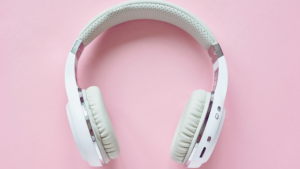
Ydych chi'n pendroni ar fin cysylltu clustffonau diwifr Brookstone i iPhone? Rydych chi wedi prynu'r clustffonau anhygoel hyn a nawr mae angen i chi eu cysylltu â'ch iPhone, wel peidiwch â phoeni, rydych chi yn y lle iawn i gael ffordd hawdd o gysylltu eich Brookstone i iPhone. Yma rydyn ni'n mynd i drafod y ffordd i wneud cysylltiad rhwng y ddau. Felly, gadewch i ni ddechrau……
Cysylltu Clustffonau Di-wifr BrookStone i iPhone
I Gysylltu clustffonau diwifr Brookstone i iPhone, rhaid i chi ddilyn y camau hyn:
- Yn gyntaf, mae'n rhaid i chi sicrhau bod eich Clustffonau i ffwrdd cyn iddynt ddechrau mynd i mewn i'r modd paru . Ni fydd y Dangosydd LED ar ddau EARCUPS eich clustffonau yn cael ei oleuo .
- Yn awr, i gychwyn y weithdrefn baru, mae'n rhaid i chi wasgu a dal y Botwm POWER sydd wedi'i leoli ar waelod y glust dde am tua 5 eiliadau neu hodiwch ef nes y byddwch yn gweld y Dangosyddion LED yn dechrau fflachio'n gyflym.
- Yn awr, mae'n rhaid i chi alluogi neu ganiatáu'r gwasanaeth Bluetooth ar eich dyfais symudol ac yna mae'n rhaid i chi chwilio neu sganio am y”BT-H31″ dyfais . (Mae'n rhaid i chi gyfeirio at lawlyfr cyfarwyddiadau eich dyfais symudol, neu mae'n rhaid i chi gysylltu â gwneuthurwr y ddyfais symudol. os oes angen mwy o wybodaeth arnoch.)
- Ar ol hynny, o'r rhestr, rhaid i chi ddewis y ddyfais “BT-H31” ac yna mae'n rhaid i chi nodi'r allwedd paru “0000”os caiff ei annog . Yn awr, bydd y ddyfais symudol wedyn yn cwblhau'r paru yn awtomatig .
- Os yw'r broses baru wedi'i chwblhau neu ei chwblhau, bydd y Dangosydd LED a osodir ar y ddau glust yn stopio i fflachio'n gyflym a byddant yn dychwelyd i fflach arafach i nodi eu bod wedi cwblhau neu gwblhau'r paru .
Cofiwch fod y broses a grybwyllir uchod yn bwysig dim ond pan fyddwch chi'n defnyddio Clustffonau Bluetooth am y tro cyntaf gyda'ch dyfais symudol. Er mwyn defnyddio'ch Clustffonau Bluetooth gyda dyfais symudol arall, rhaid i chi ailadrodd y broses uchod. Er mwyn defnyddio dyfais Bluetooth, ar eich dyfais symudol, rhaid i chi fynd i'r ddewislen Bluetooth a rhaid i chi ddewis “BT-H31” i ailgysylltu.
Cwestiynau Cyffredin
Sut i Roi Clustffonau Di-wifr yn y Modd Paru?
Ar gyfer Paru Bluetooth Hawdd
Yn gyntaf, rhaid i chi roi eich clustffonau yn y modd paru. Fel arfer, i wneud hynny mae'n rhaid i chi ddal y botwm pŵer i lawr; weithiau mae angen diffodd y clustffonau yn gyntaf cyn dechrau'r broses. Mae nifer o barau yn sbarduno golau sy'n fflachio ar ôl rhai eiliadau i ddangos bod y modd paru ymlaen, ac ychydig o weithiau mae ciw sain hefyd.
Sut i Ychwanegu Dyfais Bluetooth â Llaw?
I ychwanegu dyfais Bluetooth â llaw, yn gyntaf mae'n rhaid i chi agor yr app Gosodiadau ar eich ffôn ac yna mae'n rhaid i chi tapio Bluetooth (neu Gosodiadau > Cysylltiadau > Bluetooth). Ar ol hynny, rhaid i chi sicrhau bod y Bluetooth yn cael ei droi ymlaen (dylai'r botwm fod yn las). Yna, mae'n rhaid i chi wirio'ch dyfais Bluetooth a sicrhau ei fod wedi'i droi ymlaen ac yn y modd darganfod. Ar eich ffôn, mae'n rhaid i chi aros iddo ddangos o dan y Dyfeisiau Ar Gael.
Pam na fydd Eich Clustffonau'n Gweithio?
Mae'n rhaid i chi wirio'r gosodiadau Bluetooth
Am hyn, gallai'r camau amrywio yn dibynnu ar y ddyfais Android rydych chi'n ei defnyddio. Mae'n rhaid i chi agor Gosodiadau > Cysylltiadau > Bluetooth. Ar ol hynny, mae'n rhaid i chi droi'r switsh Bluetooth i ffwrdd, neu mae'n rhaid i chi ddad-baru dyfeisiau sain Bluetooth sydd wedi'u cysylltu â'ch ffôn eisoes. Mae'n rhaid i chi blygio'r clustffonau i'r jack sain ac yna byddwch chi'n chwarae rhywbeth i wirio a ydyn nhw'n gweithio.
Allwch Chi Cysylltu Clustffonau Bluetooth Lluosog i'ch iPhone?
Oes, mae'r iPhones diweddaraf neu fodern yn caniatáu i'w defnyddwyr gysylltu â nifer o siaradwyr Bluetooth neu glustffonau ar yr un pryd trwy'r AirPlay. Y nodwedd, a elwir yn ‘Rhannu Sain,’ ei gyflwyno i mewn 2019 gyda iOS 13.1, gadael i ddefnyddwyr yr iPhone er mwyn rhannu un ffrwd sain rhwng dau bâr o'ch clustffonau neu glustffonau.
Casgliad
Gobeithio, bydd yr erthygl hon yn eich helpu llawer i ddatrys eich problem. Mae'r ffordd i gysylltu clustffonau diwifr Brookstoon i iPhone yn syml. Mae'n rhaid i chi ddilyn y canllaw uchod i gysylltu eich clustffonau diwifr Brookstone i iPhone.