Faak binne minsken yn 'e war oer it ferbinen mei Kia Bluetooth, se witte net hoe te betsjinjen de Kia syn Bluetooth oplossing. Mar hoege jo gjin soargen te meitsjen, om't wy hjir binne mei tips en trúks om jo de ultime oplossing te jaan!
Kia hast alle modellen binne technologysk avansearre as ea, mar ferrassend noch, de populêre Kia bliuwt tafoegjen nij technology yn auto's deis nei nije hichten.
As jo foar de útdaging steane om te ferbinen mei Kia Bluetooth, dan sille jo ferrast wurde nei it lêzen fan dit artikel oer hoe ienfâldich it is om te ferbinen mei Kia Bluetooth. Sa, lit ús gean nei in stap-foar-stap proses foar in oplossing.
It proses om te ferbinen mei Kia Bluetooth
It is relatyf heul maklik en ienfâldich om in apparaat te ferbinen mei it Bluetooth-systeem fan Kia. Foar dit, jo moatte gewoan dizze maklike stappen folgje, en nei it folgjen fan dizze stappen kinne jo draadloze muzyk begjinne te streamen, meitsje en ek beantwurdzje jo oproppen, en ek mear alles sûnder jo eagen fan 'e dyk ôf te draaien en sels jo hannen op it stjoer bliuwe.
- As earste, Op jo smartphone, jo moatte Bluetooth ynskeakelje
- It hinget ôf fan hokker type telefoan jo hawwe en brûke, nei it ynskeakeljen fan Bluetooth moatte jo "Discover," "Sykje,” of “Fyn Ferbining”
- Dêrnei, Jo moatte Druk op de "Setup" knop op de radio ienheid fan jo Kia, en dan sille jo "Telefon" selektearje
- Dan, jo sille "Pair" selektearje
- As op dizze stap, it freget jo om de namme fan jo tillefoan te fertellen, doch dat dan, en dêrnei moatte jo "Ja" sizze
- Hjir, jo krije de namme fan jo auto en in wachtwurd op 'e radio-ienheid. Sa, jo sille de passkey yn jo smartphone ynfiere nei it selektearjen fan de namme fan jo auto
- En dat is it, ferbining mei Kia Bluetooth is kompleet!
Wat is de bedoeling troch Kia UVO?
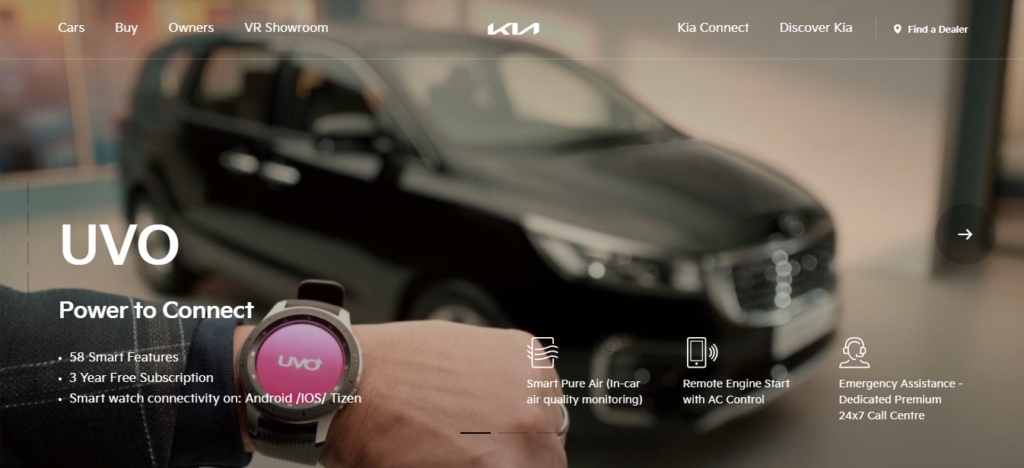
It is goed foar jo dat jo kinne ynsette of brûke UVA app fan Kia om te ferbinen mei it auto mei in smartphone. Jo kinne in oantal dingen op ôfstân dwaan kinne, om't dizze ferbining jo in protte funksjes mooglik makket om dit te dwaan. In pear fan harren binne as folget:
- (DAN) Myn punten fan belang: Jo kinne jo reizen op 'e dyk folle effektiver planne troch dizze funksje te brûken. Jo soene jo navigaasje-ynstruksjes kinne bewarje foar letter gebrûk, tidens de rit kinne jo fine in pleatslik restaurant, mark stopt lâns jo wei en safolle mear.
- Myn auto-sône: Dizze geweldige funksje fan myn auto-sône lit elkenien har bestjoerderynstellingen oanpasse foar bepaalde sjauffeurs. Troch dizze funksje te brûken, kinne jo warskôgings ynstelle foar spesifike grinzen, snelheid grinzen, en útgongsferbannen, en fansels, it sil jo helpe om jo Kia en bestjoerder te kontrolearjen op it momint dat jo net yn jo auto binne. Dizze funksje is populêr ûnder âlders om't se de My Car Zone-funksje in weardefol ark fine om har teenersjauffeurs te learen. Troch it gean al jo warskôgings direkt nei de smartphone en kinne jo berikke as it wichtich is om te freegjen oer de situaasje.
- Parking Minder: Jo kinne jo Kia fine troch dizze app te brûken, sels as jo sille wêze kinne om te dwaan yn dy mammoet parkeargaraazjes. Foar dit, jo moatte gewoan de lokaasje tracker aktivearje en dan kinne jo rinnende rjochtingen direkt nei it auto krije. Jo kinne parkearmeterherinneringen ynstelle mei help fan dizze funksje en troch dit te dwaan sille jo noait freegje om in parkearkaart te beteljen, sels op in ferrûne meter.
Hoe UVO te aktivearjen yn Kia?
It is ek ienfâldich om UVO yn Kia te aktivearjen krekt lykas it proses om te ferbinen mei Bluetooth Kia. Foar de aktivearring fan jo UVO tsjinsten op Kia, jo hawwe gjin yngenieurgraad nedich. Jo moatte gewoan dizze ienfâldige stappen folgje:
- Earst, jo moatte selektearje de [Wize] knop fan jo kontrôles op it stjoer. In pear modellen brûke de [Ynformaasje] knop.
- Dêrnei, jo moatte selektearje de [Opsette] knop fan it touchscreen.
- No, do silst selektearje [UVO eServices] op jo touchscreen.
- Hjir, út it touchscreen-menu, jo moatte selektearje [UVO eServices Aktivearring].
- En op it lêst, jo moatte selektearje [Aktivearje] op it touchscreen, en it is dien. Sa, no hawwe jo tagong ta alle tsjinsten fan UVO.
FAQs fan Ferbine mei Kia Bluetooth
Wêrom wurket Bluetooth net op Kia?
Wannear fanwege de flater fan kommunikaasje fan auto-Bluetooth-apparaat, it systeem bleau net stabyl, dan moatte jo de keppele apparaten wiskje en dan de Bluetooth-apparaten opnij ferbine. As nei it dwaan dat de Bluetooth-ferbining is noch net stabyl, dan moatte jo Bluetooth deaktivearje en Bluetooth opnij aktivearje op it apparaat. En ferbine it apparaat wer.
Hoe kinne jo jo Kia Bluetooth weromsette?
Om dit te dwaan moatte jo op Setup drukke > Tillefoanferbining > Bluetooth > Standert > Ja op jo Kia syn infotainment skerm. Dit proses sil jo Kia Bluetooth perfekt weromsette.
Hoe kinne jo jo Kia Connect weromsette?
Foar dit, earst moatte jo jo hjoeddeistige PIN ynfiere, set dan in nije PIN yn, befêstigje dizze Pin, en as lêste yntsjinje. Mar as jo hawwe fergetten dyn PIN koade, meitsje jo dan gjin soargen, jo kinne de PIN-koade noch weromsette ûnder de seksje Myn akkount dy't jo kinne fine yn 'e Kia Connect-app. It sil jo freegje om opnij oan te melden by de Kia Connect-app, sadat jo in nije PIN-koade kinne ynstelle.
Konklúzje
Hooplik, dit artikel joech jo in folsleine oplossing foar jo probleem en no nei it lêzen fan dit artikel, jo kinne sûnder problemen ferbine mei Kia Bluetooth. It is wichtich foar jo om te witten oer Kia's technologysk avansearre modellen, as it sil wêze foardielich foar dy.
![Lês mear oer it artikel Hoe Onn Soundbar ferbine mei TV? [Easy Solution]](https://toolpub.com/wp-content/uploads/2023/08/Connect-Onn-Soundbar-to-TV-300x169.jpg)