
Wannan sakon yana bayanin yadda ake Haɗa belun kunne mara waya zuwa Xbox One. A cikin wannan post, za mu bayyana ainihin zaɓuɓɓukan da kuke da su don haɗa Xbox One da naúrar kai. Wannan da aka fada, naúrar kai dole ne ya dace da Xbox One kuma zaka iya haɗa belun kunne mara waya zuwa Xbox One ta hanyoyi daban-daban. Mu yi duba da kyau.
Menene Xbox One
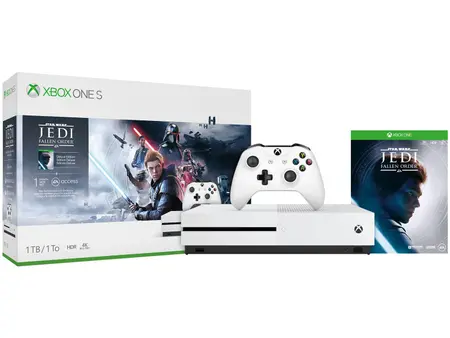
The Xbox One na gida wasan bidiyo console wanda Microsoft ya haɓaka. Asalin casing na waje na Xbox One ya ƙunshi baƙar fata mai sauti guda biyu tare da ƙare rabin a cikin launin toka., da ɗayan a cikin baƙar fata mai sheki.
Xbox One na iya dubawa da kunna abun ciki daga sabar DLNA da na'urorin ma'ajiyar USB ta amfani da ka'idar Media Player. Aikace-aikacen yana ba da damar sake kunna bidiyo daga Blu-ray Disc, DVD, da CD media.
Yadda ake haɗa belun kunne mara waya zuwa Xbox One?
Idan na'urar kai ta zo da adaftar USB, bi wadannan matakan a hankali don haɗa belun kunne mara waya zuwa Xbox One.
- Na farko, a tabbata an cika cajin belun kunne.
- Kunna Xbox One naku.
- Sannan toshe adaftan cikin tashar USB akan Xbox One naka.
- Bayan duk matakan da ke sama, kunna belun kunne kuma sanya su cikin yanayin haɗawa. Za su haɗa kai tsaye, kuma Xbox One zai canza fitowar sauti nan da nan zuwa belun kunne.
Yadda ake Haɗa Xbox One Idan na'urar kai ta zo da tashar tushe?
Idan na'urar kai ta zo da tashar tushe, kila ka ɗauki ƙarin mataki.
- Na farko, a tabbata an cika cajin belun kunne.
- Kunna Xbox One naku.
- Sannan toshe tashar tushe cikin tashar USB akan Xbox One naka.
- Idan tashar tushe tana da kebul na gani, haɗa tashar tushe zuwa tashar USB a bayan Xbox One.
- Bayan wannan kunna na'urar kai kuma saka su cikin yanayin haɗawa. Naúrar kai za ta haɗu ta atomatik tare da tashar tushe.
Yadda ake haɗawa Idan naúrar kai ba ta da Adafta ko Tasha?
Idan naúrar kai ba ta da adaftar ko tasha, bi wadannan matakan
- Latsa maɓallin daidaitawa a gefen hagu na Xbox One ko kusurwar ƙasa-dama na na'ura wasan bidiyo.
- Sannan, riže maɓallin wuta akan belun kunne har sai ya haɗu da na'ura mai kwakwalwa.
- Na adalci, haɗa na'urar kai zuwa Xbox One ta USB, sannan a kunna. Da zarar Xbox ya gane na'urar kai kuma alamar wutar lantarki ta daina kiftawa, za ku iya cire shi.
Lura: Waɗannan umarni ne na gaba ɗaya kuma waɗanda ba su shafi kowane nau'in naúrar kai ba. Koma zuwa takaddun na'urar ku don takamaiman umarni.
Saita na'urar kai
Adaftan Lasifikan kai yana goyan bayan nau'ikan na'urar kai mai jiwuwa 3.5mm
Na'urar kai mai jiwuwa ta 3.5mm guda ɗaya
Na'urar kai na USB mai jiwuwa dual 3.5mm tare da igiyoyin sauti na 3.5mm CTIA
Ana ba da lasifikan kai tare da sautin taɗi ta hanyar kebul na odiyo 3.5mm kuma ana ba da sautin wasan ta kebul na daban tare da RCA ko masu haɗin gani..
Kafin kafa Xbox One naku, Na'urar kai don amfani da na'urar wasan bidiyo, tabbatar da farko sabunta Xbox Wireless Controller don tabbatar da cewa ya shirya yin aiki tare da adaftan naúrar kai.
Tips na magance matsala
Idan kuna da wata matsala haɗa belun kunne mara waya zuwa Xbox One. Akwai 'yan abubuwa da za ku iya gwadawa don magance matsalar. Na farko, tabbatar da cewa software ɗin ku na Xbox One ta sabunta. Duba batirin mai sarrafa ku. Gwada amfani da na'urar kai tare da wata na'ura kamar kwamfutar tafi-da-gidanka ko wata na'ura don tabbatar da cewa na'urar kai tana aiki ko a'a.
Sannan gwada na'urar kai da adaftar akan wani mai sarrafawa. Idan naúrar kai tana aiki akan mai sarrafawa na biyu, gwada sake sabunta mai sarrafawa na farko da haɗa belun kunne mara waya zuwa Xbox One ta bin umarnin da aka ambata a sama..
FAQS don haɗa belun kunne mara waya zuwa Xbox One
Me zai faru idan na'urar kai ta baya aiki?
Idan Naúrar kai ba ta aiki daidai, sabunta software na mai sarrafa ku.
Can, Ina yin taɗi ta Kinect da kuma na'urar kai na?
A'a. Lokacin da aka gano na'urar kai, na'ura wasan bidiyo yana ɗauka cewa kuna son sautin ya zama na sirri kuma yana kashe sautin taɗi ta Kinect ta atomatik
Kammalawa
Duk da haka, haɗa belun kunne mara waya zuwa Xbox One tsari ne mai sauƙi. To, mun ambaci wasu matakai masu sauƙi da hanyoyi don haɗa belun kunne mara waya zuwa Xbox One. Amma dole ne ku yi shi a hankali ba tare da tsallake kowane mataki ba, in ba haka ba, ba za ku yi nasarar haɗa belun kunne mara waya zuwa Xbox One ba.
Don haka shine abin da kuke buƙatar sani game da Yadda ake haɗa belun kunne mara waya zuwa Xbox One. Muna fatan wannan labarin zai taimaka muku sosai!