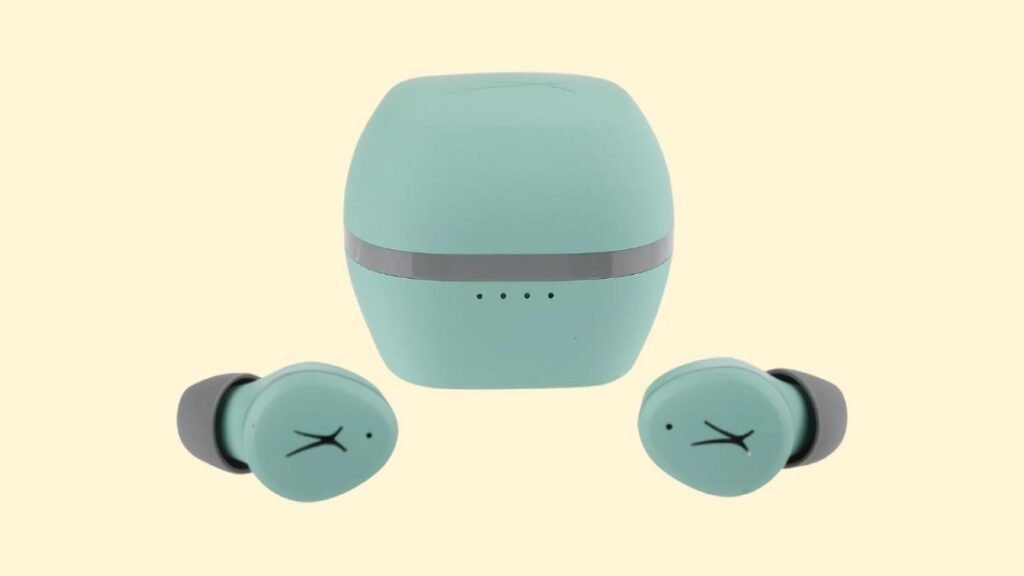
Makemake ʻoe e hoʻohui iā Altec Lansing NanoPods Earbuds? Aia nā Altec Lansing NanoPods 4 mau hola o ke ola pākaukau a 16 hola hoʻohana i ka pahu hoʻouka. Loaʻa iā lākou ke Bluetooth 5.0, ka IPX5 ka wela a me ka palapala hōʻoia lepo, 50ft o ka laulā hana, a oi aku. Maanei ʻoe e aʻo ai pehea e hoʻohana ai iā lākou me kēia Altec Lansing NanoPods hou me kāu mau polokalamu.
Pehea e hoʻopaʻa ai i nā Earbuds Altec Lansing NanoPods?
Inā makemake ʻoe e paʻa Altec Lansing NanoPods Earbuds i kāu mau polokalamu e hahai pono i nā ʻanuʻu i ʻōlelo ʻia ma lalo nei me ka ʻole o ka lele ʻana i kekahi ʻanuʻu.
Pehea e hoʻohui ai i nā Earbuds Altec Lansing NanoPods me iOS a me nā kelepona Android?
ʻanuʻu 1: Wehe i nā pepeiao pepeiao mai ka pahu hoʻopaʻa. Ma hope o kēlā, e ho'ā 'akomi lākou, a e kau mai ka malamalama maluna o lakou.
ʻanuʻu 2: A laila e hoʻā i ka Bluetooth ma kāu kelepona a hele i ka hoʻonohonoho Bluetooth.
ʻanuʻu 3: I kēia manawa, koho NanoPods. Inā i koiʻia no kahi'ōlelo huna, ʻano ʻano 0000.
Ma hope o kēlā, e hana ʻia ke kaʻina hana paʻa, e hoʻopili ʻia nā pepeiao i kāu hāmeʻa a mākaukau no ka hoʻohana.
Pehea e hoʻohui ai i nā Earbuds Altec Lansing NanoPods me PC (Windows)
ʻanuʻu 1: ʻo ka mea mua loa, e hele i ka ʻimi ʻimi ma kāu PC Kaomi ma aneʻi ʻano Bluetooth a hoʻohuli i ka Bluetooth.
ʻanuʻu 2: I kēia manawa, hele i nā hoʻonohonoho.
ʻanuʻu 3: E hele i Bluetooth a me nā mea hana ʻē aʻe.
ʻanuʻu 4: Kaomi ma Add device.
ʻanuʻu 5: Ma hope o kēlā, e wehe i nā pepeiao pepeiao mai ka pahu, e ho'ā 'akomi lākou a 'ike 'oe i ke kukui ma luna o lākou.
ʻanuʻu 6: A laila, koho NanoPods. Inā makemake ʻia kahi ʻōlelo huna, ʻano ʻano 0000.
Ma hope o kēia mau ʻanuʻu, e hana ʻia ke kaʻina hana paʻa, hui pū nā pepeiao me kāu hāmeʻa, a i kēia manawa hiki iā ʻoe ke hoʻohana iā lākou.
Pehea e hoʻohana ai i nā pepeiao pepeiao Altec Lansing NanoPods?
Eia mākou e wehewehe i kekahi mau ʻanuʻu e pili ana i ka hoʻohana ʻana i ka Altec Lansing NanoPods Nā pepeiao pepeiao.
ʻanuʻu 1: Ka mua, e wehe i nā pepeiao ʻelua mai ka pahu hoʻopaʻa.
ʻanuʻu 2: A laila, e hoʻomaopopo i ka pepeiao hema a me ka ʻākau.
ʻanuʻu 3: E koho i nā ʻōlelo aʻoaʻo pepeiao i kūpono loa i kou mau pepeiao.
ʻanuʻu 4: Ma hope o kēia mau ʻanuʻu, e hoʻokomo i nā headphone i loko o ke kahawai o loko o nā pepeiao, e hoʻololi iā lākou no ka hōʻoluʻolu maikaʻi loa a me ke kūpono maikaʻi loa, a e hōʻoia i ke kuhikuhi ʻana o ka microphone i ka waha.

Pehea e ho'ā a hoʻopau i nā pepeiao pepeiao o Altec Lansing NanoPods?
Hōʻā
Wehe i nā pepeiao pepeiao mai ka pahu hoʻopaʻa. Ma hope o kēlā, ʻike ʻoe i ke kukui e ʻā ana ma nā pepeiao pepeiao, a e ho'ā 'akomi lākou.
Hoʻopio
E hoʻopau i nā Earbuds e hoʻokomo iā lākou i loko o ka pahu hoʻouka. E pio koke lākou.
Pehea e hoʻomalu ai? / Pehea e hana ai? - Nā kuhikuhi
Nānā: Hoʻokomo ʻia ka mea ʻike paʻi multifunction ma ka ʻaoʻao o luna o nā pepeiao.
- E kaomi a paʻa i ke pihi hoʻopā multifunction ma ka pepeiao ʻākau no kahi 2 kekona e hoʻokani a hoʻomaha i ke mele.
- E kaomi i ke pihi paʻi multifunction ma ka pepeiao ʻākau ʻelua manawa e hoʻokani i ke mele aʻe.
- E kaomi i ke pihi paʻi multifunction ma ka pepeiao hema ʻelua manawa e hoʻokani i ke mele mua.
- E kaomi i ke pihi paʻi multifunction ma ka pepeiao ʻākau i hoʻokahi manawa e hoʻonui i ka leo.
- E kaomi i ke pihi paʻi multifunction ma ka pepeiao hema i hoʻokahi manawa e hoʻemi i ka leo.
- E kaomi i ke pihi paʻi multifunction ma kekahi o nā pepeiao i hoʻokahi manawa e pane i kahi kelepona e komo mai ana.
- E kaomi a paʻa i ke pihi hoʻopā multifunction ma kekahi o nā pepeiao pepeiao no kahi 2 kekona e hoʻopau i kahi kelepona i kēia manawa.
- E kaomi i ke pihi paʻi multifunction ma kekahi o nā pepeiao i ʻelua manawa e hōʻole i kahi kelepona komo.
- E kaomi a paʻa i ke pihi hoʻopā multifunction ma ka pepeiao hema no kahi 2 kekona e ho'ā i ke kōkua leo.
Pehea e ho'ā ai i ke ʻano Mono?
E ho'ā a hoʻopau paha i ke ʻano mono i kēia mau pepeiao, e hoʻopaʻa i nā pepeiao i ka hāmeʻa a lawe i kekahi o nā pepeiao mai ka pahu hoʻonaʻauao āu e makemake ai e hoʻohana.. E hoʻomaka ia e hana iā ia iho.
Pehea e hoʻopaʻa ai i nā pepeiao?
Nā pepeiao pepeiao
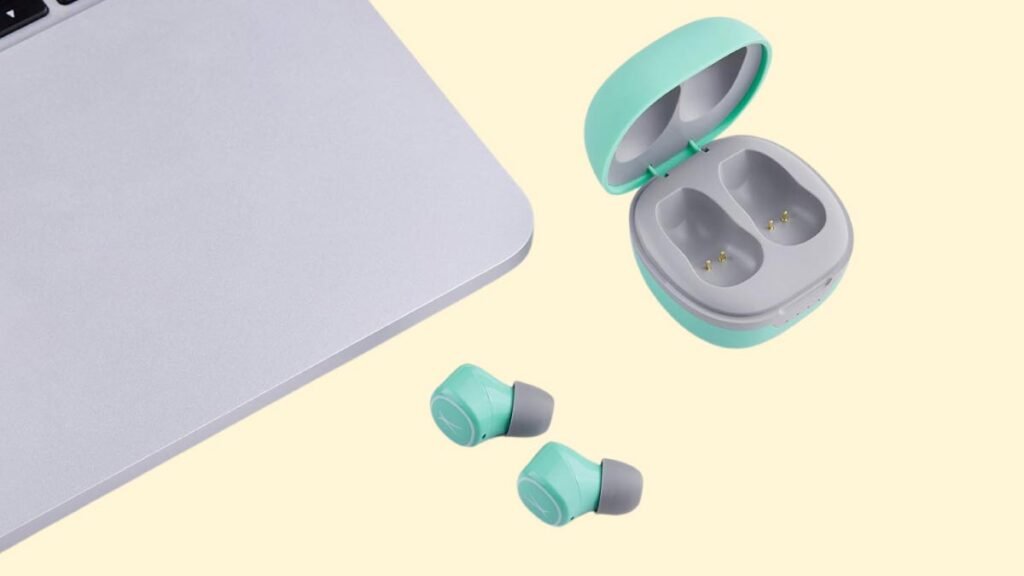
No ka hoʻouka ʻana i nā pepeiao, e hoʻokomo iā lākou i loko o ka pahu hoʻouka a pani pono i ka poʻi. E hoʻomaka ka hoʻopaʻa ʻana o nā pepeiao pepeiao.
pahu hoʻouka
No ka hoʻouka ʻana i ka pahu hoʻopiʻi, e hoʻopili i ka hihia i kahi USB charger a i ʻole port charging me ke kelepona USB-A i C. E hoʻomaka ʻo ia e hoʻopaʻa ʻakomi.
He aha ke ʻano o nā kukui?
Nā pepeiao pepeiao
- Hoʻā ke kukui ke lawe ʻoe iā lākou mai ka pahu hoʻopaʻa. ʻO ia hoʻi, ua hoʻā nā pepeiao.
- Huli ke kukui ʻulaʻula, ma ka hihia hoʻopiʻi. Ke kau nei nā pepeiao pepeiao.
- Ua pio ke kukui ʻulaʻula ma ka pahu hoʻouka. Ke hoʻopiha piha ʻia nā pepeiao.
- ʻEkolu manawa e ʻā ana ke kukui polū. I ka wā e hoʻoponopono hou ana nā pepeiao pepeiao.
- Huli uliuli ke kukui ʻulaʻula. Ke hoʻopaʻa hou ʻia nā pepeiao.
pahu hoʻouka
- Hoʻokahi kukui e ʻā ana i ka wā e hoʻopiʻi ana ʻoi aku ka liʻiliʻi ma mua o 25% o ka pila.
- Hoʻokahi kukui a ʻā kekahi i ka wā e hoʻouka ana ʻoi aku ka liʻiliʻi 50% o ka pila.
- ʻElua mau kukui e ʻā ana a hoʻokahi e ʻā ana i ka wā e hoʻopiʻi ana i ka pahu i emi iho 75% o ka pila.
- ʻEkolu mau kukui e ʻā ana a hoʻokahi ʻānaʻi ʻoiai ʻoi aku ka liʻiliʻi o ke kau ʻana 100% o ka pila.
- Ua ʻā nā kukui a pau i ka wā e hoʻopiha piha ʻia ana ka pahu hoʻoili.
Pehea e hoʻonohonoho hou ai i nā pepeiao pepeiao o Altec Lansing NanoPods?
ʻanuʻu 1: Holoi i nā moʻolelo paʻa a pau o nā NanoPods mai ka mea pili.
ʻanuʻu 2: A laila e wehe i nā pepeiao ʻelua mai ka pahu. Ma hope o kēlā, e ho'ā 'akomi lākou.
ʻanuʻu 3: I kēia manawa, e kaomi a paʻa i ke pihi paʻi multifunction ma nā pepeiao ʻelua no kahi 9 kekona. Ma hope o kēlā, ʻEkolu manawa e ʻā ana ke kukui polū, a laila huli ʻulaʻula a hoʻi i ka uliuli.
ʻanuʻu 4: E hoʻihoʻi i nā pepeiao i loko o ka pahu hoʻopaʻa. Ma hope o kēlā, E hanaʻia ka hoʻoponopono houʻana.
Manaʻo kōkua hoʻoponopono
Hema/ ʻĀkau/ Ua pau ka hana ʻana o kekahi ʻaoʻao o nā pepeiao
Inā hiki mai kēia pilikia, no ka haʻahaʻa paha o ka pākaukau a ʻaʻole i hoʻopili pololei ʻia me ka hāmeʻa. E hoʻoponopono i kēia, hiki iā ʻoe ke hana i kēia:
1. E hoʻopaʻa i ka pepeiao i hana ʻole a i ʻole, e kau i nā pepeiao ʻelua i loko o ka pahu hoʻopaʻa.
2. Hana hou i nā pepeiao pepeiao.
3. E nānā inā e hana ana nā pepeiao i loko o ka laulā hana maʻamau
Inā ʻaʻole hana kēlā, ua hewa paha ka pepeiao.
He haʻahaʻa ka leo ma ka ʻaoʻao hema/ ʻākau/ma kekahi ʻaoʻao o nā pepeiao
Inā hiki mai kēia, ma muli paha o ka lepo o ka pepeiao a i ʻole ka haʻahaʻa o ka leo. E hoʻoponopono i kēia, hiki iā ʻoe ke hana i kēia mau ʻanuʻu.
1. E hoʻomaʻemaʻe i ka pepeiao me ka pulupulu a i ʻole e hoʻomaʻemaʻe pono i ka mesh me kahi pine.
2. E ho'āʻo i ka hale hana e hoʻoponopono hou i nā pepeiao.
ʻAʻole hana ka microphone
Inā hiki mai kēia, ma muli paha o ke kani ʻana o ka microphone, a i ʻole ke kūlana maikaʻi ʻole o ka pepeiao. E hoʻoponopono i kēia, hiki iā ʻoe ke hana i kēia:
E nānā i ka leo microphone. Inā ʻaʻole hana kēlā, ʻo ia hoʻi, aia paha kahi hemahema o ka pepeiao, no laila e ho'āʻo e hoʻololi iā lākou a i ʻole e hoʻihoʻi.
Nā nīnau nīnau no ka hoʻopaʻa ʻana iā Altec Lansing NanoPods Earbuds
He wai wai ka Altec Lansing NanoPods?
ʻAʻole, ʻAʻole wai wai ka Altec Lansing NanoPods (IPX6 a i luna). Loaʻa iā lākou ka helu IPX5, ʻo ia hoʻi ua pale ʻia lākou mai ka wai i hoʻopuka ʻia mai kahi nozzle.
Loaʻa i ka Altec Lansing NanoPods kahi microphone?
ʻAe, Hele mai nā pepeiao me nā microphones i hoʻohuiʻia.
Loaʻa i ka Altec Lansing NanoPods kahi ʻano latency haʻahaʻa / pāʻani?
ʻAʻole, ʻAʻohe ʻano haʻahaʻa o kēia mau pepeiao.
Pehea e ʻike ai i ka wā e hoʻopiha piha ʻia ai nā Altec Lansing NanoPods?
Ke kau nei nā pepeiao pepeiao, Ua hoʻā kekahi mau kukui i ka pahu hoʻouka. Ke hoʻopiha piha ʻia, pio na kukui a pau.
Hiki i ka Altec Lansing NanoPods ke hoʻopili i kahi PC a me kahi kamepiula?
ʻAe, hiki i kēia mau pepeiao ke hoʻopili i nā PC, laptops, a me na papa.
Ke kāpae nei ka leo Altec Lansing NanoPods?
ʻAʻole! ʻAʻole hele mai kēia mau pepeiao me ka ʻenehana hoʻopau leo.
Ka hopena
Manaʻo mākou ua ʻike ʻoe i kēia manawa pehea e hoʻopili ai i nā Altec Lansing NanoPods Earbuds me kāu mea makemake. No laila, ʻO nā mea a pau e pono ai ʻoe e ʻike pehea e hoʻopaʻa ai iā Altec Lansing NanoPods Earbuds i kāu kelepona. Manaʻo mākou e kōkua nui kēia ʻatikala iā ʻoe!