Koj puas xav ua khub skullcandy Dime wireless earbuds rau koj lub cuab yeej? Skullcadny Dime Wireless Earbuds yuav zoo siv thaum ua si lossis kawm nyob rau hauv pem hauv ntej ntawm koj lub PC.
Yog tias koj tsis paub yuav ua li cas muab lawv rau koj lub cuab yeej tsis txhob txhawj xeeb hauv tsab xov xwm no peb qhia koj rau Pair Skullcandy Dime Wireless Earbuds rau koj lub cuab yeej. Ua raws li cov kauj ruam hauv qab no ua tib zoo muab rau lawv. Cia peb pib.
Nkag mus rau koj lub Earbuds hauv Pairing Mode

Ua ntej txuas lub earbuds rau ib lub cuab yeej muab tso rau hauv kev sib koom ua ke. Txhawm rau muab lawv tso rau hauv kev sib koom ua ke ua raws cov kauj ruam.
- Ua ntej, xyuas kom meej tias koj lub pob ntseg tawm thiab nyob rau hauv cov ntaub ntawv them nyiaj. Thiab lawv them tag nrho.
- Ces, tshem lub pob ntseg los ntawm cov ntaub ntawv them nyiaj thiab nias thiab tuav lub hwj chim khawm rau 6 vib nas this kom txog thaum lub teeb LED ntawm ob lub pob ntseg pib flashing sai.
- Tom qab qhov no tso lub pob thiab tos kom lub pob ntseg nkag mus rau hom kev ua khub, LED teeb tsis tu ncua flash sai, qhia tias lub mloog pob ntseg tau nkag mus rau hauv kev sib koom ua ke.
Pair Skullcandy Dime Wireless Earbuds
Rau khub Skullcandy Dime Wireless Earbuds rau koj lub cuab yeej ua raws cov kauj ruam hauv qab no kom zoo zoo.

Unboxing
Nqa lub pob ntseg los ntawm lub rooj them nyiaj thiab tshem cov ntawv nplaum los ntawm qhov chaw them nyiaj. Muab lawv dua rau hauv lub rooj plaub them nyiaj rau txog 30 vib nas this ua ntej siv thawj zaug.
Nco ntsoov tias cov LEDs ntawm lub pob ntseg yog liab qhov no qhia txog kev them nyiaj. Ib zaug them, tshem lub pob ntseg los ntawm lub rooj them nyiaj thiab muab tso rau hauv kev sib koom ua ke.
Ua khub
- Txhawm rau ua khub Skullcandy Dime Wireless Earbuds thawj zaug, nco ntsoov tias lub mloog pob ntseg nyob hauv rooj plaub thiab them tag nrho.
- Xyuas kom tseeb tias ob lub mloog pob ntseg LEDs liab.
- Ob lub pob ntseg tom qab ntawd yuav tau txais lub hwj chim rau thiab cov LEDs yuav ib txhij flash xiav thaum lawv synchronize ib leeg.
- Thaum lub earbuds tau synced ua ke, koj yuav hnov ib lub suab hais tias ua khub. Tsuas yog sab laug pob ntseg yuav pib flash liab thiab xiav.
- Tam sim no, los ntawm koj lub cuab yeej tig rau Bluetooth thiab nrhiav Dime hauv koj cov npe muaj nyob ntawm Bluetooth li.
- Xaiv Dime thiab lees txais ib khub lossis ok prompts uas tshwm ntawm koj lub vijtsam.
- Thaum ua khub tiav koj hnov lub suab Txuas.
Pair Skullcandy Dime Wireless Earbuds nrog lub cuab yeej tshiab
- Txhawm rau ua khub Sckullcandy Dime Wireless Earbuds nrog lub cuab yeej tshiab, tshem koj lub pob ntseg ntawm rooj plaub.
- Ces, nias thiab tuav lub pob ntawm ob lub pob ntseg rau 4 vib nas this los txhawb lawv.
- Ces, nias thiab tuav lub pob ntawm ob lub pob ntseg rau 4 vib nas this kom nkag mus ua khub hom.
- Lub suab ceeb toom yuav hais ua khub thiab koj tuaj yeem xaiv Dime los ntawm koj daim ntawv teev npe Bluetooth.
Tig Skullcadny Dime Wireless Earbuds On Thiab Off
- Koj lub mloog pob ntseg yuav cia li qhib thaum koj coj lawv tawm ntawm rooj plaub.
- Lawv yuav tua thaum koj muab lawv rov qab rau hauv rooj plaub.
- Yog tias koj xav tua koj lub pob ntseg sab nraud nias lub pob ntawm txhua lub pob ntseg rau 4 vib nas this, thiab tig lawv rov qab nias lub pob rau 2 vib nas this.
Yuav Tswj Tau Li Cas
Skullcandy Dime Wireless Earbuds muaj tag nrho cov suite ntawm kev tswj ntawm txhua lub pob ntseg kom koj txuas nrog yam tsis tas kov koj lub xov tooj..
- Txhawm rau ua si lossis nres lub suab paj nruag nias ntawm ob lub pob ntseg ib zaug.
- Txhawm rau tig lub ntim nias lub pob ntawm lub pob ntseg sab xis ob zaug.
- Txhawm rau txo qis lub ntim nias lub pob ntawm sab laug pob ntseg ob zaug.
- Hla ib zaj nkauj rau pem hauv ntej nias thiab tuav lub pob ntawm lub pob ntseg sab xis rau ib pliag.
- Hla ib zaj nkauj rov qab nias thiab tuav lub pob ntawm sab laug pob ntseg rau ib pliag.
- Txhawm rau hu xov tooj nias lub pob ntawm ob lub pob ntseg ib zaug.
- Txhawm rau xaus kev hu xov tooj nias lub pob ntawm ob lub pob ntseg ib zaug.
- Txhawm rau tsis kam hu xov tooj thiab tuav lub pob ntawm ob lub pob ntseg rau 1 ib xi nkoos.
- Txhawm rau qhib tus pab cuam ntawm koj lub cuab yeej nias lub pob ntawm ob lub pob ntseg 3 sij hawm.
Yuav them li cas
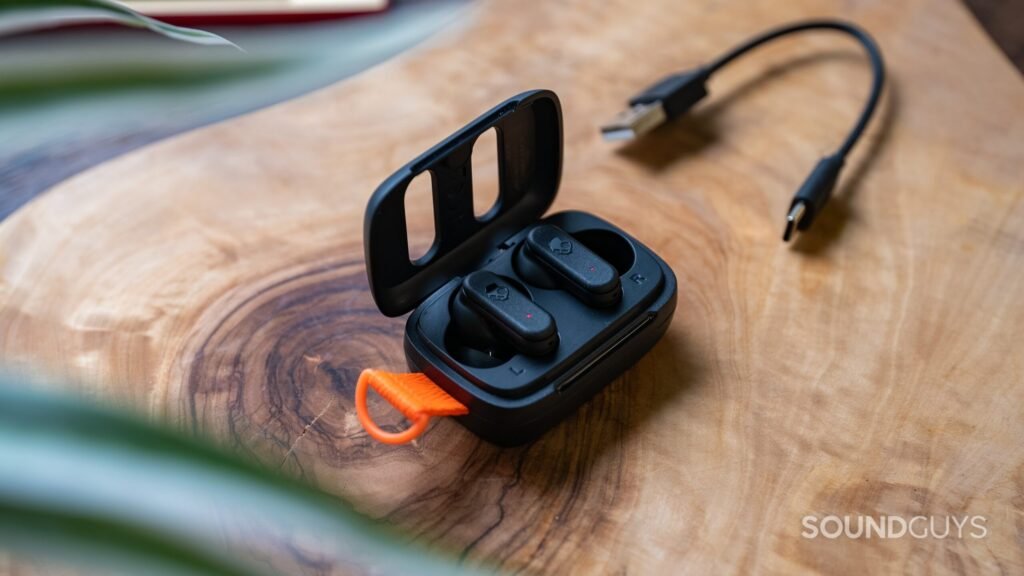
Yuav kom them lub earbuds tso rau hauv rooj plaub, cov earbuds LEDs yuav yog xim liab thaum them nyiaj. LEDs yuav tua thaum them tag nrho.
Txhawm rau them cov ntaub ntawv ntsaws rau hauv Micro USB charger cable thiab txuas mus rau lub computer. Thaum them nyiaj puv, LED yuav tig ntsuab ntsuab.
Solo hom
- Tej zaum koj xav hnov koj lub suab seev, tab sis tseem hnov dab tsi tshwm sim nyob ib puag ncig koj.
- Thaum koj xav ua li ntawd koj tuaj yeem siv ib lub pob ntseg xwb.
- Thaum koj ua khub koj lub pob ntseg, koj tuaj yeem tshem ob lub pob ntseg los ntawm rooj plaub thiab nws txuas rau hauv hom solo.
Yuav ua li cas rov pib dua Skullcandy Dime Earbuds
- Ua ntej, tshem koj lub pob ntseg los ntawm daim ntawv teev Bluetooth-paired ntawm koj lub cuab yeej thiab tua Bluetooth.
- Tom ntej no, tshem koj lub pob ntseg tawm ntawm lub rooj them nyiaj thiab tso cai rau lawv siv zog.
- Tam sim no hais tias koj lub pob ntseg mloog tau qhib thiab tsis txuas nrog ib qho khoom siv, nias thiab tuav lub pob ntawm ob lub pob ntseg 2 sij hawm, ces tuav rau ob feeb, qhov no yuav rov pib dua koj lub pob ntseg.
- Koj yuav pom cov LEDs ntawm ob lub pob ntseg flash xiav thaum lawv sync los sib sau ua ke thiab ua ke rau koj lub cuab yeej los ntawm ua raws li cov kauj ruam saum toj no ua ke.
Xaus
Yog tias koj xav ua khub Skullcandy Dime Wireless Earbuds nrog koj li, koj tuaj yeem ua qhov no yooj yim. Tsuas yog ua raws li cov kauj ruam uas tau hais los saum toj no ua tib zoo tsis txhob hla ib kauj ruam. Yog li, uas yog txhua yam koj yuav tsum paub yuav ua li cas Pair Skullcandy Dime Wireless Earbuds nrog koj lub cuab yeej, Peb cia siab tias tsab xov xwm no yuav pab koj ntau yam hauv cov ntaub ntawv no.