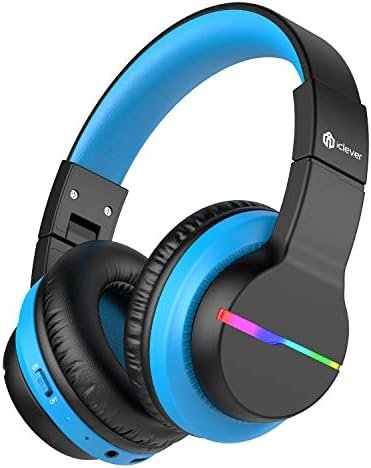
Тендан ӱзгар-влак дене iclever BTH12 беспроводной наушникым ушаш шонеда мо? iclever BTH12 беспроводной наушник-влак чапле аудиом пуат, но нуно тыгак ешартыш функций дене толын светодиодный волгалтара, тудо икмыняр эффектым да тӱсым кок могырышто гарнитур.
Ныл волгыдо режим ик посна кнопко дене виктаралтеш. Bluetooth режимыште темдалме годым, батарейым аныклаш манын, волгыдым йӧрташ тӱҥалеш. Тиде наушник-влак 40 мм динамик дене чоҥалтыныт, поян басым да илыш гай йӱкым пуа.
коклаште аудио йӱкым чеклаш 74, 85, да 94дБ комбинаций клавише-влакым кучылтын, тыге йӱкым вашталтыме ӱзгарым случайно огыт тӱкно. iClever наушник-влакын модмо жапышт 55 Шагат паша! Те USB-C шнур дене пайдаланен кертыда, моткоч писын зарядкым ышташ манын.
Шукыжо еҥ-влак огыт пале, кузе парыш iclever BTH12 беспроводной наушник-влак. Тиде статьяште, ме продуктым кузе кучылташ да ӱзгарым кузе чӱктымӧ да йӧрташ кӱлмӧ нерген лончылымо инструкцийым пуэна, тудым Bluetooth дене ушен, да волгыдо режим коклаште куснаш.
Тиде статьяште тыгак кнопко-влакым кузе кучылташ йӧн уло, йыҥгыр-влаклан вашмутым пуаш да пытараш, йыҥгыр-влакым кораҥдаш, да Siri-м активироватлаш. Ошондой, айста тӱҥалына!
iclever BTH12 беспроводной наушникым кузе чӱкташ да йӧрташ?
Чӱктӧ
Кнопкым «Включение» направленийыш кусарыза. Вара светодиодный индикатор кок тӱсан волгалтеш 1 кокымшо, да тӱрлӧ тӱсан тул-влак йӱлыт.
Куатым йӧрташ
Кнопкым Off направленийыш кусарыза, а наушникым йӧрташ .. Светодиодный индикатор кок 2019 ийлан кок волгалтеш. 1 кокымшо, вара лектын кая.
iclever BTH12 беспроводной наушникым муаш
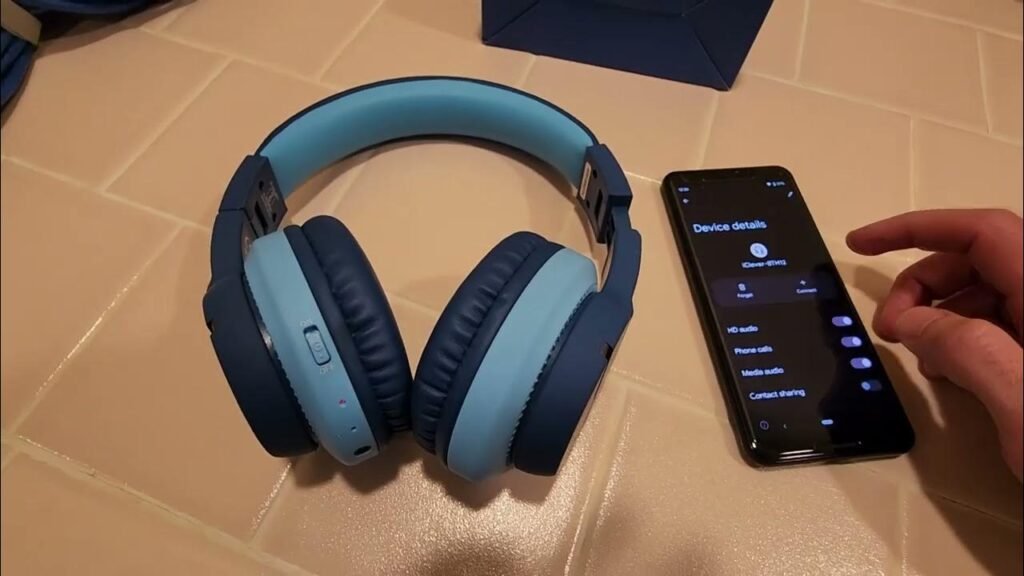
Пырля парикмахер BTH12 . Беспроводной наушник тендан ӱзгар-влак почеш ошкыл-влак почеш ..
- Наушникым савырен, кнопкым темдалме дене Направлений да тӱрлӧ тӱсан волгалтарыше-влак..
- Наушникым парыш режимыште шындыза ., да ужар да кок волгыдо вспышка алмаш-алмаш ..
- Кызыт, телефоныш каяш настройкым ышташ настройко ., да йӧным ыштен Bluetooth ..
- Анда, муаш да ойырен налаш iClever-BTH12 Bluetooth пар лӱмым ӱзгар спискыште Bluetooth парыш подключение ..
Наушникым кузе зарядкым ышташ
Тип-C кабельым наушникыште тип-C портыш ушаш .. Индикатор волгыдо ужар волгалтеш, зарядкым ончыкташ манын ..
Наушникым тичмашнек зарядитлыме годым ., индикатор волгыдо ужар гыч шем марте вашталтеш ..
Кнопка дене пашам ыштымаш
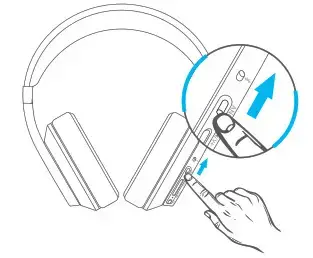
- Кӱчыкын темдал + кнопко гыч том марте ..
- Кӱчык темдал – кнопкым темдал том йымалне ..
- темдал да кучо + кнопкым темдал 2 Вес треклан 20 секунд.
- темдал да кучо – кнопкым темдал 2 ончычсо верч 2 секунд
- трек.
- МФБ кнопкым ик гана темдал, модаш/паузым ышташ манын.
- Йыҥгырлан вашмутым пуаш/пытарашлан MFB кнопкым ик гана темдал.
- Йыҥгыр деч кораҥмашлан MFB кнопкым темдалза.
- Siri-м активироватлаш манын, MFB кнопкым кок гана темдал.
iclever BTH12 беспроводной наушникым ушаш йодыш-влак
iclever BTH12 наушникым парыш режимыште кузе шындаш?
Нажмите да кучен + кнопкым темдал да – кнопкым темдал ик жапыште 4 парыш спискым эрыкташ манын, кочкышым пуымо состоянийыште секунд. Вара наушник-влак автоматически парыш режимыш пурат.
Тиде пашам ышта мо Bluetooth телевизорым йӧным пуа?
Ооба, Мый мемнан Samsung телевизор дене сеҥен ушенам.
Мучашмут
Тиде статьям лудмеке, те шке ӱзгар-влак дене iclever BTH12 беспроводной наушникым ушен кертыда. тиде тыглай процесс, те тудым ыштен кертыда, ӱлнӧ ончыктымо ошкылым ыштен.
Ошондой, чыла, мом те палышаш улыда, кузе iclever BTH12 беспроводной наушникым тендан ӱзгар-влак дене ушен. Ме ӱшанена, тиде статьяште тыланда шуко полша тиде случайыште .!