Yuav ua li cas txuas Anker Zolo Liberty Earbuds? Cov Anker Zolo Liberty Earbuds muaj lub roj teeb lub neej txog txog 8 teev + mus txog 100 teev nrog lub thawv them, Bluetooth 4.2, ob lub 5.5mm graphene dynamic tsav tsheb, txhawb AAC thiab SBC audio codecs, IPX5 hws thiab plua plav-resistant ntsuas, thiab ntau dua.
Pairing Anker Zolo Liberty Earbuds rau ntau yam khoom siv yog qhov yooj yim, tab sis feem ntau cov neeg tsis paub yuav ua li cas khub Anker Zolo Liberty earbuds. Tsis txhob txhawj, tom qab nyeem tsab xov xwm no koj yuav muaj peev xwm khub Anker Zolo Liberty earbuds rau koj cov cuab yeej. Cia peb pib!
Yuav ua li cas txuas Anker Zolo Liberty Earbuds?
Pairing Anker Zolo Liberty earbuds yog cov txheej txheem yooj yim thiab yooj yim.
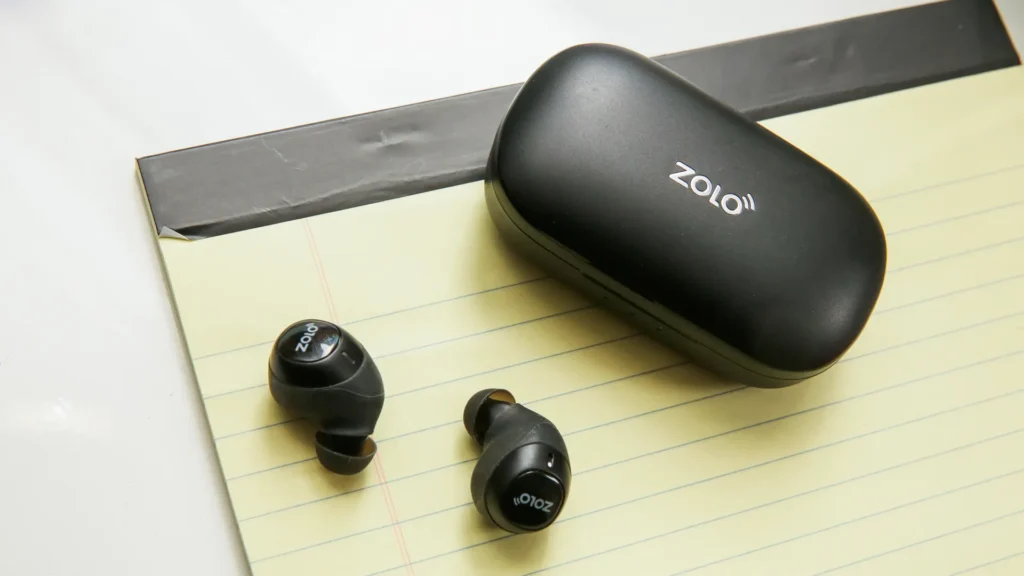
- Thov nqa tawm lub pob ntseg pob ntseg los ntawm rooj plaub, lawv yuav cia li qhib thiab nkag mus rau hom khub khub. Kuj, Koj tuaj yeem nias thiab tuav lub khawm multifunction rau txog 1 second.
- Ces, Mus rau qhov chaw thiab qhib Bluetooth ntawm koj lub cuab yeej.
- Xaiv Zolo Liberty pob ntseg los ntawm daim ntawv teev npe ntawm koj lub cuab yeej thiab coj mus rhaub rau nws ua khub.
- Yog hais tias, Sau ib lo lus zais 0000.
Yuav ua li cas txuas Anker Zolo Liberty Earbuds rau iOS thiab Android pab kiag li lawm?
- Thawj, Qhib lub thawv them nqi thiab nqa lub pob ntseg tawm. tom qab ntawd, Lawv yuav fais fab rau tsis siv neeg. Yog tias lawv tsis fais fab tsis siv neeg, Koj tuaj yeem nias thiab tuav lub khawm multifunction kov ntawm ob lub pob ntseg rau txog 1 second.
- Ces, Qhib Bluetooth ntawm koj lub cuab yeej.
- Mus rau qhov chaw Bluetooth ntawm koj lub cuab yeej.
- Xaiv Zolo Liberty. Yog tias yuav tsum muaj lo lus zais, Nkag mus rau nws 0000. tom qab ntawd, Cov khub yuav ua tiav.
Yuav ua li cas txuas Anker Zolo Liberty Earbuds rau PC?
- Qhib Bluetooth ntawm koj lub PC.
- Mus rau Cov Chaw.
- Mus rau Bluetooth thiab lwm yam khoom siv.
4. Tam sim no, Qhib lub thawv them nqi thiab nqa lub pob ntseg tawm. tom qab ntawd, Lawv yuav fais fab rau tsis siv neeg. Kuj, Koj tuaj yeem nias thiab tuav lub khawm multifunction kov ntawm ob lub pob ntseg rau txog 1 second.
5. Xaiv Zolo Liberty. Yog tias yuav tsum muaj lo lus zais, Nkag mus rau nws 0000. tom qab ntawd, Cov khub yuav ua tiav.
Yuav ua li cas hnav Zolo Liberty Earbuds?
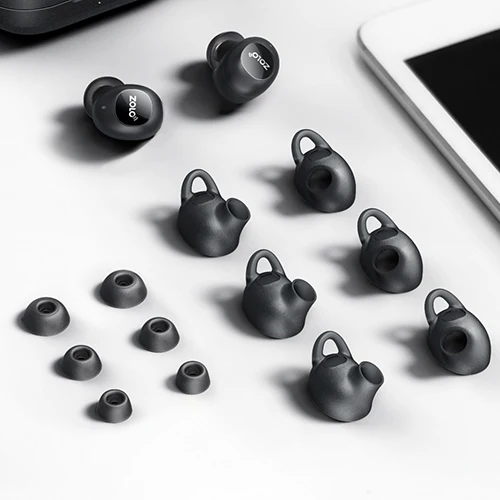
Tshem ob lub pob ntseg ntawm lub thawv them. Txheeb xyuas lub pob ntseg sab laug thiab txoj cai. Xaiv lub pob ntseg pob ntseg uas haum rau koj lub pob ntseg zoo tshaj plaws. Ntxig lub pob ntseg rau hauv koj lub pob ntseg pob ntseg. Tig kom ua tiav qhov xis nyob tshaj plaws, Xyuas kom lub microphone tig mus rau koj lub qhov ncauj.
Yuav ua li cas rov pib dua Zolo Liberty Earbuds?
Nqa lub pob ntseg tawm ntawm lub thawv them. Nias thiab tuav lub khawm kov multifunction ntawm ob lub pob ntseg rau txog 5 vib nas this, Tos kom txog thaum lub teeb liab ci ntsa iab ntawm lub pob ntseg pob ntseg.
Nias thiab tuav lub khawm kov multifunction ntawm ob lub pob ntseg rau txog 8 Tos kom txog thaum lub teeb paj yeeb flashes ntawm lub pob ntseg pob ntseg. Muab ob lub pob ntseg tso rau hauv lub thawv them.
Lub pob ntseg sab xis yuav cia li rov txuas rau lub pob ntseg sab laug. Tshem tawm tag nrho cov ntaub ntawv Zolo Liberty pairing los ntawm cov cuab yeej txuas nrog. tom qab ntawd, Kev rov pib dua yuav ua tiav.
Yuav tswj tau li cas?
- Txhawm rau ua si lossis ncua ib zaj nkauj, Nias lub khawm multifunction kov ntawm ob lub pob ntseg pob ntseg 1 Lub sijhawm.
- Txhawm rau ua si zaj nkauj tom ntej, nias thiab tuav lub khawm multifunction kov ntawm lub pob ntseg sab xis rau txog 1 second.
- Txhawm rau ua si zaj nkauj dhau los, nias thiab tuav lub khawm multifunction kov ntawm lub pob ntseg sab laug rau txog 1 second.
- Txhawm rau teb qhov kev hu tuaj, nias lub khawm multifunction kov ntawm ob lub pob ntseg pob ntseg 1 Lub sijhawm.
- Txhawm rau xaus qhov kev hu tam sim no, nias lub khawm multifunction kov ntawm ob lub pob ntseg pob ntseg 1 Lub sijhawm.
- Reject an incoming call press and hold the multifunction touch button on any of the earbuds for about 1 second.
- Transfer a call from the earbuds to the connected device press and hold the multifunction touch button on any of the earbuds for about 1 second.
- Switch between a held call and an active call press and hold the multifunction touch button on any of the earbuds for about 1 second.
- To activate the voice assistant press the multifunction touch button on any of the earbuds 2 times.
Cov lus nug txog kev txuas Anker Zolo Liberty Earbuds?
Puas yog Anker Zolo Liberty Earbuds waterproof??
No, the Anker Zolo Liberty is not waterproof. They have a rating of IPX5, which means they’re protected against some water projected from a nozzle.
Yuav ua li cas yog tias lub microphone tsis ua haujlwm?
If the Microphone is not working it can be because the microphone is muted, or the earbuds are badly positioned. To fix this, you can do the following
If the microphone is muted, Xyuas lub cuab yeej microphone ntim. Yog tias qhov ntawd tsis ua haujlwm, that means that there might be a defect in the earbuds, so try replacing them or getting a refund.
Yuav ua li cas paub thaum lub pob ntseg Anker Zolo Liberty tau them tag nrho?
When the earbuds are charging, some lights are on. When fully charged, all lights turn off from the charging case.
Xaus
We hope after reading this article you will know how to Pair Anker Zolo Liberty Earbuds to your devices.
The pairing process is so simple and easy just follow the above-mentioned steps carefully without skipping any step, otherwise you can not complete the pairing process. Zaj no yuav pab koj heev!