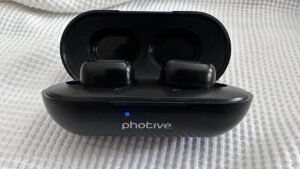
Bo ta puntra bo mes kon pa kombiná Sentry Bluetooth earbuds na bo aparatonan? Kombiná Sentry Earbud na bo aparatonan ta un proseso simpel.
Pero si bo no sa kon pa hasi esaki. No preokupá den e artíkulo aki nos lo duna bo un guia kompleto tokante kon pa kombiná Sentry Bluetooth Earbuds, i tambe ta inkluí informashon riba e funshonnan di boton, manera kon pa kontestá òf rechasá yamadanan, toka òf pausa músika, i kontrolá e último òf siguiente kantika.
Promé ku usa e Sentry Bluetooth Earbuds, ta importante pa karga tur dos earbud dor di pone nan den e kashi di karga. Unabes kargá, bo por sigui e instrukshonnan paso pa paso pa kombiná e earbuds ku bo telefòn selular òf aparato Bluetooth.
Par di Sentry Bluetooth Earbuds

Pa pareha Sentry Bluetooth Earbuds pa bo aparato Bluetooth sigui e pasonan kuidadosamente.
- Prome, desaktivá e funshon di Bluetooth riba bo aparato di músika. Manera telefonnan selular òf aparatonan Bluetooth.
- Saca e earbuds for di e caso di carga .. E earbuds lo ta sendé outomatikamente i drenta den moda di paring.
- Ora di pareha ku éksito, e orea robes lo lus blou i e orea drechi lo lus kòrá i blou alternadamente.
- Aworaki, sende e funshon di Bluetooth di bo telefòn selular. Buska i selektá BT975, i klik riba dje pa konektá.
Nota: Ora e emparehamentu outomátiko ta faya, òf orea dòbel ta deskonektá. Primi e boton di power riba e earbuds robes i drechi, pa pone e earbuds paga i sende atrobe, e orea robes i drechi lo wòrdu konektá manualmente.
Si ainda e parehamentu no ta funshoná, por fabor primi tur dos boton riba e earbuds pa 10 sekònde pa forsa e earbuds pa restart. Despues nan mester sigui ku e moda di parehamentu.
Karga e Earbuds i e Kaha di Karga
Earbuds
Pone e earbuds den e kashi di karga na e posishon korekto pa karga. Si e earbuds no ta poné bon den e kashi, e no mag di kobra.
Kaso di karga
Tin un kabel di karga USB den e pakete, bo por konektá e adaptador di koriente pa karga. E lusnan LED blou lo keda bria ora e ta karga, i tur 4 lusnan LED blou na e parti dilanti ta sende, loke ta nifiká ku e kashi di karga ta kompletamente kargá.
Funshon di Boton
- Klik e boton na e earbud robes òf drechi pa kontestá e telefon.
- Klik e boton na e earphone robes òf drechi pa sera e yamada.
- Primi largu riba e earbud robes òf drechi pa rechasá e yamada.
- Tres-klik riba e boton drechi di earbud pa sigui bèk na e último yamada.
- Tres-klik riba e boton robes di earbud pa habri e asistente di bos.
- Klik e boton na e earbud robes òf drechi pa toka òf pausa e músika.
- Klik dòbel riba e boton robes di earbud pa kambia pa e Ultimo kansion.
- Klik dòbel riba e boton drechi di e earbud pa kambia pa e siguiente kantika.
Kon pa Reset e Sentry Earbuds?
Si e earbuds no ta pareá korektamente, eliminá e earbuds for di bo telefon dor di bai na e settingnan di Bluetooth di e telefon. Despues reset e earbuds dor di primi tur dos boton riba e earbuds largu pa 10 di dos. Despues di reset nan sigui e paso di pareha pa drecha e earbuds na bo aparato di telefon.
FAQs pa kombiná Sentry Bluetooth Earbuds
Dikon e earbuds di Sentry Bluetooth ta sendé òf nò?
Bo por kontrolá si e earbuds ta koriente òf nò. si no, karga nan kompletamente promé ku sende esaki.
Dikon e señal di orea Bluetooth di Sentry ta instabil?
- Reinisá e audífononan Bluetooth.
- Kontrolá e kompatibilidat i kalidat di komunikashon di yamada di e telefon selular.
- Konfirmá si e distansia entre earbuds i telefon ta muchu leu òf si tin.
Dikon e earbuds Bluetooth no por tende bos?
- Kontrolá si e audífononan di Bluetooth ta riba estado di mute.
- Kontrolá si e earbuds i telefonnan Bluetooth ta bon konektá.
- Despues konfirmá si e distansia entre earbuds i telefon ta muchu leu òf si tin interferensia rònt di nan.
Konklushon
Despues di lesa e artíkulo aki bo lo por kombiná Sentry Bluetooth Earbuds na bo aparatonan. Emparehá nan ku bo aparato ta un proseso simpel.
Dor di sigui e pasonan delineá den e artíkulo aki, bo por disfrutá di un eksperensia sin molèster i saka lo máksimo for di e asesorionan mobil aki. E ora ei, ta esei tur loke bo mester sa kon pa kombiná Sentry Bluetooth Earbuds? Nos ta spera ku e artíkulo aki, lo yuda bo hopi den e kaso aki!