

Bo ta puntra bo mes pa kombiná Skullcandy jib true earbuds na bo aparatonan e artíkulo aki ta pa bo. Den e artíkulo aki ., nos lo guia bo dor di kombiná bo Skullcandy Jib True Wireless Earbuds ku vários aparato.
Skullcandy jib true wireless earbuds a bira un asesorio esensial pa amantenan di músika. Entre e hopi opshonnan di earbuds wireless disponibel, e Skullcandy Jib True Wireless Earbuds a gana atenshon pa nan karakterístikanan impreshonante i preis pagabel.
Pero kon bo ta kombiná Skullcandy jib true earbuds ku bo aparato? No preokupá ku e guia aki ta kubri e pasonan di parehamentu, tepnan pa solushoná problema, i motibunan pa posibel problemanan di sinkronisashon.
E ora ei, laga nos wak promé kon pa Par Skullcandy Jib True Earbuds.
Kon pa kombiná Skullcandy jib true earbuds

Par Skullcandy jib true earbuds ku bo aparato ta un proseso simpel ku ta permití bo disfrutá di bo músika faborito i tuma yamadanan wireless. Sigui e pasonan aki pa kombiná e earbuds ku bo aparato
- Prome, saka e earbuds for di e kashi di karga i hasi sigur ku e earbuds ta den modo di pareha dor di primi i tene e boton multifunshon situá riba tur dos earbuds pa algun sekònde. E lusnan LED riba e earbuds mester kuminsá bria, indikando ku nan ta kla pa pareha.
- Siguiente, bai na e settingnan riba bo aparato i aktivá e Bluetooth.
- Aworaki, buska e nòmber Skullcandy Jib Riba bo aparato for di e lista disponibel i selektá esaki pa kuminsá e proseso di parehamentu.
- Despues di esei, lo bo tende un bos òf un konfirmashon di zonido ku e parehamentu ta eksitoso. E lusnan LED riba e earbuds tambe lo stòp di flicker i keda sólido, indikando un parehamentu eksitoso.
Kombiná Skullcandy jib true earbuds ku Diferente Aparatonan
Laga nos bai riba kon pa Par Skullcandy Jib True Earbuds na diferente aparato
Par ku iPhone (iOS)
Pa Par Skullcandy Jib True Earbuds ku bo iPhone sigui e pasonan duná
- Promé ku tur kos, habri e app di Ahustonan riba bo iPhone.
- Siguiente, bai na settings riba bo iPhone i selektá Bluetooth.
- Habilitá Bluetooth si e no ta sendé kaba.
- Aworaki, skohe Skullcandy Jib True for di e lista di aparatonan disponibel.
Par ku Android
- Prome, habri e app di Settings riba bo aparato Android.
- Selektá Konekshonnan òf Bluetooth i sende Bluetooth.
- Despues, skohe Skullcandy Jib True for di e lista disponibel riba bo aparatonan.
Par ku MacBook
- Pa kombiná Skullcandy Jib True Earbuds ku bo MacBook klik riba e logo di Apple den e skina robes ariba.
- Aworaki, selektá Preferensianan di Sistema i despues klik riba Bluetooth.
- Bira Bluetooth.
- Despues di esaki skohe Skullcandy Jib True for di e lista di aparatonan disponibel.
Par ku PC (Bentana)
- Prome, habri e app di Settings riba bo Windows PC.
- Siguiente, selektá Aparatonan i despues klik riba Bluetooth & otro aparatonan.
- Bira Bluetooth.
- Despues, skohe Skullcandy Jib True for di e lista di aparatonan disponibel.
Kon pa reset e Skullcandy jib True Earbuds?
Promé ku reset e earbuds di Skullcandy Jib True, bo mester despareá òf lubidá nan den bo lista di aparato Bluetooth pareá. Pa hasi esaki, bai na e lista di aparatonan Bluetooth di bo aparato, primi riba bo nòmber di earbud Jib True, i lubidá e aparato.
Esaki lo kita esaki for di bo telefon i paga e Bluetooth di bo telefon. Aworaki, reset nan, dor di primi i tene e boton riba kada bud pa 10 di dos. E brotenan lo pasa den un siklo di koriente durante kua lo bira ON, PAGÁ, i ON atrobe.
Unabes ku nan ta ON, pone e earbuds bèk den e kashi te ora ku tur dos LED ta mustra kòrá despues saka nan i kombiná nan ku bo aparato dor di sigui e pasonan di kombinimentu ariba menshoná.
Uso di e earbuds di Skullcandy Jib True
Despues ku bo a kombiná bo Skullcandy Jib True Wireless Earbuds ku bo aparato ku éksito, bo ta kla pa kuminsá usa nan. E earbudnan aki ta ofresé un variashon di karakterístika i funshonnan ku ta mehorá bo eksperensia di skucha. Aki algun tep i triki klave pa usa e Skullcandy Jib True Wireless Earbuds.
Skullcandy Jib True Wireless Earbuds ta bini ku kontrolnan di reprodukshon inkorporá ku ta permití bo ahusta bo músika òf oudio fásilmente.
- Bo por ahusta bo músika dor di primi e earbud drechi dos biaha. Di otro banda, bo por toka òf pausa bo músika dor di primi e mesun boton tres biaha. Pa salta e siguiente pista, lo bo batié kuater biaha i bai bèk na e pista anterior.
- Bo por oumentá e volúmen dor di primi i tene e earbud drechi, i dor di hasi meskos riba e earbud robes, bo por baha e volúmen. E funshon aki ta permití bo haña bo nivel di zonido preferí sin mester yega na bo aparato.
- bo por kontestá yamadanan ku ta drenta fásilmente sin mester saka bo telefon. Primi e earbud drechi un biaha pa kontestá un yamada, i primi esaki atrobe pa terminá e yamada.
- E Skullcandy Jib True Earbuds ta kompatibel ku asistentenan di bos manera Siri òf Google Assistant. Bo por hasié dor di primi i tene e earbud drechi, aktivando e asistente di bos di bo aparato, i pidié pa hasi vários tarea, manera hasi un yamada di telefon òf manda un mensahe di teksto. E funshon aki ta agregá komodidat i funshonalidat di man liber na bo tareanan di tur dia.
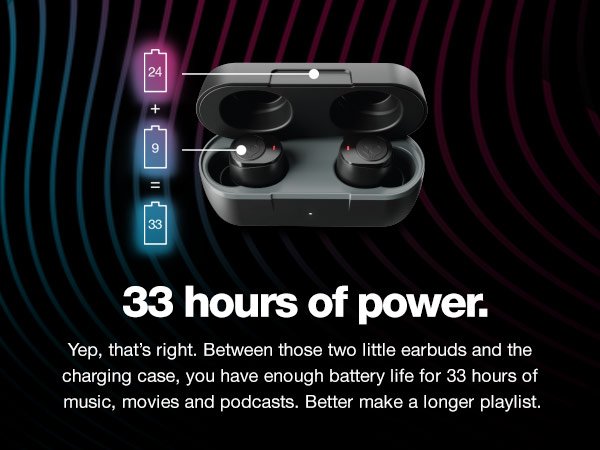
- E True Wireless Earbuds aki ta ofresé te ku 6 ora di bida di bateria riba un solo karga, ku e kaso di karga ta proveé un adishonal 16 ora di bida di bateria, dunando bo un total di 22 oranan di tempu di reprodukshon i permitiendo bo disfrutá di bo músika òf podcastnan durante henter dia.
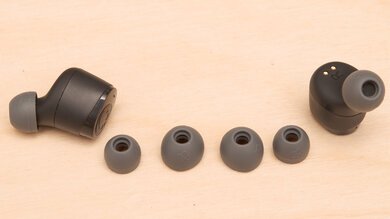
- E Skullcandy Jib True Earbuds ta bini ku diferente tamaño di punta di orea, pa un fit kómodo i sigur pa kada usuario. Ta importante pa skohe e punta di orea di tamaño korekto pa maksimisá tantu komodidat komo kalidat di oudio. Eksperimentá ku e diferente tamañonan ku ta wòrdu suministrá i buska esun ku ta pas mihó ku bo.
Nota: Ku e tepnan i trukonan aki, bo por saka lo máksimo for di bo Skullcandy Jib True Wireless Earbuds i disfrutá di un eksperensia di oudio sin problema i inmersivo unda ku bo bai. Pues pone riba bo tononan faborito, ahusta e volúmen na bo smak, i laga e Skullcandy Jib True Wireless Earbuds elevá bo eksperensia di skucha.
Konklushon
E Skullcandy Jib True Wireless Earbuds ta un eskoho fantastiko pa tur hende ku ta buskando un eksperensia di oudio sin problema i konveniente. Pero, Par Skullcandy Jib True Earbuds na bo aparato ta un proseso simpel.
Pero mester haci’e cuidadosamente sin salta ningun paso ., sino, lo bo no tin éksito den Par Skullcandy Jib True Earbuds na bo aparato. Skullcandy Jib True Wireless Earbuds ta bale la pena konsiderá.
E ora ei, sigui i upgrade bo wega di oudio ku e earbudnan wireless aki ku ta elegante i konfiabel. E ora ei, nos ta spera ku e artíkulo aki lo yuda bo hopi tokante e produkto aki!


