உங்கள் சாதனங்களுடன் PLT இயர்பட்களை எவ்வாறு இணைப்பது என்று யோசிக்கிறீர்களா?? PLT இயர்பட்கள் செயலில் உள்ள நபர்களுக்காக வடிவமைக்கப்பட்ட வயர்லெஸ் ஆடியோ சாதனமாகும். இது நீண்ட கால பயன்பாட்டிற்கான இலகுரக மற்றும் வசதியான ஜோடி இயர்பட் ஆகும். இது ஒரு உள்ளது 13.5 மிமீ இயக்கி அலகு, இது உயர்தர ஒலி மறுஉருவாக்கம் வழங்குகிறது.
PLT இயர்பட்கள் புளூடூத் பதிப்புடன் பொருத்தப்பட்டுள்ளன 5.0, வரை வயர்லெஸ் வரம்பை அனுமதிக்கிறது 10 மீட்டர். இந்த இயர்பட்கள் A2DP போன்ற பல்வேறு புளூடூத் சுயவிவரங்களை ஆதரிக்கின்றன, ஏவிஆர்சிபி, HFP, மற்றும் எச்.எஸ்.பி, வெவ்வேறு சாதனங்களுடன் பரந்த இணக்கத்தன்மையை உறுதி செய்கிறது.
திறன் கொண்ட ரிச்சார்ஜபிள் பேட்டரி 90 வரை வழங்கும் இயர்பட்களுக்கு mAh சக்தி அளிக்கிறது 5 மணிநேர தொடர்ச்சியான ஆடியோ பிளேபேக் நேரம். அதன் பிறகு, USB கேபிளைப் பயன்படுத்தி வசதியாக சார்ஜ் செய்யலாம்.
இந்த இயர்பட்கள் வியர்வை மற்றும் தண்ணீரை எதிர்க்கும் வகையில் வடிவமைக்கப்பட்டுள்ளன, பிளான்ட்ரானிக்ஸ் பேக் பீட் ஃபிட் 3100 உடற்பயிற்சி மற்றும் வெளிப்புற நடவடிக்கைகளின் போது பயன்படுத்த ஏற்றது.
அதனால், நீங்கள் இணைக்க விரும்பினால் PLT இயர்பட்ஸ் உங்கள் சாதனங்களில் முழு கட்டுரையைப் படித்து, இணைப்பதற்கான வழிமுறைகளை கவனமாகப் பின்பற்றவும்.
வழக்கில் அதிகாரம்
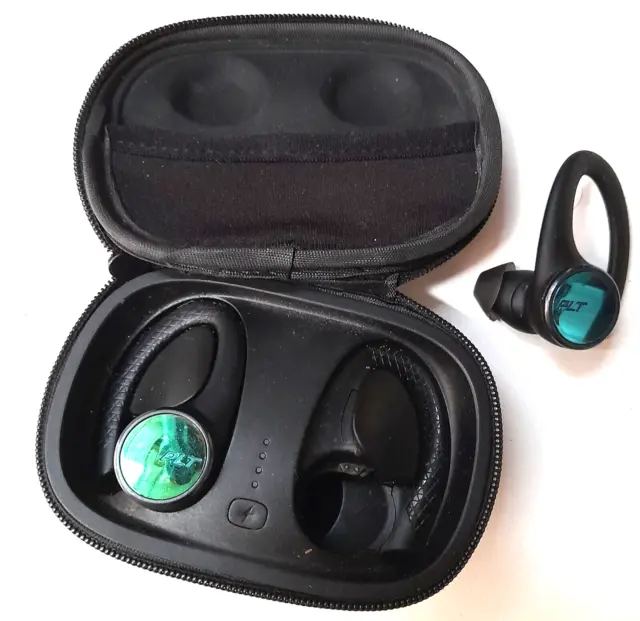
முதல் பயன்பாட்டிற்கு உங்கள் இயர்பட்களை இயக்க, உங்கள் சார்ஜிங் கேஸை இயக்கவும். சார்ஜ் கேஸ் பட்டனை கிளிக் செய்து பிடிக்கவும் 2 அதை இயக்க வினாடிகள். சார்ஜிங் கேஸ் எல்இடி ஒளிரும்.
இயர்பட்ஸை ஆன் மற்றும் ஆஃப் செய்யவும்
இயர்பட்களை தானாகவோ அல்லது கைமுறையாகவோ ஆன் மற்றும் ஆஃப் செய்யலாம்.
தானாக
கேஸில் இருந்து இயர்பட்களை எடுக்கிறது. அவை தானாகவே இயங்கும். மாறாக, அவர்களை மீண்டும் வழக்கில் சேர்க்கிறது. அவை தானாகவே அணைக்கப்பட்டு சார்ஜ் செய்யத் தொடங்கும்.
கைமுறையாக
இயர்பட் பட்டனைக் கிளிக் செய்து பிடிக்கவும் 2 அதை கைமுறையாக இயக்க வினாடிகள். அவற்றை கைமுறையாக அணைக்க, கிளிக் செய்து நான்கு வினாடிகள் வைத்திருங்கள்.
உங்கள் சாதனங்களுடன் PLT இயர்பட்ஸை இணைக்கவும்

PLT ஐ இணைக்க இயர்பட்ஸ் உங்கள் சாதனங்களில் படிகளைப் பின்பற்றவும்
- முதலில், உங்கள் இயர்பட்களை சார்ஜிங் கேஸில் இருந்து வெளியே எடுக்கவும், மற்றும் இணைத்தல் செயல்முறை தொடங்குகிறது.
- கேஸில் இருந்து இயர்பட்களை எடுத்த பிறகு. LED, வலது காதணியில் அமைந்துள்ளது, இணைத்தல் பயன்முறையைக் குறிக்க சிவப்பு மற்றும் வெள்ளை ஒளிரும்.
- இப்போது, உங்கள் மொபைலில் புளூடூத்தை இயக்கி, புதிய சாதனங்களைத் தேட அதை அமைக்கவும்
- கிடைக்கும் பட்டியலிலிருந்து PLT இயர்பட்களைத் தேர்ந்தெடுக்கவும்.
- ஒருமுறை வெற்றிகரமாக இணைக்கப்பட்டது, இணைப்பது வெற்றிகரமாக இருப்பதாக நீங்கள் கேட்கிறீர்கள், மேலும் இயர்பட் LED ஒளிரும்.
- இப்போது, உங்கள் இயர்பட்ஸ் பயன்படுத்த தயாராக உள்ளது.
இயர்பட்ஸ் மற்றும் சார்ஜிங் கேஸை சார்ஜ் செய்யவும்
இயர்பட்ஸ்
உங்கள் இயர்பட்களை சார்ஜ் செய்ய, அவற்றை சார்ஜிங் கேஸில் வைக்கவும். அவை தானாகவே சார்ஜ் செய்யும்.
சார்ஜிங் கேஸ்
கணினி அல்லது USB சார்ஜிங் சாதனத்தில் செருகுவதன் மூலம் கேஸை சார்ஜ் செய்ய. வேகமான சார்ஜிங்கிற்கு, அவற்றை சுவர் சார்ஜரில் செருகவும்.
குறிப்பு: சார்ஜிங் கேஸ் என்றால் கட்டணம் இல்லை, முதலில் வழக்கை தனித்தனியாக வசூலிக்கவும், பிறகு இயர்பட்களை சார்ஜ் செய்யவும்.
பேருந்துcs
1: சக்தி பரிமாற்றம்
உங்கள் வலதுபுற இயர்பட் சக்தியை இழந்தால், அனைத்து செயல்பாடுகள் மற்றும் ஆடியோ பரிமாற்றம் இடது இயர்பட். இடதுபுற இயர்பட்டில் டச் சென்சார் பட்டன் உள்ளது. லேசான தொடுதல் மட்டுமே தேவை.
2: ஒலியளவைச் சரிசெய்யவும்
இடதுபுற இயர்பட்டில் டச் சென்சார் பட்டன் உள்ளது. லேசான தொடுதல் மட்டுமே தேவை.
- அளவை அதிகரிக்க, இடது இயர்பட்டைத் தட்டவும்.
- அளவைக் குறைக்க, இடது இயர்பட்டைத் தொட்டுப் பிடிக்கவும்
3: ஆடியோவை இயக்கவும் அல்லது இடைநிறுத்தவும்
ஆடியோவை இயக்க அல்லது இடைநிறுத்த வலது இயர்பட்டைக் கிளிக் செய்யவும்.
4: ட்ராக் தேர்வு
அடுத்த டிராக்கிற்குச் செல்ல வலதுபுற இயர்பட்டை இருமுறை கிளிக் செய்யவும்.
முந்தைய டிராக்கை இயக்க வலது இயர்பட்டை மூன்று முறை கிளிக் செய்யவும்.
5: அழைப்புகளை மேற்கொள்ளவும்/எடுக்கவும்/முடிக்கவும்
வலதுபுற இயர்பட்டைக் கிளிக் செய்வதன் மூலம் அழைப்பிற்கு பதிலளிக்கவும் அல்லது முடிக்கவும்
6: இரண்டாவது அழைப்புக்கு பதிலளிக்கவும்
- முதலில், தற்போதைய அழைப்பை முடிக்க வலதுபுற இயர்பட்டை கிளிக் செய்யவும்.
- புதிய அழைப்பிற்கு பதிலளிக்க வலதுபுற இயர்பட்டை மீண்டும் கிளிக் செய்யவும்.
டீப்ஸ்லீப் பயன்முறை
உங்கள் இயர்பட்களை இயக்கியிருந்தாலும், இணைக்கப்பட்ட சாதனத்தின் வரம்பிற்கு வெளியே இருந்தால், டீப்ஸ்லீப் பயன்முறையில் நுழைவதன் மூலம் அவை ஆற்றலைச் சேமிக்கின்றன 120 நிமிடங்கள் மற்றும் பவர் ஆஃப் பயன்முறைக்குப் பிறகு 7 நாட்கள். டீப்ஸ்லீப் பயன்முறையிலிருந்து வெளியேற, தேர்வு
- பிறகு 120 நிமிடங்கள், ஒவ்வொரு இயர்பட்டிலும் பவர்.
- பிறகு 7 நாட்கள், பவர் ஆஃப் மற்றும் ஆன் செய்வதன் மூலம் மீட்டமைக்கவும்.
முடிவுரை
இந்தக் கட்டுரையைப் படித்த பிறகு, PLT இயர்பட்களை உங்கள் சாதனங்களுடன் இணைக்க முடியும். PLT இயர்பட்களை இணைப்பது ஒரு எளிய செயலாகும். இந்த விஷயத்தில் இந்த கட்டுரை உங்களுக்கு நிறைய உதவும் என்று நம்புகிறோம்!