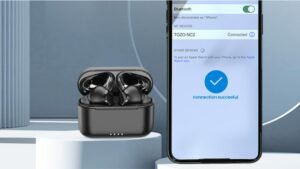
คุณต้องการเชื่อมต่อหูฟัง 1 มอร์กับอุปกรณ์ของคุณ แต่ไม่รู้ว่าจะเชื่อมต่อได้อย่างไร. ไม่ต้องกังวลเราจะให้คำแนะนำที่สมบูรณ์เกี่ยวกับเรื่องนี้.
กระบวนการจับคู่จะคล้ายกันในทุกรุ่น, เช่น หูฟังอินเอียร์ไร้สาย True Wireless ที่มีสไตล์ 1MORE, 1ANC ไร้สายที่แท้จริงมากขึ้น (EHD9001TA), 1เพิ่มเติม หูฟังไร้สาย Aero True, 1เพิ่มเติม ColorBuds, หรือ PistonBuds อีก 1 รายการ.
ไม่ต้องกังวลไปกับเรา เราจะอธิบายขั้นตอนพื้นฐานในการเชื่อมต่อ 1MORE หูฟัง ไปยังอุปกรณ์ของคุณ. ดังนั้น, มาเริ่มกันเลย!
1รุ่นหูฟังเอียร์บัดเพิ่มเติมและคุณสมบัติหลัก

1More มีเอียร์บัดให้เลือกหลากหลายรุ่น, แต่ละอันมาพร้อมกับคุณสมบัติที่เป็นเอกลักษณ์. ที่นี่เราพูดถึงโมเดลยอดนิยมบางรุ่น.
หูฟังอินเอียร์ไร้สาย True Wireless ที่มีสไตล์

หูฟังอินเอียร์ True Wireless อันมีสไตล์มีดีไซน์โฉบเฉี่ยวและมีสีสันให้เลือกหลากหลาย. พวกเขามีคุณสมบัติที่เป็นเอกลักษณ์ของ Bluetooth 5.0, ระบบควบคุมแบบสัมผัส, และอายุการใช้งานแบตเตอรี่ 24 ชั่วโมงพร้อมกล่องชาร์จ.
คัลเลอร์บัดส์
เอียร์บัดเหล่านี้มีหลายสีให้เลือกและมาพร้อม Bluetooth 5.0, ระบบควบคุมแบบสัมผัส, และอายุการใช้งานแบตเตอรี่ 22 ชั่วโมงพร้อมกล่องชาร์จ. เอียร์บัดเหล่านี้มีระดับกันน้ำและเหงื่อระดับ IPX5 อีกด้วย.
แอโร ทรู ไวร์เลส เอียร์บัด
หูฟังเหล่านี้มีบลูทูธ 5.0, ระบบควบคุมแบบสัมผัส, และอายุการใช้งานแบตเตอรี่ 20 ชั่วโมงพร้อมกล่องชาร์จ, การยกเลิกเสียงรบกวน, และยังมีความต้านทานเสียงลมอีกด้วย.
ทรู ไวร์เลส เอเอ็นซี (EHD9001TA)
หูฟังเหล่านี้เป็นบลูทูธ 5.0, ระบบควบคุมแบบสัมผัส, และอายุการใช้งานแบตเตอรี่ 22 ชั่วโมงพร้อมกล่องชาร์จ. นอกจากนี้ยังมีระบบตัดเสียงรบกวนแบบแอคทีฟและต้านทานเสียงลม เช่น หูฟัง Aero True Wireless.
พิสตันบัดส์
หูฟัง Piston มีบลูทูธด้วย 5.0, ระบบควบคุมแบบสัมผัส, และอายุการใช้งานแบตเตอรี่ 20 ชั่วโมงพร้อมกล่องชาร์จ, ระดับการกันน้ำและเหงื่อระดับ IPX4.
วิธีเชื่อมต่อหูฟัง 1MORE เข้ากับอุปกรณ์ของคุณ?
เพื่อเชื่อมต่อ 1เอียร์บัดเพิ่มเติม ไปยังอุปกรณ์ของคุณ ให้ทำตามขั้นตอนง่ายๆ เหล่านี้อย่างระมัดระวังโดยไม่ต้องข้ามขั้นตอนใดๆ เพื่อให้กระบวนการจับคู่ราบรื่นและประสบความสำเร็จ.

ขั้นตอน: 1 ชาร์จหูฟังเอียร์บัดของคุณ
ก่อนอื่นเลย, ตรวจสอบให้แน่ใจว่าหูฟังเอียร์บัดของคุณชาร์จเต็มแล้วก่อนที่จะจับคู่กับอุปกรณ์ของคุณ แต่หากไม่ถูกเรียกเก็บเงิน ให้ทำตามขั้นตอนเพื่อทราบวิธีเรียกเก็บเงิน.
- ใส่หูฟังเอียร์บัดของคุณลงในกล่องชาร์จอย่างถูกต้อง และตรวจดูให้แน่ใจว่าหูฟังอยู่ในแนวเดียวกับหมุดชาร์จ. โดยใช้
- ปิดกล่องชาร์จแล้วเชื่อมต่อกับแหล่งจ่ายไฟ เช่น สาย USB.
- ไฟแสดงสถานะ LED บนกล่องชาร์จจะเปลี่ยนเป็นสีแดงเพื่อแสดงว่าหูฟังกำลังชาร์จอยู่.
- เมื่อหูฟังเอียร์บัดชาร์จเต็มแล้ว, ไฟ LED จะดับลง.
ขั้นตอน: 2 ตรวจสอบอุปกรณ์บลูทูธของคุณ
ในขั้นตอนที่ 2 ตรวจสอบให้แน่ใจว่าบลูทูธของอุปกรณ์ของคุณเปิดอยู่และอยู่ในโหมดจับคู่. หากต้องการตรวจสอบว่าพวกเขากำลังจับคู่กัน ให้ทำตามขั้นตอน.
- ไปที่การตั้งค่าและเปิดบลูทูธ.
- คลิกที่จับคู่อุปกรณ์ใหม่หรือตัวเลือกเพิ่มอุปกรณ์ใหม่.
- หากไม่มีตัวเลือก, ปิดและเปิดบลูทูธเพื่อรีเฟรชรายการอุปกรณ์ที่มีอยู่.
- หากคุณมีอุปกรณ์อื่นเชื่อมต่อกับหูฟังเอียร์บัดของคุณ, ตัดการเชื่อมต่อก่อนเชื่อมต่อกับอุปกรณ์ใหม่.
โดยทำตามขั้นตอนเหล่านี้, คุณสามารถดำเนินการจับคู่ให้เสร็จสิ้นและเพลิดเพลินไปกับหูฟัง 1MORE ของคุณ.
ขั้นตอน: 3 ค้นหาหูฟัง 1MORE บนอุปกรณ์ของคุณ
- เมื่อเปิดบลูทูธแล้ว, เปิดเคสแล้วนำเอียร์บัดออกมา. หูฟังจะเปิดขึ้นโดยอัตโนมัติและเข้าสู่โหมดจับคู่ และไฟจะกะพริบเป็นสีแดงและสีน้ำเงิน ซึ่งหมายความว่าหูฟังจะพร้อมสำหรับการจับคู่.
- เมื่อคุณเห็น 1MORE Earbuds ในรายการอุปกรณ์ของคุณ ให้เลือกพวกเขา.
- หากได้รับแจ้งให้ป้อนรหัส PIN 0000.
ขั้นตอน: 4 การยืนยันการจับคู่
เมื่อกระบวนการจับคู่เสร็จสิ้น, คุณจะได้ยินเสียงยืนยันจากหูฟังเอียร์บัด. ตอนนี้คุณควรจะสามารถฟังเพลงหรือรับสายผ่านหูฟัง 1more ของคุณได้.
วิธีรีเซ็ตหูฟัง 1MORE?
หากคุณต้องการรีเซ็ต 1MORE Earbuds, คุณสามารถทำได้โดยทำตามขั้นตอน
- ใส่หูฟังเอียร์บัดของคุณลงในกล่องชาร์จแล้วปิดฝา.
- กดปุ่มที่ด้านหลังของกล่องชาร์จค้างไว้เพื่อ 10 วินาที.
- ไฟ LED ที่ด้านหน้ากล่องชาร์จจะดับลงแล้วเปิดใหม่อีกครั้ง, ซึ่งแสดงว่าหูฟังเอียร์บัดของคุณถูกรีเซ็ตแล้ว.
- เมื่อหูฟังเอียร์บัดของคุณถูกรีเซ็ตแล้ว, จับคู่กับอุปกรณ์ของคุณอีกครั้งโดยทำตามขั้นตอนการจับคู่.
เคล็ดลับการแก้ไขปัญหา
หากคุณมีปัญหาในการจับคู่หูฟัง 1MORE กับอุปกรณ์ของคุณ, มีบางสิ่งที่คุณสามารถทำได้เพื่อแก้ไขปัญหา. อันดับแรก, ตรวจสอบให้แน่ใจว่าหูฟังเอียร์บัดของคุณชาร์จเต็มแล้วและเปิดอยู่.
หากชาร์จเต็มแล้ว, ลองรีเซ็ตการเชื่อมต่อ Bluetooth ของคุณโดยปิดแล้วเปิดใหม่อีกครั้ง. หากคุณยังคงประสบปัญหาอยู่ คุณสามารถลองปิดและเปิดอุปกรณ์อีกครั้งหรือรีเซ็ตหูฟังเอียร์บัดเป็นการตั้งค่าจากโรงงาน.
บทสรุป
เราหวังว่าหลังจากอ่านบทความนี้แล้ว คุณจะสามารถเชื่อมต่อ 1MORE Earbuds กับอุปกรณ์ที่คุณต้องการได้. ดังนั้น, สิ่งที่คุณต้องรู้คือวิธีเชื่อมต่อหูฟัง 1MORE เข้ากับอุปกรณ์ของคุณ. เราหวังว่าบทความนี้จะช่วยคุณได้มาก!