วิธีการเชื่อมต่อ หูฟังบลูทูธ Viviter? หากคุณประสบปัญหาในการจับคู่หูฟังเอียร์บัด Vivitar กับอุปกรณ์ของคุณ, โพสต์นี้จะให้คำแนะนำทีละขั้นตอนเพื่อเชื่อมต่ออย่างรวดเร็วและง่ายดาย. ไม่ว่าคุณจะใช้ iPhone, Android, หรืออุปกรณ์อื่น, เราช่วยคุณได้.
คำแนะนำทีละขั้นตอนในการเชื่อมต่อหูฟังบลูทูธ Vivitar
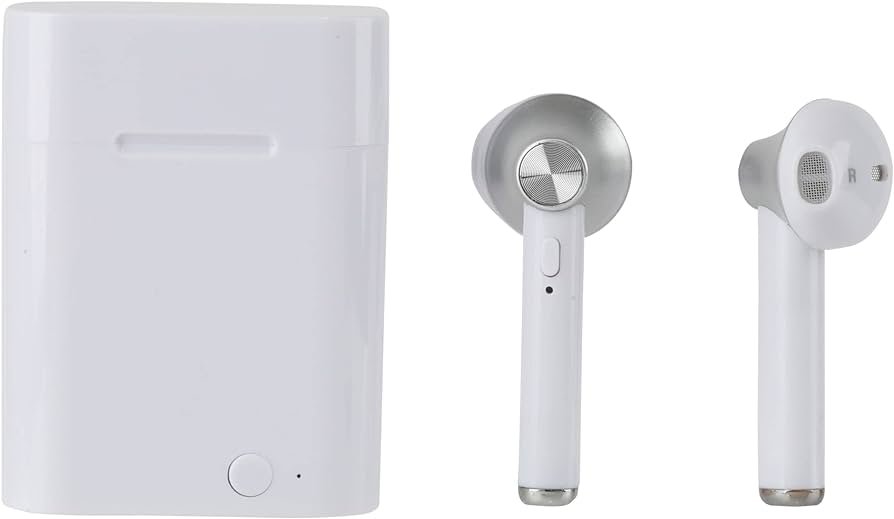
เพื่อเชื่อมต่อ Vivitar หูฟังบลูทูธ ไปยังอุปกรณ์ของคุณ ให้ทำตามขั้นตอนเหล่านี้
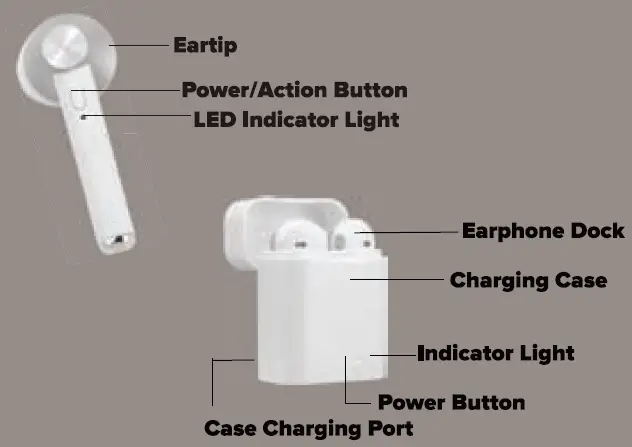
- อันดับแรก, กดปุ่มเปิด/ปิดบนหูฟังแต่ละตัวค้างไว้ประมาณหนึ่ง 2 วินาทีเพื่อเปิดเครื่อง. ไฟแสดงสถานะ LED จะกะพริบสลับกันเป็นสีแดงและสีน้ำเงินเพื่อระบุว่าหูฟังของคุณอยู่ในโหมดจับคู่.
- แล้ว, ไปที่เมนูการตั้งค่าบลูทูธบนอุปกรณ์ของคุณ และตรวจสอบให้แน่ใจว่าบลูทูธเปิดอยู่.
- จากรายการอุปกรณ์บลูทูธที่มี, เลือกวิต้า.
- ตอนนี้, รอให้ไฟ LED บนหูฟังของคุณหยุดกระพริบ. ข้อความนี้แสดงว่าหูฟังของคุณจับคู่กับอุปกรณ์ของคุณแล้ว.
เคล็ดลับการแก้ไขปัญหา
หากคุณประสบปัญหาการเชื่อมต่อกับหูฟัง Vivitar, เรายังมีเคล็ดลับการแก้ปัญหาบางอย่างเพื่อช่วยให้คุณเชื่อมต่อหูฟังเอียร์บัดและทำงานได้อย่างถูกต้อง.
- ตรวจสอบให้แน่ใจว่าหูฟังเอียร์บัดของคุณอยู่ในโหมดจับคู่. คุณสามารถตั้งค่าให้อยู่ในโหมดจับคู่ได้โดยการกดปุ่มเปิด/ปิดค้างไว้จนกว่าไฟสัญญาณ LED จะกะพริบสลับกันระหว่างสีแดงและสีน้ำเงิน.
- ตรวจสอบให้แน่ใจว่าเปิดบลูทูธอยู่ และอุปกรณ์ของคุณอยู่ในโหมดจับคู่.
- ตรวจสอบให้แน่ใจว่าหูฟังเอียร์บัดและอุปกรณ์ของคุณอยู่ภายใน 10 ระยะเมตรของกันและกัน. บลูทูธมีขอบเขตจำกัด, และสิ่งกีดขวาง เช่น ผนังหรืออุปกรณ์อิเล็กทรอนิกส์อื่นๆ ก็สามารถรบกวนการเชื่อมต่อได้เช่นกัน.
- ลองรีเซ็ตหูฟังเอียร์บัดของคุณโดยปิดแล้วเปิดใหม่อีกครั้ง. คุณยังสามารถลองรีเซ็ตการตั้งค่า Bluetooth ของอุปกรณ์ได้.
- ลองจับคู่หูฟังเอียร์บัดของคุณกับอุปกรณ์อื่นเพื่อดูว่าปัญหาเกิดขึ้นกับอุปกรณ์เดิมของคุณหรือไม่.
- ตรวจสอบว่ามีการอัพเดตเฟิร์มแวร์สำหรับหูฟังเอียร์บัดของคุณหรือไม่.
คำถามที่พบบ่อยในการเชื่อมต่อหูฟังบลูทูธ Vivitar
ฉันจะรู้ได้อย่างไรว่าหูฟัง Vivitar ของฉันชาร์จเต็มแล้ว?
ไฟแสดงสถานะ LED จะดับลงเมื่อหูฟังของคุณชาร์จเต็มแล้ว.
ใช้เวลานานแค่ไหนในการชาร์จหูฟัง Vivitar ให้เต็ม?
เวลาในการชาร์จสำหรับหูฟัง Vivitar อาจแตกต่างกันไป, แต่โดยทั่วไปจะใช้เวลา 2-3 ชั่วโมงสำหรับการชาร์จเต็ม.
ฉันสามารถใช้หูฟัง Vivitar กับอุปกรณ์หลายเครื่องได้หรือไม่?
ใช่, คุณสามารถจับคู่หูฟังของคุณกับอุปกรณ์หลายเครื่องได้, แต่คุณจะต้องยกเลิกการเชื่อมต่ออุปกรณ์เหล่านั้นจากอุปกรณ์เครื่องหนึ่งก่อนที่จะจับคู่กับอุปกรณ์อื่น.
ฉันจะทำความสะอาดเอียร์บัด Vivitar ของฉันได้อย่างไร?
เพื่อทำความสะอาดหูฟังของคุณ, เช็ดเบา ๆ ด้วยความนุ่มนวล, ผ้าแห้ง. หลีกเลี่ยงการใช้น้ำหรือน้ำยาทำความสะอาดใดๆ เนื่องจากอาจทำให้หูฟังเสียหายได้.
ฉันสามารถใช้หูฟัง Vivitar ขณะออกกำลังกายได้หรือไม่?
ใช่, หูฟังเอียร์บัด Vivitar ออกแบบมาเพื่อใช้ระหว่างออกกำลังกายและทำกิจกรรมทางกายภาพอื่นๆ. ทนต่อเหงื่อและสามารถทนต่อความชื้นได้.
ฉันจะปิดหูฟัง Vivitar ของฉันได้อย่างไร?
อา: หากต้องการปิดหูฟังเอียร์บัดของคุณ, เพียงกดปุ่มเปิด/ปิดค้างไว้จนกระทั่งไฟ LED ดับลง.
ฉันสามารถใช้หูฟัง Vivitar เพื่อโทรออกได้หรือไม่?
ใช่, หูฟัง Vivitar มาพร้อมกับไมโครโฟนในตัวที่ให้คุณโทรออกและรับสายได้.
บทสรุป
เชื่อมต่อหูฟังบลูทูธ Vivitar กับอุปกรณ์ของคุณอย่างตรงไปตรงมา. ดังนั้น, หากคุณต้องการเชื่อมต่อหูฟังบลูทูธ Vivitar กับอุปกรณ์ของคุณ คุณจะต้องปฏิบัติตามขั้นตอนที่กล่าวมาข้างต้น
นั่นคือทั้งหมดที่คุณต้องรู้เกี่ยวกับวิธีเชื่อมต่อหูฟังบลูทูธ Vivitar กับอุปกรณ์ของคุณ. เราหวังว่าบทความนี้จะช่วยคุณได้มาก!