Axloie kablosuz kulaklıklarını telefonunuzla eşleştirmek ister misiniz?? Axloie kablosuz kulaklıklar harika bir ses kalitesi sağlar. Piyasada pek çok farklı türde kulaklık mevcut. Ancak Axloie kablosuz kulaklıklar en iyisidir ve müşterilerin onları satın almasını sağlayan akıllı bir tasarıma ve pürüzsüz ses deneyimine sahiptir..
Fakat, çoğu kişi Axloie'yi nasıl eşleştireceğini bilmiyor kablosuz kulaklıklar telefonunla. Endişelenme, Bu yazı size Axloie kablosuz kulaklıkları telefonunuzla eşleştirmenin kolay süreci hakkında konuşacak. Bu yüzden, müziğinizi dinlemeye geri dönebilirsiniz. Haydi başlayalım ve ayrıntılara dalalım!
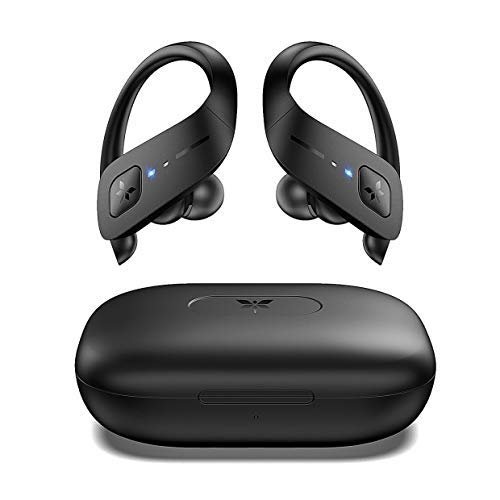
Axloie kablosuz kulaklıklara genel bakış
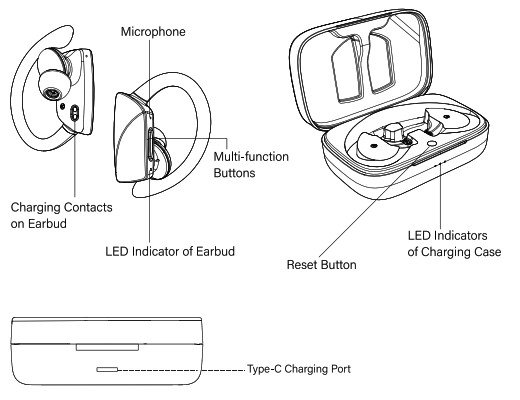
Nasıl yapılır Axloie Kablosuz Kulaklıkları Eşleştirme
Axloie Kablosuz Kulaklıkları telefonunuzla eşleştirmek için verilen basit adımları izleyin
- Basitçe, kulaklıkları şarj kutusundan çıkarın, ve otomatik olarak açılacaklar.
- Daha sonra, telefonunuzdaki Bluetooth özelliğini etkinleştirin ve eşleştirmek için Magic'i seçin.
- Bundan sonra, kulaklıklar her açtığınızda otomatik olarak telefona yeniden bağlanabilir.
Axloie kablosuz kulaklıklar nasıl kontrol edilir
- Müziği çalmak ve duraklatmak için kulaklıklardan herhangi birinin üzerindeki dokunmatik düğmeye iki kez dokunun.
- Sesi artırmak için sağ kulaklığın dokunmatik düğmesine dokunun.
- Sesi kısmak için sol kulaklıktaki dokunmatik düğmeye dokunun.
- Sonraki parçayı çalmak için sağ kulaklıktaki dokunmatik düğmeye üç kez dokunun.
- Önceki parçayı çalmak için sol kulaklıktaki dokunmatik düğmeye üç kez dokunun.
- Aramayı yanıtlamak için kulaklıklardan herhangi birinin üzerindeki dokunmatik düğmeye bir kez dokunun.
- Kulaklıklardan herhangi birinin üzerindeki dokunmatik düğmeye dokunup basılı tutun. 2 aramayı bitirmek için saniyeler.
- Kulaklıklardan herhangi birinin üzerindeki dokunmatik düğmeye dokunup basılı tutun. 2 Gelen bir çağrıyı reddetmek için saniye.
- Sağ kulaklıktaki dokunmatik düğmeye dokunup basılı tutun. 2 Sesli asistanı etkinleştirmek için saniyeler.
Nasıl şarj edilir
Kulaklıkları şarj edin
Kulaklıkları şarj kutusuna yerleştirin ve kapağı düzgün bir şekilde kapatın.. Otomatik olarak şarj olmaya başlarlar. Kulaklıklar tamamen şarj olduğunda kulaklıkların gösterge ışıkları kapalı olacaktır.
Şarj kutusunu şarj edin
Şarj kutusunu şarj etmek için USB güç kaynağına veya duvar şarj cihazına takın. Tamamen şarj olduğunda üç ışık yanacaktır.
HAxloie Kablosuz Kulaklıklar nasıl sıfırlanır
Sıfırlamak için Axloie kablosuz kulaklıklar Her iki kulaklığı da kutuya yerleştirin ve dokunmatik arayüze üç kez hafifçe vurun. Gösterge ışıkları yanıp sönüyor 2 kez ve dışarı çıkmak 1 ikincisi, kulaklıkların sıfırlandığı anlamına gelir. Kulaklıkları sıfırladıktan sonra kulaklıkları telefonunuzla yeniden eşleştirmeniz gerekir.
Sorun giderme ipuçları
Sıfırlamadan sonra duyulabilir bir ses yoksa. Telefonunuzdaki Magic kulaklık kayıtlarını silmekten çekinmeyin ve onarmak için Magic kulaklıkları araştırın. Sol kanal veya sağ kanal sesli komutlarını duyana kadar sol kulaklığın dokunmatik arayüzüne birkaç kez dokunun.. Başarısız olursa, fabrika ayarlarını geri yüklemeyi deneyin.
Nasıl Kapatılır
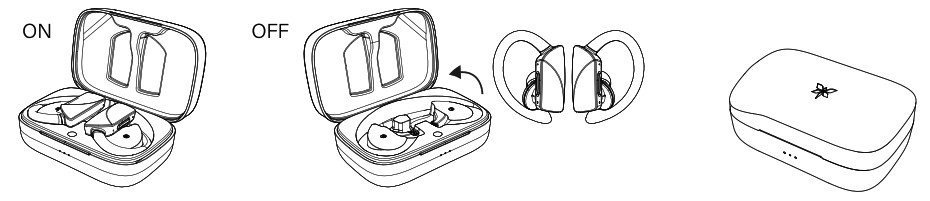
Otomatik olarak kapatmak için kulaklıkları şarj kutusuna koymanız yeterlidir. Açmak/kapatmak için dokunmatik arayüzleri de basılı tutabilirsiniz..
Özellikler
- Bluetooth sürümü 5.0
- Destek profili A2DP/AVRCP/HFP/HSP
- Su geçirmez IPX5
- Gürültü engelleme CVC6.0
- Çalışma aralığı 10 Metre (33 ft)
- Kulaklıkların pil kapasitesi 50mAh
- Şarj kutusunun pil kapasitesi 3000mAh
- Çalışma süresi 3 saat
- Kulaklıkların şarj süresi 1 saat
- Şarj kutusunun şarj süresi 3-4 saat
Çözüm
Umutla, bu makale sorununuzu çözmenize çok yardımcı olacaktır. Axloie Kablosuz Kulaklıkları telefonunuzla eşleştirmenin yolu çok basittir. Axloie Kablosuz Kulaklıkları telefonunuzla eşleştirmek için yukarıda belirtilen kılavuzu izlemeniz yeterlidir..
Hiçbir adımı atlamadan tüm adımları dikkatlice takip etmelisiniz.. Aksi takdirde, bu süreçte başarılı olamayacaksın. Axloie Kablosuz Kulaklıkların Nasıl Eşleştirileceği hakkında bilmeniz gereken tek şey bu. bu makalenin size çok yardımcı olacağını umuyoruz!

![4Moms Bluetooth'a nasıl bağlanılacağı makalesi hakkında daha fazla bilgi edinin? [iPhone & Android]](https://toolpub.com/wp-content/uploads/2023/08/Connect-To-4Moms-Bluetooth-300x169.jpg)