Вам цікаво, як підключити навушники Boltune до вашого пристрою?? Не хвилюйтесь, у нас є повний посібник щодо процесу сполучення та іншого. На ринку, існують тисячі бездротових навушників Bluetooth.
Але навушники Boltune – це навушники, які прямо копіюють стиль Airpods. Вони мають дві різні версії. Один має довший стебло, як і оригінал Airpods а друга версія має короткий ніж, як у Airpods Pro.
Навушники Boltune мають сертифікат водонепроникності IPX8, Технологія ANC, 7 годин прослуховування при повному заряді, 4 мікрофони (2 за навушник) щоб покращити розпізнавання голосу, і багато іншого в коробці, є наступні аксесуари, футляр для зарядки, Посібник користувача, кабель USB, Вушні вкладиші, і Короткий посібник.
Проте, більшість людей не знають, як підключити навушники Boltune до своїх пристроїв. Не хвилюйтеся, ця публікація проведе вас через простий процес створення пари Boltune Earbuds. Так, Давайте детально розглянемо, як підключити навушники Boltune до ваших пристроїв.
Відмінність BT-BH023 і BT-BH024
І BT-BH023, і BT-BH024 є бездротовими навушниками Bluetooth. Кожен має кілька особливостей, а інший ні.
BT-BH023
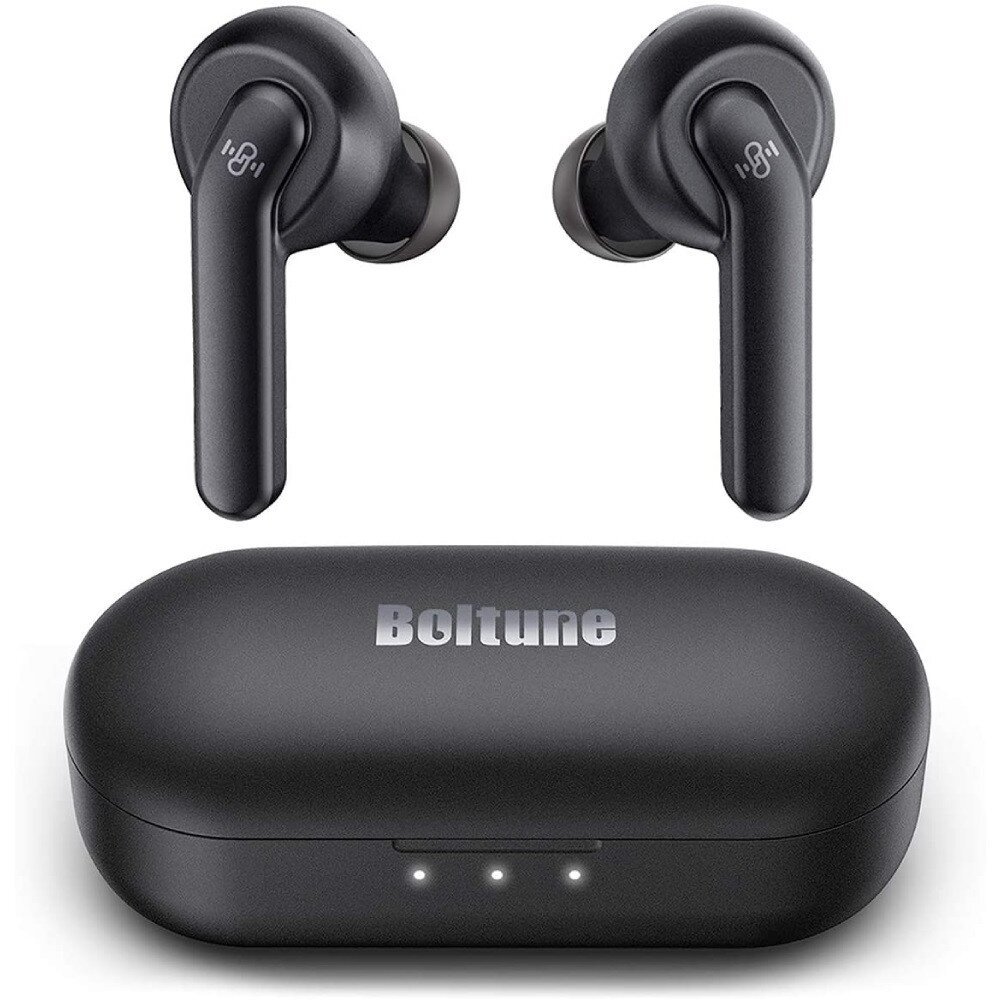
- Футляр для навушників всередині навушників
- Кабель для зарядки Micro USB
- Два альтернативних розміри вкладишів (2 за навушник)
- Посібник користувача
- Короткий посібник
- Одна картка підтримки, яка пропонує 30 місяців гарантії замість 12.
- Подарункова карта Amazon, якщо ви оціните їхній продукт
BT-BH024
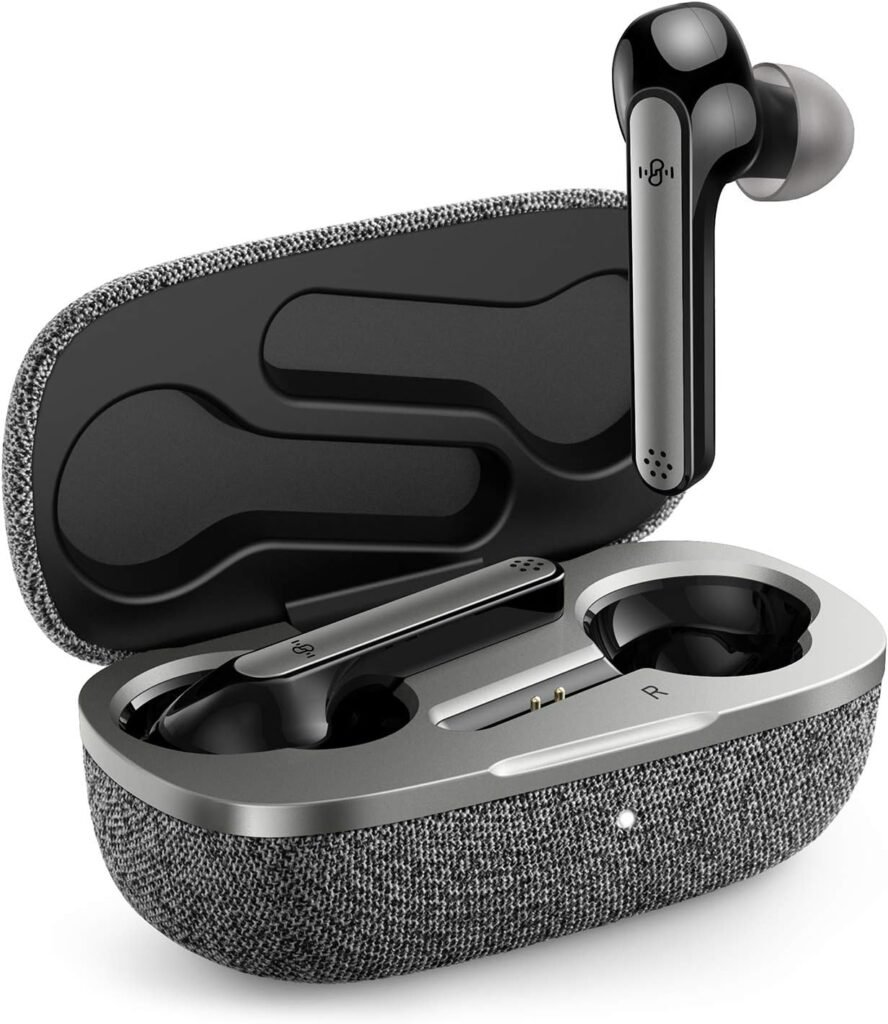
- Футляр для навушників всередині навушників
- Кабель для зарядки Micro USB
- Два альтернативних розміри вкладишів (2 за навушник)
- Посібник користувача
- Короткий посібник
- Одна картка підтримки, яка пропонує 30 місяців гарантії замість 12
Хщоб підключити навушники Boltune до телефону Andriod
Щоб підключити навушники Boltune Earbuds до телефону Andriod, виконайте наступні дії
- Поперше, вийміть навушники із зарядного футляра. Вони автоматично ввімкнуться та з’єднаються один з одним, світлодіодні індикатори на обох навушниках блиматимуть білим, а навушники перебувають у режимі сполучення.
- Увімкніть Bluetooth на телефоні свого Android.
- Перейдіть до налаштувань Bluetooth.
- Виберіть Boltune BT-BH023. Якщо потрібен пароль, типу 0000.
- Після цього процесу, світлодіодні індикатори на обох навушниках повільно блимають білим, і сполучення буде виконано.
Сполучення з ПК
Підключіть навушники Boltune Earbuds до ПК, дотримуючись наведених кроків
- Увімкніть Bluetooth на ПК.
- Зайдіть в налаштування.
- Перейдіть до Bluetooth та інших пристроїв.
- Натисніть Додати пристрій і натисніть Bluetooth.
- Вийміть навушники із зарядного футляра. Вони автоматично ввімкнуться та з’єднаються один з одним
- Виберіть BoltuneBT-BH023. Якщо буде запропоновано ввести пароль, типу 0000.
- Після цього, світлодіодні індикатори на обох навушниках повільно блимають білим, і сполучення буде виконано.
Як активувати окремі навушники?
- З’єднайте обидва навушники з пристроєм, виконавши наведені вище дії.
- Вийміть один навушник із зарядного футляра та переконайтеся, що другий вкладено в зарядний футляр із закритою кришкою.
- Після того, ви можете вільно використовувати єдиний (вліво або вправо) навушник.
Як керувати відстеженням і викликами
- Двічі торкніться сенсорної кнопки на будь-якому з навушників, щоб відтворити або призупинити музику.
- Торкніться сенсорної кнопки правого навушника, щоб збільшити гучність.
- Торкніться сенсорної кнопки на лівому навушнику, щоб зменшити гучність.
- Тричі торкніться сенсорної кнопки на правому навушнику, щоб відтворити наступний трек.
- Тричі торкніться сенсорної кнопки на лівому навушнику, щоб відтворити попередній трек.
- Натисніть сенсорну кнопку на будь-якому з навушників один раз, щоб відповісти на дзвінок.
- Натисніть і утримуйте сенсорну кнопку на будь-якому з навушників для 2 секунд, щоб завершити розмову.
- Натисніть і утримуйте сенсорну кнопку на будь-якому з навушників для 2 секунд, щоб відхилити вхідний виклик.
- Натисніть і утримуйте сенсорну кнопку на правому навушнику для 2 секунд, щоб активувати голосовий помічник.
Як заряджати навушники та зарядний футляр?
Навушники
Щоб зарядити навушники, розмістіть обидва навушники в правильному положенні в зарядному футлярі. Навушники почнуть заряджатися автоматично.
Зарядний футляр
Щоб зарядити зарядний футляр, підключіть зарядний кабель Micro USB до порту на зарядному футлярі. Він почне заряджатися автоматично.
Як скинути налаштування навушників Boltune?
Натисніть і утримуйте будь-яку сенсорну кнопку навушників для 10 секунд, поки світлодіодний індикатор тричі не блимне білим. Після цього історія створення пари очищається, коли навушник вимкнено. Потім помістіть обидва навушники назад у зарядний футляр, закрийте кришку на кілька секунд, а потім розкрийте його, щоб створити пару з будь-яким пристроєм Bluetooth.
Щоб підключити навушники Boltune Earbuds до свого пристрою, уважно дотримуйтесь інструкцій, зазначених вище, не пропускаючи жодного кроку.
Поради щодо усунення несправностей
Припустімо, що у вас виникли проблеми з підключенням навушників Boltune до пристрою. Є кілька речей, які ви можете спробувати вирішити проблему. Перший, переконайтеся, що навушники повністю заряджені. Перевірте, чи навушники працюють у нормальному діапазоні.
Спробуйте відновити заводські налаштування навушників. Але якщо встановлено низьку гучність, щоб усунути це, обережно очистіть навушники за допомогою ватної палички або шпильки. Якщо мікрофон не працює або мікрофон вимкнено, перевірити гучність мікрофона пристрою.
Якщо він не працює, це означає, що навушники несправні. Так, навушники не сполучені з жодним пристроєм. Перший, вимкніть інший Bluetooth із пристроїв поблизу, потім активуйте навушники та переведіть їх у режим сполучення, і повторіть згаданий вище посібник, щоб створити пару навушників Boltune із вашим пристроєм.
Поширені запитання щодо підключення навушників Boltune
Чи водонепроникні навушники Boltune BH023??
Так, навушники Boltune BH023 водонепроникні. Вони мають рейтинг IPX8, що захищає їх від сильного дощу та сильного поту.
Чи є у Boltune BH023 мікрофон?
Так, Boltune BH023 має 4 вбудовані мікрофони.
Можливість підключення Boltune BH023 до ПК і ноутбука?
Так, Boltune BH023 можна підключати до ПК і ноутбуків. Щоб підключити їх до своїх пристроїв. Увімкніть Bluetooth на своєму пристрої. Перейдіть до Bluetooth та інших пристроїв. Натисніть Додати пристрій і натисніть Bluetooth. Вийміть навушники із зарядного футляра. Вони ввімкнуться та з’єднаються один з одним автоматично, вибравши BoltuneBT-BH023. Якщо буде запропоновано ввести пароль, типу 0000.
Висновок
Ви можете отримати безпроблемний і бездротовий звук, підключивши навушники Boltune до свого пристрою. Ви можете легко підключити навушники Boltune до свого пристрою, виконавши наведені вище дії. Спосіб підключення навушників Boltune до пристрою дуже простий!