有好多方法可以將羅技 G435耳機配對到你嘅裝置, 好似智能手機噉, iPhone, 或者 PC. 其中一個方法係透過藍牙連線. 係呢個 post 入面, 你會學到點樣將羅技 G435耳機同你嘅藍牙裝置配對.
將羅技 G435耳機配對到你嘅智能手機
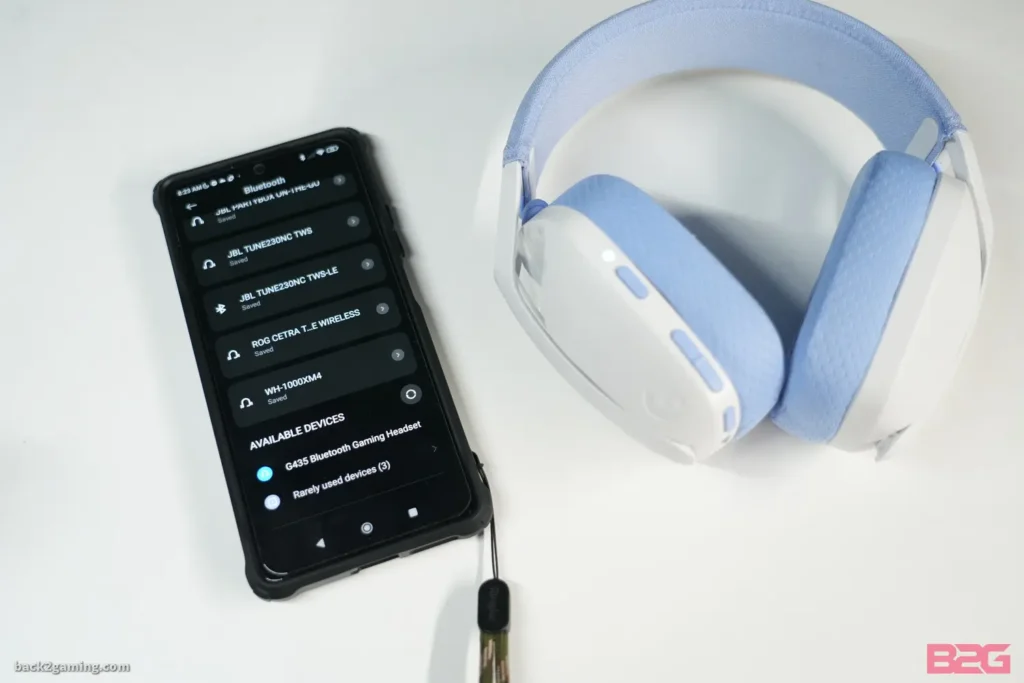
你可以按照以下步驟配對 羅技 G435耳機 去你部智能手機.
- 第一, 撳開掣嚟開 G435.
- 然之後, 按住開同靜音掣,將你嘅羅技 G435耳機放入配對模式 3 秒. 當佢進入配對模式嗰陣, LED 會閃爍藍色.
- 打開你部智能手機嘅設定, 揀藍牙, 同埋開佢.
- 現時, 喺裝置清單入面搜尋羅技 G435,然後撳一下就可以連接.
將羅技 G435耳機同電腦配對
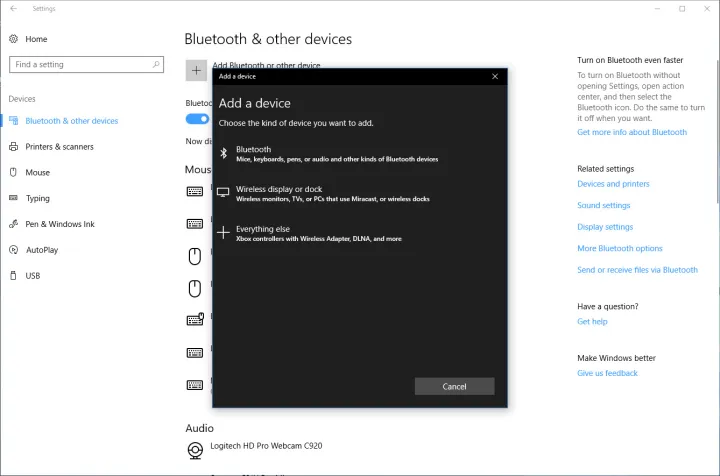
配對羅技 G435 有電腦嘅耳機 跟住呢啲步驟.
- 首先, 撳開掣就可以開你部 G435耳機.
- 按住開同靜音掣,將你嘅羅技 G435耳機放入配對模式 3 秒. 當佢進入配對模式嗰陣, LED 會閃爍藍色.
- 打開你部電腦上面嘅設定.
- 去藍牙 & 其他裝置, 揀藍牙, 同埋開佢.
- 現時, 喺裝置清單入面搜尋羅技 G435,然後撳一下就可以連接.
將羅技 G435耳機同 IOS 裝置配對

請按照以下簡單步驟配對羅技 G435 有 IOS 裝置嘅耳機.
- 開你部 Logitech G435耳機,然後按住開同靜音掣,將佢放入配對模式 3 秒. 當佢進入配對模式嗰陣, LED 會閃爍藍色.
- 去你嘅 IOS 裝置嘅設定,然後開藍牙.
- 現時, 喺裝置清單入面搜尋羅技 G435,然後撳一下就可以連接.
電池檢查
- 撳一下開關掣, 當耳機開咗嗰陣.
- 電池,電芯 31% 去 100% 個 LED 會顯示綠色5秒.
- 電池,電芯 15% 去 30% 個 LED 會顯示紅色5秒.
- 電池,電芯 <15% 個 LED 會閃紅燈5秒.
頁面調整
Sidetone 可以畀你喺同其他人溝通嗰陣聽到你把聲, 佢反映咗用電話講嘢嘅體驗,令你可以將你嘅講嘢音量調整到適當嘅水平.
啟用側調
按兩下靜音掣, LED 就會以橙色閃爍兩次.
停用側調
按兩下靜音掣, LED 就會以橙色閃爍一次.
調整側調
上: 撳一下靜音掣 + 體積 UP.
落: 撳一下靜音掣 + 音量調低.
結論
將羅技 G435耳機同你嘅藍牙裝置配對並唔複雜. 你只需要將耳機放入配對模式,就可以將佢哋同你嘅智能手機配對, IOS 裝置, 或者其他藍牙裝置. 請按照呢個詳細指南,瞭解點樣將羅技 G435耳機配對到你嘅裝置.