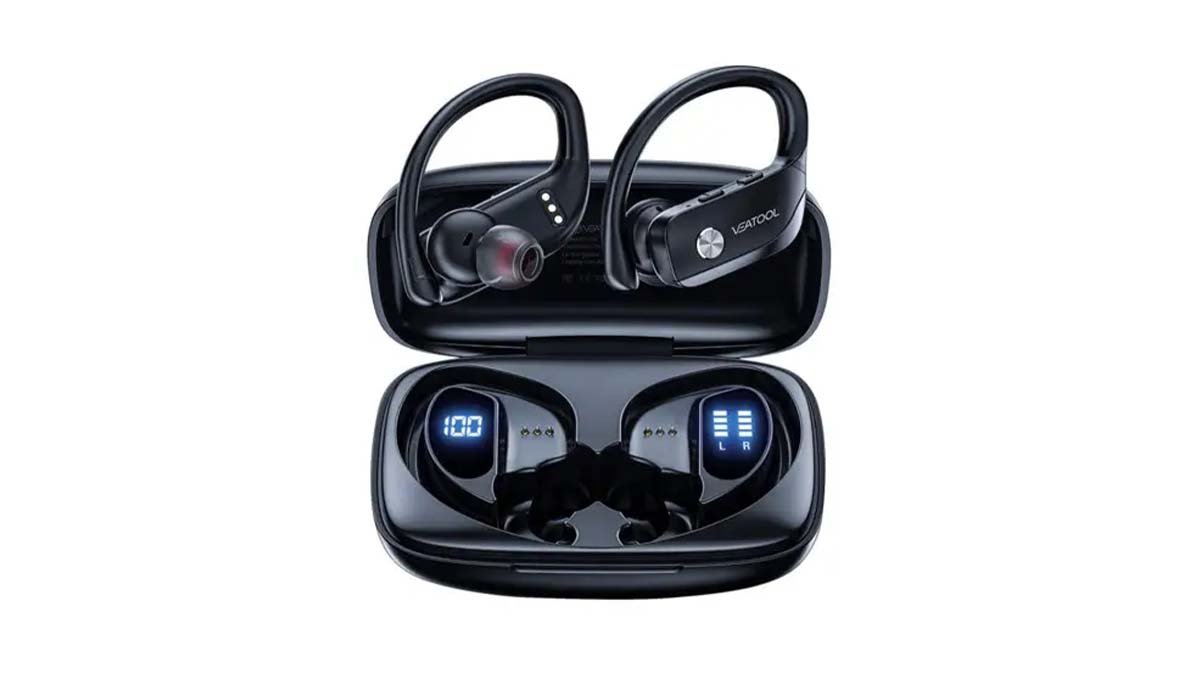
將 Veatool T16 耳塞連接到手機和其他裝置並不是一件困難的事情, 您可以輕鬆地將 VEATOOL T16 與您的手機連接或配對. 製造商開發這些耳塞是為了在活動或運動期間為用戶提供無縫的音訊冒險或體驗.
出色地, 如果您有這些耳機並且在將它們與手機配對時遇到問題, 那麼不用擔心, 這篇文章只是為了解決你的問題. 以下是有關將 Veatool T16 耳塞連接到手機的一些說明.
將 Veatool T16 耳機連接至手機和 IOS
請依照以下步驟連接 Veatool T16 耳塞:
- 首先, 您必須打開充電盒的蓋子,然後按住兩個耳機上的多功能觸控按鈕才能使用 1.5 秒. 當你這樣做時, 您的 VETOOL T16 耳機將會開啟.
- 之後,您必須進入裝置的藍牙設置.
- 現在, 您必須選擇“QCY-T16”. 如果有需要密碼, 你必須輸入“0000”.
- 最後, VEATOOL T16 耳機的配對即將完成.
將 VETOOL 真無線運動耳機 T16 連接到 PC (視窗)
- 第一的, 你必須開啟Windows的藍牙.
- 在那之後, 你必須去設置.
- 現在, 你必須去“藍牙和不同的設備”.
- 這裡, 您必須單擊“新增設備”.
- 下一個, 您必須點擊藍牙.
- 現在, 您必須打開充電盒的蓋子,然後按住 T16 耳機上的多功能觸控按鈕才能使用 1.5 秒. 這樣做之後, 您的耳塞將會打開.
- 打開它們後, 您將選擇“QCY-T16”. 如果需要密碼, 那你就必須輸入“0000”.
- 所以, 透過執行上述所有步驟,您的 VEATOOL T16 的配對將正確完成.
未將 VETOOL T16 連接至筆記型電腦/Windows/PC
如果您的 T16 耳機未連接到您的 PC/筆記型電腦/Windows, 這表示您電腦的藍牙有配對錯誤或問題. 出色地, 您必須執行以下操作才能解決此問題:
- 首先, 您必須嘗試停用附近裝置的藍牙.
- 在那之後, 您必須啟動耳機的配對模式, 然後從“設定”中配對並連接耳塞 >>> 藍牙 & 其他設備 >>> 新增設備 >>>> 然後選擇藍牙.
- 現在, 您必須卸載並重新安裝藍牙驅動程式, 或者你必須更新藍牙驅動程式. 這一切都可以在管理上完成 >>> 裝置經理, 重置您的耳機 (如果功能正常的話), 然後你必須重複該步驟.
- 所以, 您必須嘗試重置耳機.
重置 VEATOOL T16
重置您的耳機, 您將遵循這些簡單的步驟:
- 首先, 您必須打開充電盒的蓋子.
- 在那之後, 您必須按住充電盒中的多功能按鈕才能 10 秒.
- 所以, 當你必須這樣做時, 您的耳機的重置將會完成.
如何開啟和關閉耳機?
打開耳塞: 用於開啟, 您必須打開充電盒的蓋子,然後按住兩個耳機上的多功能觸控按鈕即可 1.5 秒. 這樣做之後, 您的耳機將向右打開.
關閉 Ed 耳機: 關閉耳塞, 您必須將耳機放入充電盒中,然後合上充電盒的蓋子. 當你這樣做, 您的耳塞將自動關閉.
如何配戴 VETOOL T16 耳塞?
第一的, 您必須將兩隻耳機從充電盒中取出. 然後你必須辨識左右耳塞. 在那之後, 您必須選擇更能保護耳朵的耳塞. 現在, 你必須將耳塞插入耳朵’ 內管. 您還可以旋轉它們以獲得最佳的貼合度和舒適度, 並確保耳塞式麥克風指向您的嘴.
如何充電耳塞?
為您的耳塞充電, 您只需將耳塞放入充電盒中,然後合上蓋子即可. 然後自動, 您的耳機將開始充電.
充電盒
您必須將充電盒連接到 USB 充電器或包含 USB-A 轉 C 電纜的充電端口, 為充電盒充電. 所以, 在那之後, 它將自動開始充電.
如何修正耳塞一側音量過低的問題?
發生這種情況是因為耳塞中有污垢, 如果耳塞的一側髒了,表示您的耳塞髒了’ 音量低. 或者也有可能你把音量調低了. 所以, 解決這個問題, 你必須按照以下步驟操作:
- 首先, 您必須嘗試使用棉花棒清潔耳塞,或者可以使用大頭針清潔網孔.
- 您也可以嘗試將耳機恢復原廠設置.
如何啟動耳塞上的遊戲模式?
啟用或停用 T16 耳塞中的遊戲模式, 您必須按下右耳塞上的多功能觸控按鈕. 你必須這樣做, 三次.
結論
本文提到了您需要了解的有關 VEATOOL T16 的所有信息. 所以, 希望, 這篇文章將對您非常有幫助,您已經完全了解如何連接 Veatool T16 耳塞.