Xhuma i-Onn Soundbar ku-TV kulula nje, uma uzama ukuxhuma i-Onn Soundbar ku-TV kodwa ungakwazi ukukwenza ungaphatheki kabi! Nasi isiqondiso esiphelele sokuthi wenze ukuxhumana okuphelele phakathi kwakho kokubili ibha yomsindo ne-TV yakho.
I-Onn Soundbar ithathwa njengesengezo esihle kakhulu ku-TV ngoba igcina yonke into oyidingayo ukuze uthole umsindo ongcono kakhulu. Kunezindlela ezahlukahlukene ongaxhuma ngazo ibha yomsindo ye-Onn ku-TV kuye ngokuthi yimaphi amathuluzi osuvele unawo. Ngakho, asiqhubekele emininingwaneni……..
Isinyathelo ngesinyathelo Isiqondiso sokuxhuma i-Onn Soundbar ku-TV
Ukuze uxhume i-Onn Soundbar ku-TV, kufanele ulandele lezi zinyathelo:
Isinyathelo 1
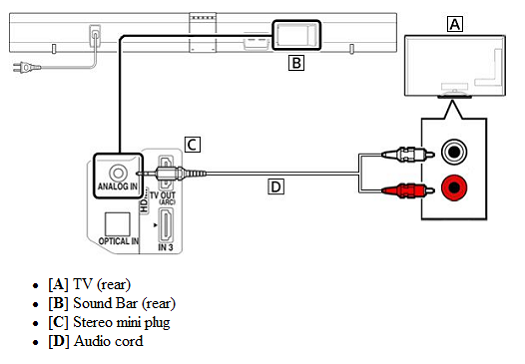
Esinyathelweni sokuqala, ukuze Xhuma i-Onn Soundbar ku-TV kufanele wenze Izixhumo ezifanele. Okokuqala nje, ku-TV yakho uzodingeka ukuthi uthole okokufaka kwe-HDMI okubhalwe ukuthi ARC. Imele isiteshi sokubuyisela umsindo, okusho ukuthi yonke imisindo evela ku-TV izodlula kubha yakho yomsindo. Kodwa uma ungakutholi okokufaka kwe-HDMI okubhalwe ukuthi ARC, bese kufanele usebenzise intambo yokubona efakiwe kanye nekhebula le-HDMI.
Kufanele ubeke isiphetho esisodwa sentambo ye-HDMI kokokufaka kwe-HDMI ARC ku-TV yakho bese ubeka esinye isiphetho kubha yakho yomsindo.. Kufanele uqaphele ukuthi iyiphi i-HDMI yokufaka oyikhethayo ngoba uma uzoyisetha ku-TV yakho isethelwe kulokhu kufakwayo ngqo..
Khona-ke, kufanele uxhume ikhebuli yokubona embobeni ebhalwe ukuthi I-Optical noma i-Digital Audio. Kodwa uma unokufaka kwe-HDMI okubonisa njenge-ARC, kusho ukuthi awudingi ukusebenzisa noma iyiphi intambo yokubona. Kufanele uvule i-TV yakho futhi kufanele uqinisekise ukuthi uyayinika amandla noma uyayivumela i-CEC. Lesi silungiselelo sizokuvumela ukuthi ulawule i-TV yakho ngokusebenzisa i Unyaka kude noma ukulungisa ivolumu yebha yomsindo ngesilawuli kude se-TV yakho.
Abakhiqizi be-TV banikeza amagama amaningana esilungiselelo. Ngakho, kufanele uhlole imanyuwali yomnikazi wakho noma ungavakashela goRoku.com/HDMIhelp uma i-TV yakho iyi-Roku.
Uma i-TV yakho iyi-Roku TV, bese isilungiselelo sizovuleka ngokuzenzakalelayo phakathi nokusetha. Uvumele i-CEC, futhi sithole eyakho ibha yomsindo setha kusilawuli kude se-TV yakho.
Kufanele uthole inkinobho ebhalwe ngokuthi Okokufaka noma Umthombo noma into efanayo. Ngemva kwalokho, kufanele uqinisekise ukuthi okokufaka kwe-HDMI okuyikonakona kuguquliwe njengalokho okusebenzisile ukuxhuma ibha yakho yomsindo. Ngeke ibonise lutho esikrinini, nokho.
Isinyathelo 2
Kulesi sinyathelo, ngesikhathi sokuxhuma ibha yomsindo ye-Onn ku-TV kufanele unike amandla ibha yakho yomsindo nesilawuli kude. Ukukwenza, kufanele Uxhume umkhawulo owodwa wekhebula lamandla endaweni yokukhipha odongeni bese kuthi enye indawo yale khebula uxhume kubha yomsindo.. Manje, uzobona ilogo esikrinini sakho. Uma kungenjalo, udinga ukuqinisekisa ukuthi unokufaka okulungile ku-TV yakho.
Manje, kufanele ufake amabhethri kusilawuli kude futhi uqinisekise ukuthi ahlezi noma abekwe kahle futhi abekwe ngendlela efanele. Khona-ke, kufanele ukhethe ulimi lwakho futhi uxhume kunethiwekhi yakho.
Isinyathelo 3
Manje, kufanele uxhume ibha yomsindo wakho kunethiwekhi yakho. Kufanele ukhethe inethiwekhi yakho engenantambo, bese uzofaka iphasiwedi noma ukhiye wokudlula. I-Passkey iyazwela. Uma ekhona wonke amasheke asayinwa aluhlaza, kusho ukuthi ulungele ukuhamba.
Uma kwenzeka u-X obomvu esithombeni, kufanele uye ku-go.roku.com/ibha yomsindo bese usesha okuthi “Angikwazi ukuxhuma kunethiwekhi yami engenantambo”.
Ibha yakho yomsindo izothola isofthiwe yamanje uma uyilanda. Ungakwazi ukukwenza noma nini lapho udinga. Ngale ndlela, uma kunezibuyekezo zakamuva zesiteshi, ibha yomsindo yakho izozigcina nazo. Ngemva kokulanda isofthiwe yakamuva yebha yomsindo wakho, izokwazisa ukuthi ubeke uhlobo lokubonisa. Kufanele Ucindezele “KULUNGILE” kusilawuli kude bese ibha yomsindo yakho izonquma ukulungiswa okuhle kwe-TV yakho ngokuzenzakalelayo.
Uma isikrini sibonisa kahle, khona-ke kufanele ukhethe “YEBO”. Kungenjalo, kufanele uzame ukushintsha isixazululo. Ungase uthole lo mlayezo uma i-TV ingekho ku-ARC noma esimweni lapho i-CEC yakho inganikwanga amandla. Kufanele uvule i-CEC kuzilungiselelo zakho ze-TV. Uma i-TV yakho ingenayo i-ARC, kufanele ukhethe "i-TV yami ayisekeli i-ARC" ukuze weqe lesi sinyathelo bese usebenzisa okokufaka okubonakalayo. Khona-ke, uzobuka isikrini sokuvula.
Isinyathelo 4
Manje, kufanele wenze kusebenze ibha yomsindo ye-Onn yakho. Kwalokhu, kufanele ulandele imiyalo esesikrinini ukuze wenze futhi uvule i-akhawunti ye-Roku. Uma usunayo i-akhawunti ye-Roku vele, bese udinga nje ukungena ngemvume. Manje, kufanele wengeze ezinye zeziteshi ozithandayo ukuze lezi ziteshi zilungele ukusakaza ku-TV yakho.
Ungakwazi njalo ukwengeza okwengeziwe ngokuhamba kwesikhathi ngokuchofoza okuthi “Engeza Isiteshi” futhi ungakwazi ukususa noma yiziphi iziteshi ofuna ukuzisusa ngokuchofoza inketho ethi “Susa Isiteshi” ngezansi kweziteshi ozikhethile.. Emizuzwini embalwa nje le nqubo izophela futhi manje usulungile futhi usulungele ukusakaza-bukhoma!
Ukuxhuma i-Onn Soundbar ku-TV Ngoxhumano lwe-Bluetooth
Ukuxhuma i-Onn Soundbar ku-TV Ngoxhumano lwe-Bluetooth, kufanele ulandele lezi zinyathelo:

- Okokuqala nje, kufanele uvule kokubili ibha yakho yomsindo ne-TV yakho. Manje, kufanele uvule uxhumano lwe-Bluetooth ngokusebenzisa irimothi kubha yomsindo.
- Khona-ke, kufanele uye kuzilungiselelo ze-Bluetooth ye-TV, bese uqala ukuskena.
- Manje, uzobona ibha yakho yomsindo ohlwini lwamadivayisi atholakalayo. Kufanele nje ukhethe ibha yomsindo ye-Onn kulolu hlu olutholakalayo, bese kufanele ixhume kubha yakho yomsindo.
- Uma ibha yomsindo yakho ixhunywa ku-TV ngokusebenzisa i-Bluetooth, zonke izibani ezibekwe kumonitha zizoyeka ukucwayiza.
- Khona-ke, kufanele uhlole umsindo ku-TV yakho.
- Uma ubona lowo msindo usaphuma ezipikheni ezinezintambo, bese udinga ukuya kuzilungiselelo zomsindo. Lapha, kufanele ukhethe uxhumano lwe-Bluetooth esikhundleni solunezintambo.
FAQs Of Xhuma i-Onn Soundbar ku-TV
Ungakwazi yini ukuxhuma i-Onn Soundbar yakho ye-TV yakho Ngokungenantambo?
Yebo, ungaxhuma kalula i-Onn Soundbar ku-TV ngaphandle kwentambo, ngoba iza noxhumano lwe-Bluetooth.
Kungani i-Onn Soundbar Yakho Ingasebenzi Kumodi ye-Bluetooth?
Okokuqala nje, kufanele uhlole ukuthi umsindo uthulisiwe noma cha. Uma umsindo ungathulisiwe, bese uzoya kuzilungiselelo zomsindo, lapha kuzilungiselelo uzohlola imodi yomsindo, uma imodi yomsindo ikhethiwe ukuthi ifakwe ngentambo, kusho ukuthi uzodinga ukusebenzisa uxhumano olungenantambo.
Isiphetho
Uma unebha ye-Onn Sound futhi udinga ukuyixhuma ku-TV yakho kodwa awukwazi ukuyenza, ke lesi sihloko senzelwe wena nje futhi ngethemba, izokusiza kakhulu ukuxhuma ibha yomsindo ye-Onn ku-TV.