Uyafuna Ukumatanisa Ama-Earbuds e-Altec Lansing NanoPods? I-Altec Lansing NanoPods inakho 4 amahora wempilo yebhethri futhi 16 amahora usebenzisa ikesi lokushaja. Bane-Bluetooth 5.0, Isitifiketi se-IPX5 sokujuluka nesivimbela uthuli, 50ft yebanga lomsebenzi, futhi nokuningi. Lapha ufunda ukuthi ungazisebenzisa kanjani ngalawa ma-Altec Lansing NanoPods ngamadivayisi akho.
Ungayibhalela kanjani i-Alter Lansing Nanopods Earbuds?
Uma ufuna ukubhanqa Ama-Earbuds e-Altec Lansing NanoPods kumadivayisi akho landela izinyathelo ezishiwo ngezansi ngokucophelela ngaphandle kokweqa noma yisiphi isinyathelo.
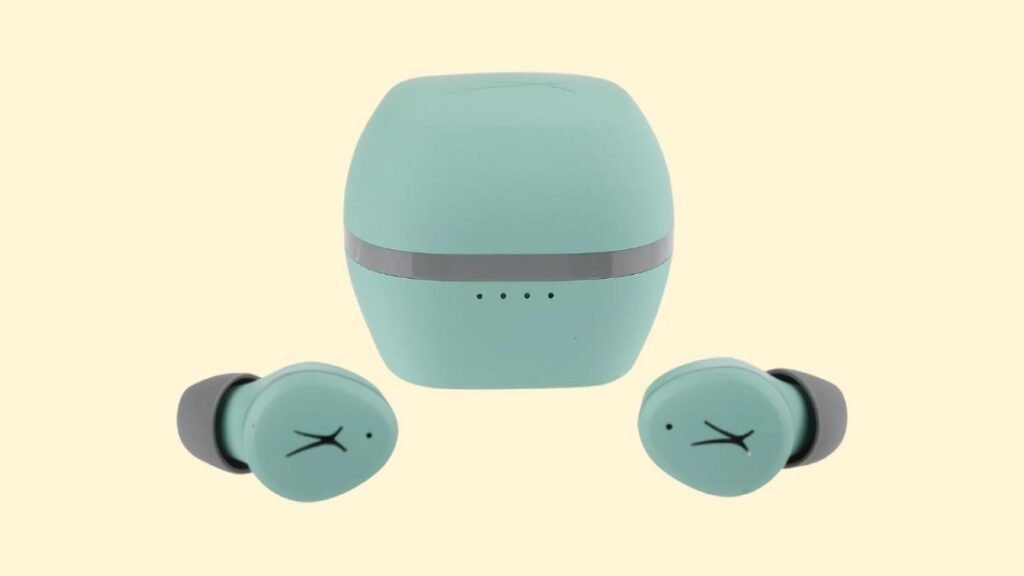
Ungamatanisa Kanjani Ama-earbuds e-Altec Lansing NanoPods Nge-iOS kanye Nezingcingo ze-Android?
Isinyathelo 1: Khipha ama-earbud ekesini lokushaja. Ngemva kwalokho, zizoVULA ngokuzenzakalelayo, nokukhanya kuzobakhanyisela.
Isinyathelo 2: Bese uvula i-Bluetooth kudivayisi yakho bese uya kuzilungiselelo ze-Bluetooth.
Isinyathelo 3: Manje, khetha i-NanoPods. Uma utshelwa ngephasiwedi, ukuthayipha 0000.
Ngemva kwalokho, inqubo yokumatanisa izokwenziwa, ama-earbud azobhangqwa kudivayisi yakho futhi alungele ukusetshenziswa.
Ungamatanisa Kanjani I-Altec Lansing NanoPods Earbuds Nge-PC (IWindows)

Isinyathelo 1: Okokuqala nje, iya kubha yokusesha ku-PC yakho Chofoza lapha thayipha i-Bluetooth bese uvula i-Bluetooth.
Isinyathelo 2: Manje, go to the settings.
Isinyathelo 3: Iya ku-Bluetooth namanye amadivayisi.
Isinyathelo 4: Chofoza okuthi Engeza idivayisi.
Isinyathelo 5: After that take out the earbuds from the case, they will turn on automatically and you see a light on them.
Isinyathelo 6: Khona-ke, khetha i-NanoPods. If needed a password, ukuthayipha 0000.
After all these steps, inqubo yokumatanisa izokwenziwa, the earbuds pair with your device, and now you can use them.
Ungawagqoka Kanjani Ama-earbuds e-Altec Lansing NanoPods?
Here we describe a few steps on how to wear the Altec Lansing NanoPods Izindlebe.
Isinyathelo 1: Okokuqala, take out both earbuds from the charging case.
Isinyathelo 2: Khona-ke, identify the left and right earbuds.
Isinyathelo 3: Choose the ear tips that best fit your ears.
Isinyathelo 4: After these steps insert the headphones into the inner canal of the ears, rotate them for the best possible comfort and best fit, futhi uqiniseke ukuthi imakrofoni ikhomba emlonyeni.

Ungawavula Futhi Uvale Kanjani Ama-earbuds e-Altec Lansing NanoPods?
Vula
Khipha ama-earbud ekesini lokushaja. Ngemva kwalokho, you see a light will light up on the earbuds, futhi zizovula ngokuzenzakalelayo.
Vala
To turn Off the Earbuds place them into the charging case. Zizocisha ngokuzenzakalelayo.
Indlela Yokulawula? / Isebenza kanjani? – Imiyalo
Incwajana: The multifunction touch sensor is placed on the top part of the earbuds.
- Cindezela futhi ubambe inkinobho yokuthinta yemisebenzi eminingi ku-earbud engakwesokudla cishe 2 seconds to play or pause music.
- Press the multifunction touch button on the right earbud two times to play the next song.
- Press the multifunction touch button on the left earbud two times to play the previous song.
- Press the multifunction touch button on the right earbud one time to turn the volume up.
- Press the multifunction touch button on the left earbud one time to turn the volume down.
- Cindezela inkinobho yokuthinta yemisebenzi eminingi kunoma yimaphi ama-earbud ngesikhathi esisodwa ukuze uphendule ucingo olungenayo.
- Press and hold the multifunction touch button on any of the earbuds for about 2 seconds to end a current call.
- Press the multifunction touch button on any of the earbuds two times to reject an incoming call.
- Cindezela futhi ubambe inkinobho yokuthinta yemisebenzi eminingi ku-earbud engakwesokunxele cishe 2 seconds to Activate the voice assistant.
Uyenza Kanjani Imodi ye-Mono?
To activate or deactivate the mono mode in these earbuds, pair the earbuds to the device and take out one of the earbuds from the charging case that you want to use. Izoqala ukusebenza ngokwayo.
Ungashajwa Kanjani Ama-Earbuds?
Izindlebe
Ukushaja ama-Earbuds, place them into the charging case and close the lid properly. Ama-Earbuds azoqala ukushaja ngokuzenzakalelayo.
Ikesi lokushaja
Ukushaja icala lokushaja, connect the case to a USB charger or charging port with the included USB-A to C cable. Izoqala ukushaja ngokuzenzakalelayo.
Zisho Ukuthini Izibani?
Izindlebe
- A light turns on when you take them out from the charging case. It means the earbuds turn on.
- A red light turns ON, on the charging case. Lapho ama-earbuds eshaja.
- A red light turns off on the charging case. When the earbuds are fully charged.
- A blue light flashed three times. When the earbuds are resetting mode.
- A red light turns blue. When the earbuds are reset.
Ikesi lokushaja
- One light flashing while charging is less than 25% of the battery.
- One light on and one flashing while charging is less than 50% of the battery.
- Two lights on and one flashing while charging the case has less than 75% of the battery.
- Three lights on and one flashing while charging is less than 100% of the battery.
- All lights are on while the charging case is fully charged.
Ungayisetha Kanjani kabusha i-Altec Lansing NanoPods Earbuds?
Isinyathelo 1: Delete all pairing records of the NanoPods from the connected device.
Isinyathelo 2: Then take out both earbuds from the case. Ngemva kwalokho, zizovula ngokuzenzakalelayo.
Isinyathelo 3: Manje, press and hold the multifunction touch button on both earbuds for about 9 imizuzwana. Ngemva kwalokho, a blue light will flash three times, to then turn red and back to blue.
Isinyathelo 4: Place the earphones back in the charging case. Ngemva kwalokho, Ukusetha kabusha kuzokwenziwa.
Amathiphu okuxazulula inkinga
Kwesokunxele/Kwesokudla/Olunye uhlangothi lwama-earbud luyekile ukusebenza
If this issue happens, it may be because it is low on battery or it did not connect correctly with the device. Ukulungisa lokhu, ungenza okulandelayo:
1. Charge the earbud that is not working or, place both earbuds in the charging case.
2. Factory reset the earbuds.
3. Check if the earbuds are operating within a normal working range
Uma lokho kungasebenzi, the earbud is probably faulty.
Kwesobunxele/Kwesokudla/Olunye uhlangothi lwama-earbud lunomthamo ophansi
If this happens, it may be because the earbud is dirty or the volume is set low. Ukulungisa lokhu, you can do the following steps.
1. Hlanza i-earbud usebenzisa i-swab kakotini noma uhlanze ngokucophelela inetha ngephini.
2. Zama ukusetha kabusha ifektri.
Imakrofoni ayisebenzi
If this happens, kungaba ngoba imakrofoni ithulisiwe, noma ama-earbud ami kahle. Ukulungisa lokhu, ungenza okulandelayo:
Hlola ivolumu yemakrofoni yedivayisi. Uma lokho kungasebenzi, lokho kusho ukuthi kungase kube khona iphutha kuma-earbud, ngakho zama ukuwashintsha noma uthole imbuyiselo.
Imibuzo Evame Ukubuzwa Yokubhangqa Ama-Earbud e-Altec Lansing NanoPods
Ingabe i-Altec Lansing NanoPods ayinamanzi?
-Nokuba, ama-Altec Lansing NanoPod awavimbeli amanzi (IPX6 nangaphezulu). Banesilinganiso se-IPX5, okusho ukuthi zivikelwe emanzini athile aphuma emlonyeni.
Ingabe i-Altec Lansing NanoPods inomakrofoni?
Yebo, Ama-Earbuds eza nemibhobho ehlanganisiwe.
Ingabe i-Altec Lansing NanoPods inemodi ye-latency ephansi/yomdlalo?
-Nokuba, lawa ma-earbud awanayo imodi yokubambezeleka ephansi/yomdlalo.
Wazi kanjani ukuthi ama-Altec Lansing NanoPods ashajwe ngokugcwele?
Lapho ama-earbuds eshaja, amanye amalambu akhanyisa ikesi lokushaja. Uma ishajwe ngokugcwele, zonke izibani ziyacisha.
Ingabe i-Altec Lansing NanoPods ingaxhumeka ku-PC nakuLaptop?
Yebo, lawa ma-earbud angaxhumeka kuma-PC, laptop, ngisho namaphilisi.
Ingabe umsindo we-Altec Lansing NanoPods uyakhansela?
-Nokuba! Lezi zindlebe azifiki nobuchwepheshe be-Noise-ukukhanselwa.
Isiphetho
Siyethemba ukuthi manje usuyazi ukuthi ungamatanisa kanjani ama-Earbuds e-Altec Lansing NanoPods ngedivayisi yakho oyifunayo. Ngakho, okudingeka ukwazi ukuthi ungamatanisa kanjani ama-Earbuds e-Altec Lansing NanoPods kudivayisi yakho. Siyethemba le ndatshana izokusiza kakhulu!