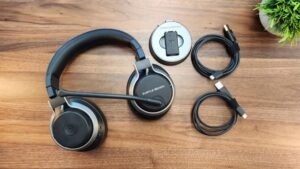
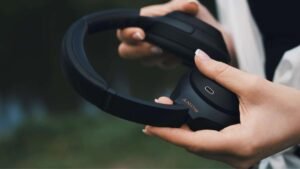
আপনি কি ব্রুকস্টোন ওয়্যারলেস হেডফোন আইফোনে সংযুক্ত করার বিষয়ে ভাবছেন?? আপনি এই আশ্চর্যজনক হেডফোনগুলি কিনেছেন এবং এখন আপনার আইফোনে সেগুলি সংযুক্ত করার প্রয়োজন৷, ভাল বিরক্ত করবেন না, আপনার ব্রুকস্টোনকে আইফোনের সাথে সংযুক্ত করার একটি সহজ উপায় পেতে আপনি সঠিক জায়গায় আছেন৷. এখানে আমরা উভয়ের মধ্যে সংযোগ স্থাপনের উপায় আলোচনা করতে যাচ্ছি. তাই, শুরু করা যাক……
Connect BrookStone Wireless Headphones to iPhone
ব্রুকস্টোন ওয়্যারলেস হেডফোনগুলিকে আইফোনের সাথে সংযুক্ত করতে, আপনাকে এই পদক্ষেপগুলি অনুসরণ করতে হবে:
- সবার আগে, পেয়ারিং মোডে প্রবেশ করতে শুরু করার আগে আপনাকে নিশ্চিত করতে হবে যে আপনার হেডফোনগুলি বন্ধ রয়েছে . আপনার হেডফোনের উভয় EARCUPS-এর LED ইন্ডিকেটর আলোকিত হবে না .
- এখন, পেয়ারিং পদ্ধতি শুরু করতে, আপনাকে প্রায় জন্য ডান ইয়ারকাপের নীচে অবস্থিত পাওয়ার বোতাম টিপুন এবং ধরে রাখতে হবে 5 সেকেন্ড বা এটি হোড করুন যতক্ষণ না আপনি দেখতে পাবেন LED ইন্ডিকেটরগুলি দ্রুত ফ্ল্যাশ হতে শুরু করে.
- এখন, আপনাকে আপনার মোবাইল ডিভাইসে ব্লুটুথ পরিষেবা সক্ষম বা অনুমতি দিতে হবে এবং তারপরে আপনাকে অনুসন্ধান বা স্ক্যান করতে হবে৷”BT-H31″ ডিভাইস . (আপনাকে আপনার মোবাইল ডিভাইসের নির্দেশিকা ম্যানুয়ালটি উল্লেখ করতে হবে, অথবা আপনাকে মোবাইল ডিভাইসের প্রস্তুতকারকের সাথে যোগাযোগ করতে হবে. if you have to require more information.)
- তারপর, তালিকা থেকে, আপনাকে ডিভাইসটি বেছে নিতে হবে “BT-H31” এবং তারপর আপনাকে পেয়ারিং কী লিখতে হবে “0000”যদি অনুরোধ করা হয় . এখন, মোবাইল ডিভাইস তারপর স্বয়ংক্রিয়ভাবে জোড়া চূড়ান্ত করবে .
- পেয়ারিং প্রক্রিয়া শেষ বা সম্পন্ন হলে, উভয় ইয়ারকাপে রাখা এলইডি ইন্ডিকেটর দ্রুত ফ্ল্যাশ হতে থামবে এবং তারা জোড়া ফ্ল্যাশ সম্পূর্ণ করেছে বা চূড়ান্ত করেছে তা নির্দেশ করার জন্য তারা একটি ধীর ফ্ল্যাশে ফিরে আসবে .
Keep in mind that the above-mentioned process is important just when you are using for the first time Bluetooth Headphones with your mobile device. In order to use your Bluetooth Headphones with another mobile device, আপনাকে উপরের প্রক্রিয়াটি পুনরাবৃত্তি করতে হবে. ব্লুটুথ ডিভাইস ব্যবহার করার জন্য, আপনার মোবাইল ডিভাইসে, আপনাকে ব্লুটুথ মেনুতে যেতে হবে এবং আপনাকে নির্বাচন করতে হবে “BT-H31” to reconnect.
FAQs
How to Put Wireless Headphones in Pairing Mode?
For an Easy Bluetooth Pairing
সবার আগে, you have to put your headphones in pairing mode. সাধারনত, to do that you just have to hold down the power button; the headphones sometimes require to be turned off firstly before starting the process. A number of pairs trigger a flashing light after some seconds to show the pairing mode is on, and a few times there’s also an audio cue.
How to Manually Add a Bluetooth Device?
To manually add a Bluetooth device, firstly you have to open the Settings app on your phone and then you have to tap Bluetooth (or Settings > সংযোগ > ব্লুটুথ). তারপর, you have to ensure that the Bluetooth is turned on (the button should be blue). তারপর, you have to check your Bluetooth device and ensure that it is turned on and in discovery mode. On your phone, you have to wait for it to show up under the Available Devices.
Why Wont Your Headphones Work?
You have to check the Bluetooth settings
এই জন্য, the steps could vary depending on the Android device that you are using. You have to open Settings > সংযোগ > ব্লুটুথ. তারপর, you have to turn the Bluetooth switch to Off, or you have to unpair Bluetooth audio devices that have been connected to your phone already. You have to plug the headphones into the audio jack and then you will play something in order to check if they function.
Can You Connect Multiple Bluetooth Headphones to Your iPhone?
হ্যাঁ, the latest or modern iPhones allow their users connect to a number of Bluetooth speakers or headphones simultaneously through the AirPlay. The feature, which is called ‘Share Audio,’ was rolled out in 2019 with iOS 13.1, letting the iPhone users in order to share one audio stream between two pairs of your headphones or earbuds.
উপসংহার
আশাকরি, this article will help you a lot to resolve your issue. The way to connect Brookstoon wireless headphones to iPhone is just straightforward. You just have to follow the above-mentioned guide to connect your Brookstone wireless headphones to iPhone.