
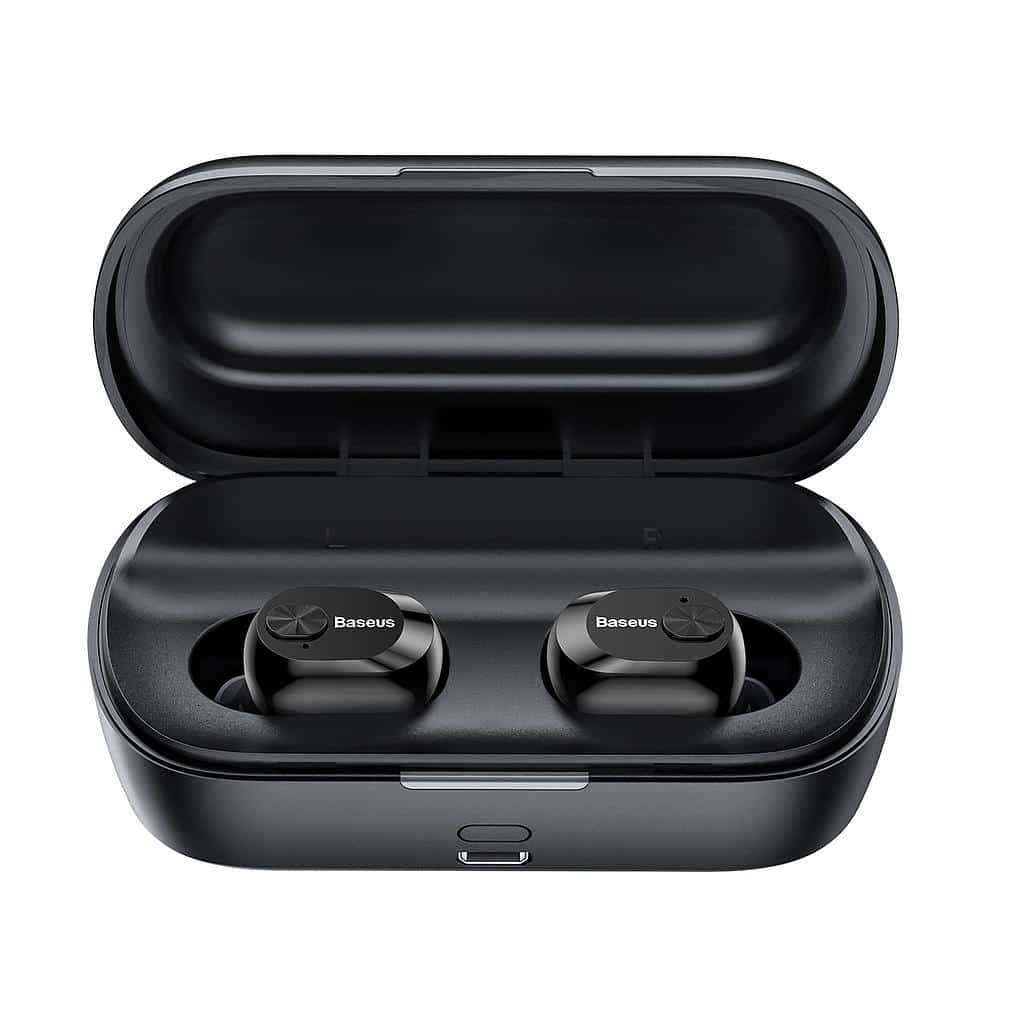
Bo ke konektá Baseus Encok W01 Earbuds na bo aparatonan? E Baseus Encok W01 ta e mihó eskoho ta bini ku un durashon di bateria di 6 oranan, HFP, HSP, A2DP, AVRCP, SPP, Kompatibilidat di PBAP, Bluetooth 5.0, un kashi di karga ku un bateria di 2000mAh, e sertifikado IPX4 resistente na sodó i stòf, e hopi mas.
Pero aki nos ta siña kon pa Konektá Baseus Encok W01 Earbuds na bo aparatonan. E ora ei, ban kuminsá!
Kon pa Konektá Baseus Encok W01 Earbuds?
Konektando Baseus Encok W01 Earbuds pa bo aparatonan ta un proseso simpel. Pa konektá nan na bo aparatonan sigui e pasonan aki bou kuidadosamente.
Konektá Baseus Encok W01 Earbuds ku Android
- Prome,habri e kashi di karga i saka e earbuds. Despues di esei, un lus blou lo ta sendé pa 1 segundo, i nan lo sende outomatikamente.
- Un lus blou lo kuminsá bria den tur dos earbud ora un lus blou kuminsá bria lihé riba e earbud robes i un biaha kada 5 sekònde riba e earbud drechi, e ta nifiká ku e earbudnan awor ta den moda di pareha.
- Aworaki, bai na e settingnan di Bluetooth di e aparato Android.
- Despues, selektá Baseus Encok W01. Si ta impulsá pa un password ., tipo 0000.
- Despues di esei, e proseso di parehamentu lo wòrdu hasi ..

Konektá Baseus Enock W01 Earbuds ku PC
- Promé ku tur kos, sende e Bluetooth di e bentana.
- Bai na e settingnan, i bai na Bluetooth i otro aparatonan.
- Despues, klik riba Agregá aparato i klik riba Bluetooth.
- Despues, habri e kashi di karga i saka e earbuds. Despues di esei, un lus blou lo ta sendé pa 1 segundo, i nan lo sende outomatikamente.
- Ora un lus blou kuminsá bria lihé riba e earbud robes i un biaha kada 5 sekònde riba e earbud drechi, e ta nifiká ku e earbudnan awor ta den moda di pareha.
- Selektá Baseus Encok W01. Si pidi un kontraseña, tipo 0000.
- Despues di esei, e proseso di parehamentu lo wòrdu hasi ..
Kon pa bisti e earbuds?
- Saka tur dos earbud for di e kashi di karga i identifiká e earbud robes i drechi. Skohe e puntanan di orea ku ta mihó pa bo orea.
- Insertá e earbuds den e kanal interno di e oreanan.
- Rota e earbuds pa e mihó komodidat posibel i mihó ahuste, i hasi sigur ku e mikrofon ta mustra riba e boka.
Kon pa sende i paga e earbuds?
Turn On
Tin dos método pa sende e earbuds.
1: Outomátikamente
2: Manualmente
Outomátikamente
- Pa sende e earbuds outomatikamente habri e kashi di karga i saka e earbuds afó.
- Despues di esei, un lus blou lo ta sendé pa 1 segundo, i nan lo sende outomatikamente.
Manualmente
- Pa sende e orea manualmente, primi i tene e boton multifunshon riba tur dos orea pa 2 di dos.
- Despues di esei, un lus blou lo ta sendé pa 1 segundo, i nan lo sende.
Apagá
Tin dos método pa paga e earbuds.
1: Outomátikamente
2: Manualmente
Outomátikamente
- Den e método aki pone e earbuds den e kashi di karga.
- Despues di esei, un luz cora lo ta cendi pa 1 segundo, i nan lo paga outomatikamente.
Manualmente
- Den e método aki primi i tene e boton multifunshonal di toke riba tur dos earbud pa mas o ménos 4 di dos.
- Despues di esei, un luz cora lo ta cendi pa 1 di dos i despues lo paga.
Instrukshonnan di Kontrol
- Primi e boton di toke multifunshonal riba kualke un di e earbudnan un biaha pa toka òf pausa músika.
- Primi i tene e boton di toke multifunshon riba e earbud drechi pa mas o ménos 1 di dos pa toka e siguiente kantika.
- Primi i tene e boton di toke multifunshon riba e earbud robes pa mas o ménos 1 di dos pa toka e siguiente kantika.
- Primi e boton di toke multifunshonal riba kualke un di e earbudnan un biaha pa kontestá un yamada entrante.
- Primi e boton di toke multifunshonal riba kualke un di e earbudnan un biaha pa terminá un yamada aktual.
- Primi i tene e boton di toke multifunshonal riba kualke un di e earbudnan pa 2 sekònde pa rechasá un yamada entrante.
- Durante un yamada, primi i tene e boton di toke multifunshon riba e earbud robes pa 1 di dos pa kambia di e earbuds pa e aparato konektá. Hasi meskos pa kambia bèk na e earbuds pa e switch di oudio redial.
- Ora tin un yamada entrante, primi e boton di toke multifunshonal riba kualke un di e earbudnan un biaha pa kontestá e promé yamada. Ora e di dos yamada ta yegando, primi un biaha pa kontestá yamada 2, i primi i tene pa kambia entre nan pa un yamada multi-partido.
Kon pa Aktivá e Modo Mono?
Pa aktivá òf desaktivá e modo mono den e Baseus Encok W01, saka un di e earbudnan for di e kashi di karga ku bo ke aktivá. E lo kuminsá funshoná di su mes.

Kon pa Karga e Earbuds?
Earbuds
Pa carga e earbuds ., simplemente pone nan den e kashi di karga i sera esaki korektamente. E earbuds lo cuminsa cobra automaticamente ..
Kaso di kobransa
Pa cobra e caso di cobransa ., tur loke bo mester hasi ta konektá e kashi na un kargadó USB òf un porta di karga. Lo kuminsá kobra outomatikamente.
Konklushon
Konektá Baseus Encok W01 Earbuds na bo aparatonan ta un proseso simpel. Bo por konektá Baseus Encok W01 Earbuds na bo aparatonan dor di sigui e proseso ariba menshoná. E ora ei, tur loke bo mester sa ta kon pa konektá Baseus Encok W01 Earbuds. Nos ta spera cu e articulo aki lo yuda bo hopi .!