Zonido di iPhone no ta funshoná pa motibu di problemanan di Software i Hardware. E Problema di Software por drecha fásilmente. tin vários motibu ku ta stroba di toka e speaker di e telefon. Bo por enfrentá problemanan durante di tende bo bos miéntras bo ta yama, Zonido no ta funshoná ora ta toka oudio òf video, etc., Aki lo mi kompartí e solushonnan di trabou pa resolvé e problemanan aki.
[lwptc]
10 Korekshonnan pa zonido di iPhone no ta funshoná
Drecha 1: Reinisá iPhone
Si bo zonido di iPhone no ta funshoná Djis Restart bo telefon. E lo solushoná tur e problemanan relashoná ku software. Bo problemanan relashoná ku zonido por drecha. bo por restart bo telefon di dos manera. Soft Reset i Hard Reset.
Método di Soft Reset
Pa un reset suave, bo mester djis primi e boton di volúmen di banda i e boton di energia te ora e slider di energia aparesé riba e pantaya.
Unabes bo a haña e Power Slider, djis hala e slider di robes pa drechi. bo Telefòn lo kuminsá outomatikamente.
Hard Reset

- Primi e Boton di Subi Volúmen i Liberashon Rápido.
- Primi e Boton di Baha Volúmen i Liberashon Rápido.
- Primi e Boton di banda te ora bo haña e símbolo di apel riba e pantaya.
- E telefon lo reset outomatikamente.
siña den detaye pa reset bo iPhone for di Kon pa Hard Reset iPhone
Drecha 2: Deshabilitá e Modo Silensioso
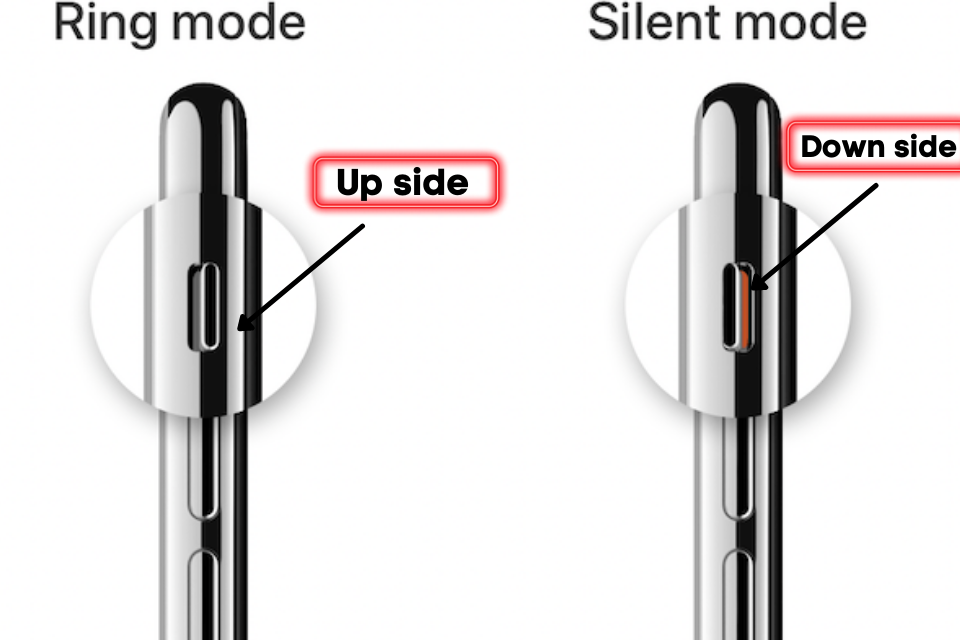
Apple ta proveé e boton di Silensioso na e sidebar. e boton aki ta wòrdu usá pa aktivá e modo silensioso. Si e yabi ta poné na e parti abou esei ta nifiká ku e modo silensioso ta aktivá.
Si e boton ta set na banda di pantaya esei ta nifiká ku e modo silensioso ta desaktivá. pues por fabor hasi sigur ku e modo silensioso di bo telefon mester a desabilitá.
Drecha 3: Apagá Bluetooth
Si bo Telefòn ta transferí e oudio pa un otro speaker di zonido òf AirPods a traves di Bluetooth e ora ei e oudio lo wòrdu silensiá pa bo telefòn selular.
Pa paga e Bluetooth, Navegá pa e panel di Kontrol i primi riba e símbolo di Bluetooth pa deshabilitá esaki.
Bo por paga e Bluetooth tambe dor di e siguiente Konfigurashon > General > Bluetooth i Kambia e opshon di Bluetooth.
Drecha 4: Aktualisashon di iOS
Apple frekuentemente ta aktualisá e vershon di ios pa mehorá e sistema. semper tene bo telefon na altura pa prevení erornan di software. E lo mehorá e rendimentu di telefòn selular.
Pa aktualisá e vershon di iOS, sigui nabegá pa kaminda Konfigurashon > General > Aktualisashon di Software
Drecha 5: Reset e Ahustonan
Si bo Ahustonan di Telefòn a wòrdu kambia eroneamente i e zonido a bai for di e telefon, e ora ei e ahustonan di reset ta e mihó eskoho pa rekonfigurá e ahustonan predeterminá.
Tur bo datonan lo ta safe. E opshonnan aki ta djis reset e settingnan ku bo a kambia. pa reset e balor, bai na Konfigurashonnan > General > Reset > Reset tur e settingnan
Drecha 6: Turn Of No Molestia
Bo por Habilitá e servisio di No Molestá eroneamente. e ta silensiá e zonido i notifikashon. pa deshabilitá e no stroba nabegá pa Ahustonan > Opshon di No Molestia i kambia e modo.
Drecha 7: Prueba e Speaker di Telefòn
Si bo baha e nivel di volúmen bo por Ahustá e settingnan di Volúmen pa oudio por skucha perfektamente.
Pa oumentá e volúmen bai na Konfigurashonnan > Soni & Háptiko i oumentá e alerta di Ringer na e nivel di mas haltu.
Drecha 8: Deshabilitá e Aplikashonnan di Terser Parti pa spar bateria
E appnan di terser parti tin bia ta kambia e nivel di volúmen di e oudio. nos no por tende esaki korektamente. si bo instalá kualke app i diripiente e bos a bai anto desinstalá e app.
Drecha 9: Reset di fábrika
Si bo purba tur solushon pero tòg bo Problema ta pendiente anto bo por reset bo telefon kompletamente. Pa reset bo telefon bai na Konfigurashonnan > Reset > Kita tur kontenido
E proseso di reset ta tuma algun tempu pa kompletá.
Drecha 10: Habilitá notifikashon di telefon
Si bo no selektá e zonido di Notifikashon i SMS e ora ei e alertanan di telefon lo keda ketu. bo por pone e zonido di notifikashon for di e settingnan.
Problema di Hardware
Hardware tambe ta e motibu pa e sistema di zonido. si kualke speaker ta daña anto bo por enfrentá problema ora bo ta skucha e oudio. bo por bai na kuido di apel pa drech’é lihé.
FAQs
Dikon mi telefon diripiente no tin zonido?
Tin hopi motibu ku ta prevení zonido di oudio manera servisio di DND, Modo silensioso, Apps di terser parti, Malkonfigurá e settingnan, aktualisashon di sistema, erornan di software, etc.
Dikon mi no por tende niun hende ora nan yama mi riba mi iPhone?
Tin dos motibu komun raportá pa usuarionan. e promé ta ku bo aparato ta enfrentá un problema di hardware, di dos asuntu di ret tambe ta e motibu pa e problema di bos.
Kon mi por kita mi iPhone for di e modo silensioso?
Apple Suministrá e yabi di moda silensioso na e panel banda. move e yabi aki den direkshon di e pantaya di telefòn selular pa desabilitá e modo silensioso.
Resúmen
Ta konfrontando e problema di zonido riba e iPhone. Bo por drecha esaki a traves di Deactive no stroba, Apagá Bluetooth, Reinisá e aparato, Reset e settingnan di ret, reset tur e settingnan, i reset di fábrika. si bo ta haña e problema aki ainda, tuma kontakto ku e tim di apple. nan lo yuda bo sali for di e problema.
Mi ta spera bo haña e solushon pa zonido di iPhone no ta funshoná. Si bo a drecha e problema anto kompartí esaki ku usuarionan di iPhone.