
¿Táan a k'áatik bix je'el u páajtal a ts'áik auriculares inalámbricos Comiso ti' a nu'ukul t'aan? Wa ts'o'ok a maan auriculares Comiso yéetel bejla'e' k'áato' conectar le ti' u dispositivo utia'al u jump'éel yaan audio xma' toop.
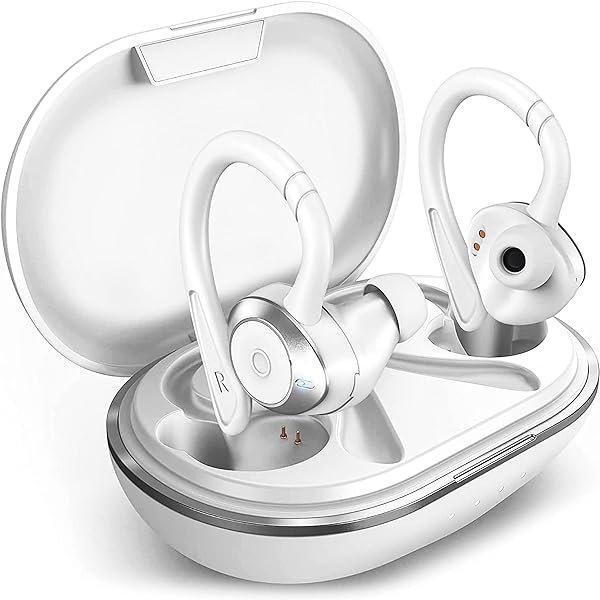
auriculares inalámbricos Comiso ko'oten yéetel a 5.0 Chip Bluetooth, yéetel ts'aik 6 horas u k'iinil báaxal continuo, yéetel jump'éel kiis kuuch uti'al jump'éel adicional 36 horas yéetel ganchos suaves, jump'éel diseño ma' tu yokol ja', yéetel jump'éel altavoz premium incorporado.
Le k'iino'oba' auriculares ku ts'aik juum ka'anal calidad yéetel comodidad. Emparejar auriculares inalámbricos Comiso yéetel u nu'ukul t'aan, tablet, máaben ts'íib, wa nu'ukul t'aan ku ts'áaik ti'ob u páajtalil u péeko'ob xma' u aktáantiko'ob mix jump'éel talamil ti' le alambres enredados.
Ch'e'eno', waye' yaan jump'éel náakake' u yaak'il completa yóok'ol bix emparejar auriculares inalámbricos Comiso ti' u dispositivo. Bey u, ko'ox asab detalles!
Par u auriculares inalámbricos Comiso
Utia'al u emparejar le auriculares inalámbricos Comiso ti' u dispositivo toj ka' le wook dados
- Yáax, k'a'abéet a wilik wa a auriculares táan ti' modo emparejamiento uti'al a auriculares inalámbricos Comiso.
- Bejla'e' yaan a presionar yéetel mantener le botón POWER Kula'an tu inferior utia'al yan 5 segundos wa mantener tak ka wilik le indicadores LED comienzan u parpadear jáan.
- Ka' lelo', ken a wil u auriculares inalámbricos Comiso ku taalo'ob te' listao', k'a'abéet a péets'k'abtik yéetel bejla'e', k'a'ana'an u conectado ti' u nu'ukul t'aan.
- Wa ts'o'ok u ts'o'okol le tuukula' emparejamiento, le luces indicadoras LED yaan u p'atik u parpadear ti' le ka'ap'éel auriculares.
K'a'ajesik ba'ax le tuukula' mencionado ka'anal jach k'a'anan chéen ken tech táan utilizando tumen yáax ka'atéen par auriculares inalámbricos Comiso yéetel u dispositivo. K'a'abéet a ka'a beetik le ba'ax ts'o'ok u ya'ala'ala' uti'al a meyajtik a auriculares inalámbricos Comiso yéetel uláak' dispositivo móvil.
Utia'al u meyaj juntúul dispositivo Bluetooth, ti' u dispositivo móvil, k'a'abéet a bin te' menú Bluetooth yéetel k'a'abéet a yéeyik Comiso uti'al a ka'a conectar.
FAQs utia'al u emparejar auriculares inalámbricos Comiso
Jayp'éel horas je'el u páajtal a meyajtik tak ken xu'uluk u batería?
Le auriculares ku ts'aik 6 horas u báaxal continuo yéetel le kiis buuts kuuch completamente cargado je'el u páajtal u kuuch le auriculares seis Óoxten. Amal kuuch k'iini' ku bisik 1.5 oora'ob. Yéetel u páajtalil le kiis buuts kuuch, le auriculares je'el u páajtal u utilizados utia'al 36 oora'ob.
Le auriculares je'elo'oba' ku meyajo'ob yéetel XR iPhones?
Je'el, ku meyajo'ob yéetel je'el ba'alak smartphone yaan ti' Bluetooth inalámbrico ti' leti', tuláakal le iPhones ku meyajtiko'ob. Le auriculares yaan ti' jump'éel chan kiis buuts yaan ti' jump'éel tarjeta kuuch incluida, yéetel le ken ts'o'okok u kuuch, chéen je'el u páajtal a conectar ti' a iPhone usando Bluetooth yéetel je'el bin je'el tu'ux yéetel leti'ob.
ku meyajo'ob yéetel ku nupikubáajo'ob ti' le Samsung Galaxy S21plus 5g?
Je'el, ku meyajo'ob yéetel ku nupikubáajo'ob ti' le Samsung Galaxy S21plus 5g.
Conclusión
Kexi', le artículoa' yaan u yáantkech ya'ab uti'al a yutskíintik a talamil. Bix u emparejar le auriculares inalámbricos Comiso ti' u dispositivo jach chéen ch'a'abil. Chéen yaan a t'u'uchpachtik le náakake' u yaak'il mencionada utia'al u emparejar auriculares inalámbricos Comiso yéetel u dispositivo.
K'a'abéet a t'u'uchpachtik tuláakal le wook yéetel kanáanil xma' a p'atik mix jump'éel paso. Uláak'e, ma' yaan u yantaltech éxito ti' le tuukula'. Bey u lelo' tuláakal k'a'abet a wojéeltik yóok'ol Bix emparejar auriculares inalámbricos Comiso. k pa'atik u le artículo yaan u yáantikech ya'ab!


