Yaan ya'ab maneras u emparejar le auriculares Logitech G435 ti' u dispositivos, bey le teléfonos inteligentes, iPhones, wa PC. Le jump'éel bix ken jach yo'osal jump'éel conexión Bluetooth. Ti' le post, ka kanik bix u emparejar le auriculares Logitech G435 yéetel u dispositivos Bluetooth.
Emparejar le auriculares Logitech G435 ti' u nu'ukul t'aan
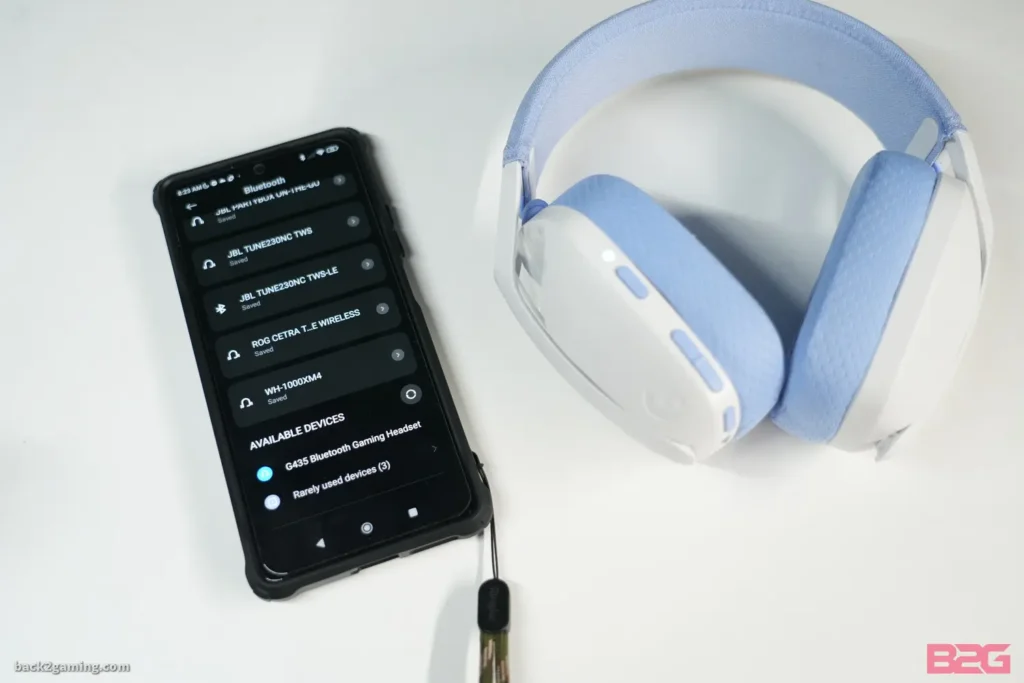
Wa ka beetik le wook je'el u páajtal a emparejar le Logitech G435 Headset ti' a nu'ukul t'aan.
- Yáax, t'abik le G435 yéetel u péets'k'abtik le botón t'abik.
- Túun, ts'áa a Logitech G435 Headset ti' modo emparejamiento pulsando yéetel sosteniendo le botones t'aba'an yéetel silenciar utia'al 3 sobras. LED flash azul bey u yokol ti' modo emparejamiento.
- Je'ek'abt le configuración ti' a smartphone, yéey Bluetooth, ka t'abik.
- Bejla'e', kaxant Logitech G435 ti' le tsoolol dispositivos yéetel pulse utia'al u conectar.
Emparejar le auriculares Logitech G435 yéetel PC
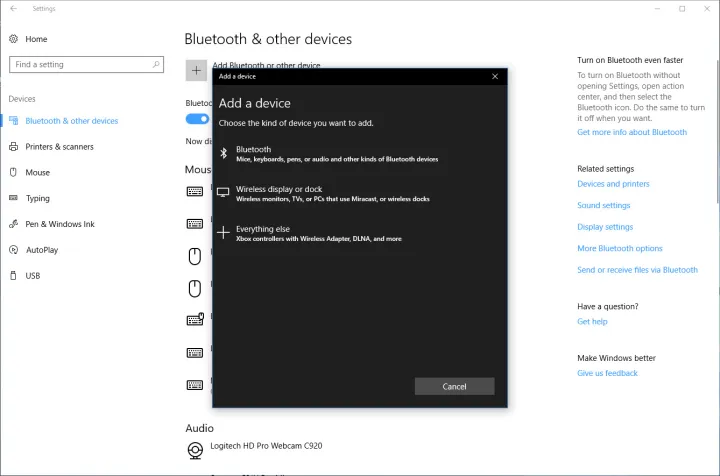
Utia'al u emparejar le Logitech G435 Auricular yéetel PC t'u'uchpachtik le wook je'ela'.
- Tu yáax kúuchil, pulse le botón t'abik uti'al u t'abik a G435 Headset.
- Ts'áa a Logitech G435 Headset ti' modo emparejamiento pulsando yéetel sosteniendo le botones t'aba'an yéetel silenciar utia'al 3 sobras. LED flash azul bey u yokol ti' modo emparejamiento.
- Je'ek'abt le configuración ti' a PC.
- Xeen ti' Bluetooth & Uláak' nu'ukulo'ob, yéey le Bluetooth, ka t'abik.
- Bejla'e', kaxant Logitech G435 ti' le tsoolol dispositivos yéetel pulse utia'al u conectar.
Emparejar le auriculares Logitech G435 yéetel dispositivos IOS

Beet le k'iino'oba' sencillos wook utia'al u emparejar le Logitech G435 Auriculares yéetel dispositivos IOS.
- T'abik a Logitech G435 Headset ka ts'áa ti' le modo emparejamiento pulsando yéetel sosteniendo le botones t'aba'an yéetel silenciar utia'al 3 sobras. LED flash azul bey u yokol ti' modo emparejamiento.
- Xeen ti' configuración ti' u dispositivos IOS yéetel t'abik le Bluetooth.
- Bejla'e', kaxant Logitech G435 ti' le tsoolol dispositivos yéetel pulse utia'al u conectar.
Compruebe le batería
- jump'éel chéen pulse le botón t'aba'an, ken u t'abik le auricularo'.
- Batería 31% ti' 100% le LED yaan u chíikpajal ya'ax ichil 5 segundos.
- Batería 15% ti' 30% le LED yaan u ye'esik chak ichil 5 segundos.
- Batería <15% le LED yaan u léembal rojo ichil 5 segundos.
Página Tune
Sidetone ku cha'ik u yu'uba'al a t'aan ka'alikil táan a t'aan yéetel uláak' máako'ob, ku chíikbesik u yúuchul t'aan ti' jump'éel nu'ukul t'aan yéetel ku cha'ik u ajustar u volumen t'aan ti' jump'éel nivel ma'alob.
Habilitar Side Tune
Pulsa ka'atéen le botón Mute yéetel le LED parpadeará ka'ap'éel Óoxten ti' naranja.
Desactivar le sintonía lateral
Pulse ka'atéen le botón Mute yéetel le LED parpadeará juntéene' ti' naranja.
Ajustar le melodía lateral
Ka'anal: jump'éel chéen pulse ti' le botón Mute + Volumen UP.
Yáanal: jump'éel chéen pulse ti' le botón Mute + ÉENDAR u volumen.
Conclusión
U ts'áabal le auriculares Logitech G435 yéetel a dispositivos Bluetooth ma' jach talam. Chéen k'a'abet a ts'áik le auriculares ti' modo emparejamiento uti'al a emparejar yéetel a smartphone, Dispositivos IOS, wa uláak' nu'ukulo'ob Bluetooth. Bin le náakake' u yaak'il detallada utia'al u kanik bix emparejar le auriculares Logitech G435 ti' u dispositivos.