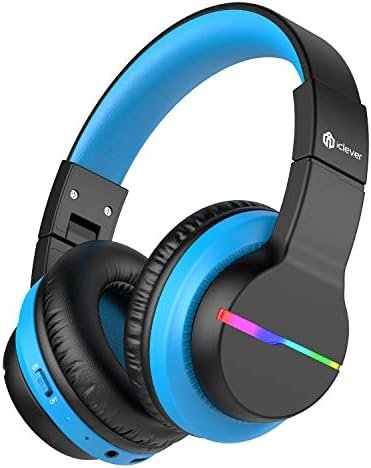
మీరు మీ పరికరాలకు Clever BTH12 వైర్లెస్ హెడ్ఫోన్లను జత చేయాలనుకుంటున్నారా? Clever BTH12 వైర్లెస్ హెడ్ఫోన్లు గొప్ప ఆడియోను అందిస్తాయి, కానీ అవి హెడ్సెట్కి రెండు వైపులా బహుళ ప్రభావాలను మరియు రంగులను కలిగి ఉండే LED లైట్లతో వచ్చే అదనపు ఫీచర్ను కూడా కలిగి ఉన్నాయి.
నాలుగు లైట్ మోడ్లు ఒక స్వతంత్ర బటన్ ద్వారా నియంత్రించబడతాయి. బ్లూటూత్ మోడ్లో నొక్కినప్పుడు, బ్యాటరీ ఆదా కోసం లైట్లను ఆఫ్ చేస్తుంది. ఈ హెడ్ఫోన్లలో అంతర్నిర్మిత 40mm స్పీకర్ యూనిట్ ఉంది, ఇది రిచ్ బాస్ మరియు లైఫ్లైక్ ఆడియోను అందిస్తుంది.
మధ్య ఆడియో వాల్యూమ్ను పరిమితం చేయండి 74, 85, మరియు 94dB కలయిక కీలను ఉపయోగిస్తుంది కాబట్టి వాల్యూమ్ స్విచ్ అనుకోకుండా తాకబడదు. iClever హెడ్ఫోన్లు ప్లే టైమ్ని కలిగి ఉంటాయి 55 గంటలు! మీరు నమ్మశక్యం కాని వేగవంతమైన ఛార్జింగ్ కోసం USB-C కార్డ్ని ఉపయోగించవచ్చు.
ఎలా జత చేయాలో చాలా మందికి తెలియదు clever BTH12 వైర్లెస్ హెడ్ఫోన్లు. ఈ వ్యాసంలో, మేము ఉత్పత్తిని ఎలా ఉపయోగించాలనే దానిపై వివరణాత్మక సూచనలను అందిస్తాము మరియు పరికరాన్ని ఎలా ఆన్ మరియు ఆఫ్ చేయాలనే దానిపై సమాచారాన్ని అందిస్తాము, బ్లూటూత్తో జత చేయండి, మరియు లైట్ మోడ్ల మధ్య మారండి.
ఈ కథనం బటన్లను ఎలా ఆపరేట్ చేయాలో కూడా మార్గనిర్దేశం చేస్తుంది, కాల్లకు సమాధానం ఇవ్వండి మరియు ముగించండి, కాల్లను తిరస్కరించండి, మరియు సిరిని సక్రియం చేయండి. కాబట్టి, ప్రారంభిద్దాం!
Clever BTH12 వైర్లెస్ హెడ్ఫోన్లను పవర్ ఆన్ మరియు ఆఫ్ చేయడం ఎలా?
పవర్ ఆన్
బటన్ను ఆన్ దిశకు మార్చండి. అప్పుడు LED సూచిక నీలం రంగులో మెరుస్తుంది 1 రెండవది, మరియు రంగురంగుల లైట్లు వెలుగుతున్నాయి.
పవర్ ఆఫ్
బటన్ను ఆఫ్ దిశకు మార్చండి, మరియు హెడ్ఫోన్ ఆఫ్ చేయబడింది. LED సూచిక నీలం రంగులో మెరుస్తుంది 1 రెండవది ఆపై ఆగిపోతుంది.
Clever BTH12 వైర్లెస్ హెడ్ఫోన్లను జత చేయండి
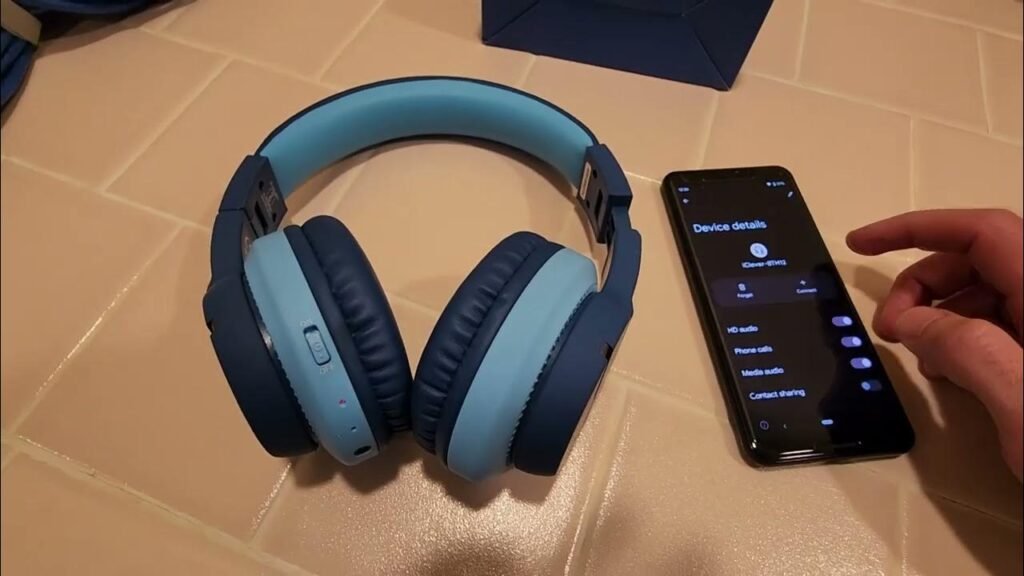
Clever BTH12ని జత చేయడానికి వైర్లెస్ హెడ్ఫోన్స్ మీ పరికరానికి దశలను అనుసరించండి.
- బటన్ను ఆన్ దిశకు మార్చడం ద్వారా హెడ్ఫోన్లను ఆన్ చేయండి మరియు రంగురంగుల లైట్లు ఆన్ చేయబడ్డాయి.
- హెడ్ఫోన్లను జత చేసే మోడ్లో ఉంచండి, మరియు ఎరుపు మరియు నీలం లైట్లు ప్రత్యామ్నాయంగా మెరుస్తాయి.
- ఇప్పుడు, మీ ఫోన్ని ఆన్ చేసి సెట్టింగ్లకు వెళ్లండి, మరియు బ్లూటూత్ని ప్రారంభించండి.
- అప్పుడు, బ్లూటూత్ జత కనెక్షన్ కోసం పరికర జాబితాలో iClever-BTH12 బ్లూటూత్ జత చేసే పేరును కనుగొని, ఎంచుకోండి.
హెడ్ఫోన్లను ఎలా ఛార్జ్ చేయాలి
హెడ్ఫోన్లలోని టైప్-సి పోర్ట్కి టైప్-సి కేబుల్ను కనెక్ట్ చేయండి. ఛార్జింగ్ను సూచించడానికి సూచిక లైట్ ఎరుపు రంగులో మెరుస్తుంది.
హెడ్ఫోన్ పూర్తిగా ఛార్జ్ అయినప్పుడు, సూచిక కాంతి ఎరుపు నుండి నీలం రంగులోకి మారుతుంది.
బటన్ యొక్క ఆపరేషన్
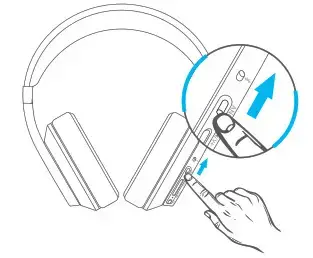
- షార్ట్ ప్రెస్ ది + వాల్యూమ్ పెంచడానికి బటన్.
- వాల్యూమ్ డౌన్ చేయడానికి – బటన్ను చిన్నగా నొక్కండి.
- నొక్కండి మరియు పట్టుకోండి + కోసం బటన్ 2 తదుపరి ట్రాక్ కోసం సెకన్లు.
- నొక్కండి మరియు పట్టుకోండి – కోసం బటన్ 2 మునుపటి కోసం సెకన్లు
- ట్రాక్.
- ప్లే/పాజ్ చేయడానికి MFB బటన్ను ఒకసారి నొక్కండి.
- కాల్కు సమాధానం ఇవ్వడానికి/ ముగించడానికి MFB బటన్ను ఒకసారి నొక్కండి.
- కాల్ని తిరస్కరించడానికి MFB బటన్ను నొక్కుతూ ఉండండి.
- సిరిని సక్రియం చేయడానికి MFB బటన్ను రెండుసార్లు నొక్కండి.
Clever BTH12 వైర్లెస్ హెడ్ఫోన్లను జత చేయడానికి తరచుగా అడిగే ప్రశ్నలు
Clever BTH12 హెడ్ఫోన్లను జత చేసే మోడ్లో ఎలా ఉంచాలి?
నొక్కడం మరియు పట్టుకోవడం + బటన్ మరియు – కోసం ఏకకాలంలో బటన్ 4 జత చేసే జాబితాను క్లియర్ చేయడానికి పవర్ ఆన్ స్టేట్లో సెకన్లు. అప్పుడు హెడ్ఫోన్లు స్వయంచాలకంగా జత చేసే మోడ్లోకి ప్రవేశిస్తాయి.
ఈ పని బ్లూటూత్ టీవీని ఎనేబుల్ చేస్తుందా?
అవును, నేను మా Samsung TVకి విజయవంతంగా కనెక్ట్ అయ్యాను.
ముగింపు
ఈ కథనాన్ని చదివిన తర్వాత మీరు మీ పరికరాలకు Clever BTH12 వైర్లెస్ హెడ్ఫోన్లను జత చేయగలరు. ఇది ఒక సాధారణ ప్రక్రియ, మీరు పైన పేర్కొన్న దశలను అనుసరించడం ద్వారా దీన్ని చేయవచ్చు.
కాబట్టి, మీ పరికరాలకు Clever BTH12 వైర్లెస్ హెడ్ఫోన్లను ఎలా జత చేయాలో మీరు తెలుసుకోవలసినది. ఈ సందర్భంలో ఈ వ్యాసం మీకు చాలా సహాయపడుతుందని మేము ఆశిస్తున్నాము!